


I have taken the CKNE beta exam. I found the exam to be challenging and very interesting. If you are interested in Kubernetes networking, CKNE is a great certification to prepare for.
I have created this study guide to give you a complete roadmap for studying for the Certified Kubernetes Network Engineer (CKNE). I have also added relevant resources to study for each topic.
By the end of this guide, you will have an understanding of the following:
- What is CKNE certification
- Who is eligible to take the CKNE Exam?
- CKNE exam details
- Complete roadmap to study for the CKNE exam
Let's get started.
What is CKNE Certification?
CKNE (Certified Kubernetes Network Engineer) is a certification from Linux Foundation and CNCF.
The CKNE certification tests your Kubernetes networking knowledge and hands-on troubleshooting skills.
Not every topic in the certification is new. If you have already prepared for CKA or are working with Kubernetes, you may already be familiar with topics like Gateway API, health check probes, CoreDNS, etc.
On the CKNE page, Linux Foundation recommends having at least CKA-level Kubernetes administration knowledge for the CKNE exam. However, CKA certification isn't required to take this exam. Anyone can take the exam.
It is mainly for those working on the networking part of the Kubernetes cluster, such as CNI, Services, Gateway API, and network monitoring.
It doesn't mean only people who work on Kubernetes networking can take it. Anyone interested in, or who needs to be strong in Kubernetes networking, can take this exam.
So, if you are a DevOps, SRE, or Platform Engineer working on a Kubernetes cluster, preparing for this certification is definitely worth it.
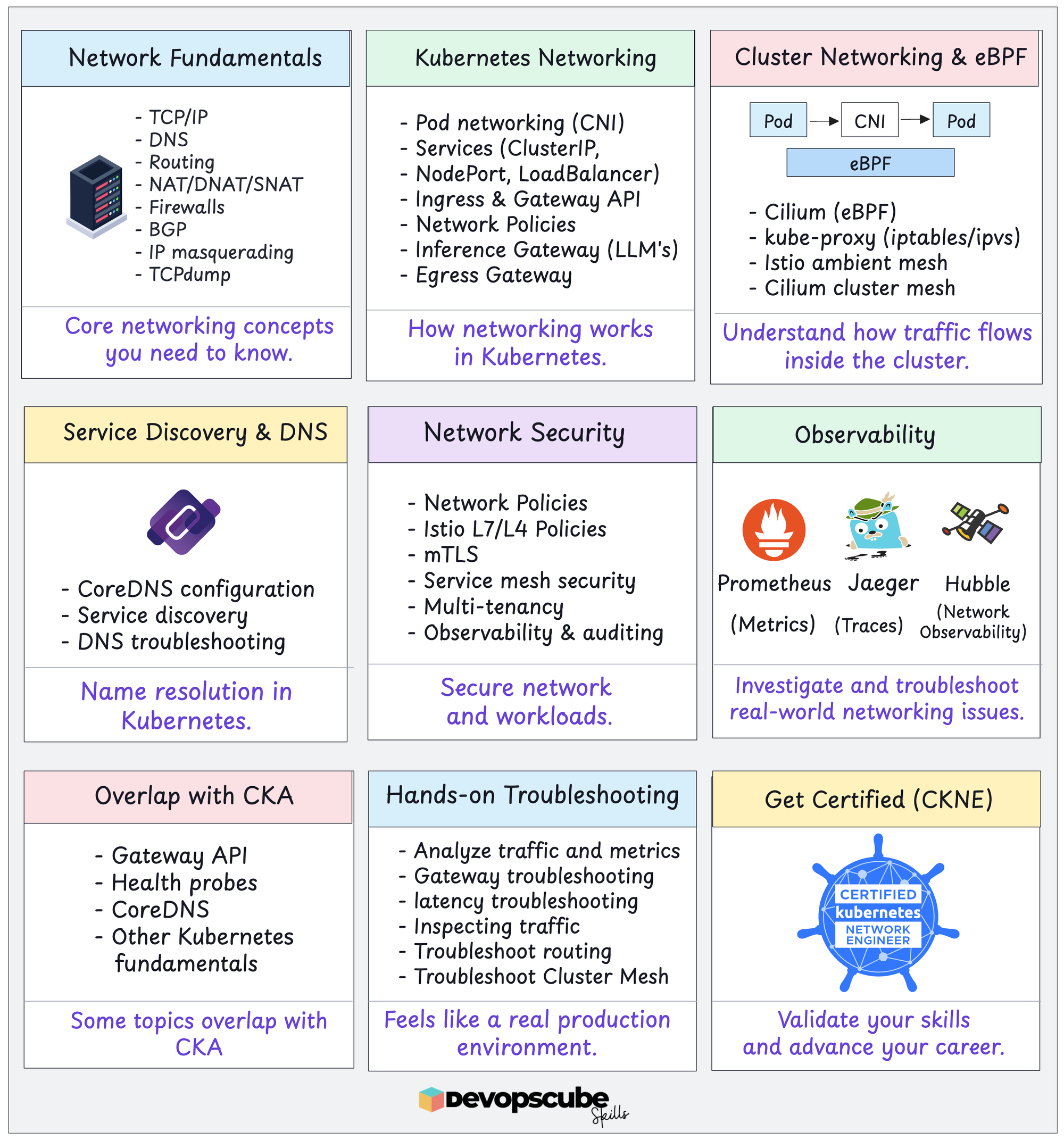
The following image outlines the complete CKNE learning path.
CKNE Exam Details
Below are the CKNE exam details.
| Detail | Value |
|---|---|
| Exam Type | Performance-based |
| No. of Tasks | 15–20 |
| Exam Duration | 2 hours |
| Certification Validity | 2 Years |
| Exam Retake | One retake included |
| Exam Eligibility Window | 12 months from purchase |
| Exam Price | $445 |
This exam will be conducted online and will be proctored. You will take the exam via the PSI secure browser, which makes sure only the exam tab is open during the exam.
Also, you can take up to 3 breaks during the exam.
Register for the CKNE Certification Exam [Save 40% Today]
To begin your journey of becoming a Certified Kubernetes Network Engineer, start by registering for the exam on the Linux Foundation portal.
Note: Save 40% Today on CKNE certification using the Voucher code given below. This code expires soon.
CKNE Exam Syllabus
I really liked how the CKNE exam syllabus is structured. It covers almost all key networking parts of Kubernetes clusters.
The following table gives you the complete CKNE exam syllabus and its weightage.
| Domain | Concepts | Weightage |
|---|---|---|
| Core Infrastructure and CNI |
|
15% |
| Service Networking and DNS |
|
25% |
| Advanced Traffic Management |
|
20% |
| Network Security and Policy |
|
25% |
| Observability |
|
15% |
Tools used in the CKNE Certification Exam
As per the exam syllabus, you may use the following tools during CKNE exam scenarios.
You should be comfortable using the tool and its related web UI. For example, you may be given Prometheus or Jaeger UI to troubleshoot issues in a live cluster.
- Cilium Documentation https://docs.cilium.io/
- Istio Documentation https://istio.io/latest/docs/
Now let's look the CKNE certification preparation roadmap in detail.
CKNE Exam Preparation Roadmap
The following sections cover the complete roadmap to study for the CKNE exam.
Since it's a hands-on exam, nothing helps you more than trying out everything in a real cluster. While preparing, keep a kubeadm, Kind, or Minikube cluster running so you can try everything.
Spend at least 1 hour every day to prepare for the exam.
Let's get started.
Core Infrastructure and CNI (15%)
This section covers the core networking infrastructure of the Kubernetes cluster.
Installing and Configuring CNI Plugins
CNI (Container Network Interface) plugins are responsible for configuring pod networking, assigning IPs to Kubernetes pods, and enabling pod-to-pod communication.
Learn to install and configure different CNI plugin types like Calico and Cilium. Calico and Cilium can also be installed using their CLI, so learn the CLI installation method as well.
Also, learn how Cilium uses eBPF and how to configure eBPF to replace kube-proxy. Another important configuration is BPF masquerading, which lets Cilium do SNAT using eBPF.
Relevant documentations:
Managing IPAM and Pod CIDR Allocation
CNI Plugins configure Pod networking, while IPAM (IP Address Management) is responsible for allocating and managing IP addresses.
Understand cluster CIDR and pod CIDRs, how IP ranges are allocated, and how different CNI plugins change IPAM configurations.
Relevant documentations:
Using Linux Tools (iptables, ip, tcpdump) for Packet-level Issues
Even when we talk about Kubernetes networking, the underlying networking is still Linux. So, learn to use Linux network troubleshooting tools.
Learn about networking concepts like iptables, tcpdump, NAT rules, etc and how they are used in Kubernetes. Practice using ip addr, ss, and ip route to check networking and connectivity issues.
For packet-level troubleshooting, practice using tcpdump to capture packets. Learn to filter packets by IPs and Ports, and capture a specific number of packets.
Troubleshooting Pod Connectivity (DNS, pod-to-pod)
When it comes to Kubernetes pod connectivity issues, the most common problems are pods not being able to talk to each other or DNS not resolving.
Learn to troubleshoot across different Kubernetes components, like CNI, kube-proxy, CoreDNS, and NetworkPolicy.
For example, if two pods on different nodes can't communicate, you need to determine whether the issue is routing, network policies, or CNI configuration.
Understand how SNAT, masquerading, and egress network policies can affect egress traffic in the cluster. You can practice testing the connectivity between pods and external services.
Relevant documentations:
Configuring Multi-interface Pods
As you know, each pod gets one network interface by default.
In most cases, one network interface is fine. However, some heavy-traffic workloads require multiple network interfaces, and that is where a CNI like Multus comes in.
Learn how to configure Multus for multiple network interfaces and how Multus allows pods on different network interfaces to connect to each other.
To understand it better, configure multiple network interfaces and how both interfaces are used inside a container.
Service Networking and DNS (25%)
In this section, we will cover services, kube-proxy and its alternatives, DNS, health check probes, and Gateway API.
Here, you will learn how traffic reaches the correct application, whether the request comes from inside or outside the cluster.
Configuring L4 Services
Here, understand four Kubernetes service types: ClusterIP, NodePort, LoadBalancer, and ExternalName.
Not just understanding, you need to do hands-on by exposing applications with all service types. Also learn about headless services, which do not have a ClusterIP but let clients discover the backend endpoints using DNS.
Another important thing you need to look into is connecting external services. Learn how to create a service without selectors and manually create EndpointSlices that point to external IPs.
Relevant documentations:
Understanding kube-proxy and CNI Alternatives
Kube-proxy is the default Kubernetes component that manages virtual IPs, but you can also use Cilium and kube-router as alternatives to kube-proxy.
Learn to configure and use alternatives like Cilium and kube-router in place of kube-proxy. Understand how kube-proxy and Cilium handle traffic to services.
For Cilium, practice enabling eBPF in place of kube-proxy using kubeProxyReplacement=true.
Relevant documentations:
Customizing coreDNS for Services
CoreDNS is the default Kubernetes DNS server for Kubernetes. Learn to read and modify its configuration file Corefile.
Understand and learn to configure the CoreDNS forward plugin to forward DNS queries to another DNS server. Practice configuring CoreDNS to forward DNS queries to an external DNS server.
Also, practice scenarios like internal service names resolved without any issue but fail when resolving external domains.
Relevant documentations:
Troubleshooting Service Network Traffic
Don't just focus on basic DNS debugging, you need to learn to trace and find where traffic flow is failing.
Checking service selectors, ports, and EndpointSlices is a good start, but also learn to use Hubble, which is Cilium's observability tool that helps you to track traffic from the client until it reaches a pod.
Relevant documentations:
Configuring Pod Endpoint Availability
Kubernetes routes traffic to pods that are ready. So, learn about EndpointSlices, Health Check Probes, and Traffic routing Topologies.
Learn the differences and uses of different health check probes.
In short, readiness probes check whether a pod is ready to receive traffic, liveness probes check whether the container is running, and startup probes delay readiness and liveness checks until the application starts.
Learn to check pod events, health check configurations, and endpoint slices. If you learn these, you can solve most unhealthy pod issues.
Relevant documentations:
Managing Traffic with the Gateway API (Gateway, HTTPRoutes)
Gateway API in Kubernetes manages L4 and L7 ingress traffic. Understand how to configure Gateway API CRDs like Gateway, GatewayClass, and HTTPRoutes.
For hands-on practice, use Envoy and Istio as Gateway API controllers. Focus on configuring path-based routing, TLS termination, and troubleshooting unreachable routes.
In an exam, let's say if a route is not working, you should be able to point out whether the issue is with the listener, routes, or TLS configuration to know how to troubleshoot.
Advanced Traffic Management (20%)
In this section, focus on advanced traffic routing management such as LLM traffic, egress routing, and cross-cluster routing.
Optimizing LLM Traffic
As AI workloads evolve, Kubernetes is increasingly used to deploy and manage LLMs.
But when running LLMs on Kubernetes, it sends requests to random model servers. To prevent this, Gateway API Inference Extension was introduced.
Inference Gateway extends Gateway API's capability to route traffic to LLMs based on model and cache.
Learn about InferencePool and the endpoint picker. These will be used by the Gateway API Inference Extension to choose the best model server from a pool of pods.
For hands-on, practice configuring an HTTPRoute to an InferencePool and send an inference request, such as /v1/completions to verify if the request reached the correct model.
Implementing Routing to Expose Networks
This topic is about exposing Kubernetes workloads outside the cluster securely.
When it comes to exposing the workloads securely, you may remember Ingress and Gateway API. But apart from these, Cilium's BGP Control Plane can also use BGP (Border Gateway Protocol) to expose services.
First, understand how BGP peers communicate and exchange routes. Then practice configuring Cilium BGP using resources like CiliumBGPClusterConfig, CiliumBGPPeerConfig, and CiliumBGPAdvertisement.
Also, practice troubleshooting common issues like incorrect peer IPs and missing CiliumBGPAdvertisement reosurece sceanrios.
Here, learn about:
Configuring Egress Gateways for Cluster Exit Traffic
So far, you have mostly covered ingress traffic. Here, you need to learn about egress traffic management and how to secure it.
This is where we use Cilium Egress Gateway. To use Cilium Egress Gateway, enable the Egress Gateway feature, kube-proxy replacement eBPF, and BPF masquerading.
Then configure CiliumEgressGatewayPolicy which is used to select workloads and destination CIDRs.
Another important service you need to look into is Istio Egress Gateway. Learn how to configure it and understand how it controls egress traffic in a service mesh.
Learn about:
Implementing Cross-Cluster Service Discovery and Load Balancing
In production environments, applications may run on multiple clusters. For applications to connect from different clusters, cross-cluster networking and service discovery are needed.
Understand and learn about cross-cluster connections and traffic load balancing across multiple clusters. You can use Cilium to use a cluster mesh to connect different clusters and enable cross-cluster workloads to communicate.
When doing cross-cluster service discovery, look out for key things such as each cluster having a unique name and ID, and the pod CIDRs not overlapping.
Practice configuring cross-cluster with two Kubernetes clusters and use Cilium CLI to enable cluster mesh to allow workloads on two clusters to communicate with each other.
Also, practice troubleshooting cross-cluster connectivity failures, routing, service discovery, and network policies.
Relevant documentations:
Network Security and Policy (25%)
In this section, we will look into network security and how we can implement it.
Securing Traffic with Network Policies
Network policies restrict pod-to-pod communication at the L3 and L4 layers, but they are not limited to L3 and L4. With Cilium, we can extend the restriction to L7.
Practice writing Network Policies to allow and block both workloads and specific endpoints. Also, understand how Cilium network policy rules differ from Kubernetes network policy.
Relevant documentations:
Implementing Node and Pod Level Encryption
By default, communication between pods and nodes is not encrypted. But we can use Cilium to encrypt both pod-to-pod and node-to-node communication without changing the application.
We can enable encryption using Cilium's WireGuard and IPsec.
Understand how Cilium's WireGuard encryption works between pods on different nodes. Practice enabling encryption via Cilium's WireGuard, then deploy pods on different nodes, and verify the connection between them is encrypted.
For node-to-node communication, you need to enable additional configurations.
Managing TLS Certificates for Gateway API
We can manage TLS certificates for Gateway API in two ways, one is creating TLS certificates manually and saving them as Kubernetes Secrets.
The next method is using cert-manager, which automates the process of TLS creation and management.
Start by practicing creating a TLS certificate and storing it in a secret, and use an HTTPS Gateway listener to use that secret. Also, practice with cert-manager to issue and manage certificates automatically.
Learn how to troubleshoot issues such as referring to incorrect secrets, missing certificates, and expired certificates.
Relevant documentations:
Implementing Pod-level Authentication and Authorization
The suitable tool to look into here is Istio. It's a service mesh that helps to secure traffic between applications.
You need to learn about Istio's ambient mesh, which encrypts pod-to-pod communication with mTLS. Ambient mesh has two components:
- ztunnel - This handles traffic in layer 4 and mTLS.
- Waypoint proxy - This handles layer 7 traffic, such as HTTP routing and authorization.
Start by understanding how traffic flows between workloads in an ambient mesh and practice adding an application to the mesh.
The next thing you need to learn is creating Istio authorization policies, which are used to allow or block workloads or HTTP endpoints.
Learn to use L7 rules where you can restrict traffic based on HTTP traffic.
For troubleshooting, practice identifying why the request is not returning properly and verify if the traffic is passing through the correct waypoint.
Finally, look into Istios security concepts.
Observability (15%)
Until now, you have covered networking and its security. Now, it's about network observability.
Since the topic is about observability, UI helps you observe everything better.
CKNE exam allows you to use the UIs of Prometheus, Hubble, and Jaeger for troubleshooting. So learn to use them for troubleshooting.
Analyzing Network Health Using Metrics
With metrics, we can understand how workloads are performing, their resource usage, and health. For the CKNE exam, you need to learn two important tools to analyze metrics.
They are Prometheus and Hubble.
Prometheus collects metrics from applications and Kubernetes components. Learn to use the Prometheus UI to query networking and service metrics.
Hubble runs on top of Cilium, which gives visibility into traffic flow between services. Learn to use both Hubble CLI and UI to check traffic flows.
For example, you can use Hubble to track failed traffic between applications to identify whether the connection is dropped or blocked.
Focus on using both Prometheus and Hubble to find unhealthy backends and connection failures, packet drops, etc.
Troubleshooting End-to-End Network Performance with Tracing
In some cases, the application is reachable, but it's taking too long to complete a request. Here, tracing plays a key role in network troubleshooting. With it, we can find traffic flow through different services and where the network is delayed.
For tracing, we can rely on two tools Jaeger and OpenTelemetry.
Practice finding traffic flows through multiple services using Jaeger UI. Also practice comparing successful and failed requests for troubleshooting.
Auditing Traffic with Logs
Logs give you information about what is happening inside a service. We can use logs to track back the exact issue while troubleshooting, it can be real-time data or old data.
Different logging tools provide different information. For example, Kubernetes Auditing logs record API activity, Hubble provides network flow details, and Envoy Access logs provide information about requests handled by proxies
Learn to use these tools together to troubleshoot issues like routing problems and connection blocks.
Also, learn to inspect Envoy proxy logs. you might need to find which client is sending a request to the wrong URL.
When a request is not reaching the correct backend, practice checking Gateway logs to troubleshoot it
Try to understand whether the problem is caused by routing configurations, auth policy, or an unhealthy backend.
Other CKNE Learning Resources
These free study materials will help you prepare for the CKNE exam.
- Kubernetes networking concepts
- CNI Specification
- Services, DNS & Gateway API
- Network Policy & Security
- CKNE Exam Instructions
- CKNE Allowed Resources
I will keep updating these learning resources.
Conclusion
CKNE Certification tests your complete Kubernetes networking knowledge, from configuration to monitoring.
Focus more on tools like Cilium, Istio, and the Gateway API because they appear in almost every section. This means you will likely see more questions on them.
Learn everything hands-on, and you will understand it better.
CKNE is definitely worth preparing for.