


Agentic AI workloads are becoming increasingly important for DevOps, SRE, and platform engineering. But to use AI Agents effectively, you first need to understand how they work.
This blog covers the core concepts, such us:
- AI Agent frameworks
- Tools
- Agent loops
- State machines
- Approval gates
- Agent Memory
Let's get started.
What is an AI Agent?
AI Agent is an application that uses LLMs to understand a goal, decide what to do next, and use tools to complete the task.
Unlike a normal application that follows what is written in the code, an agent can choose its next action based on the information it receives.
And the LLM is what makes the decisions about what to do after each step.
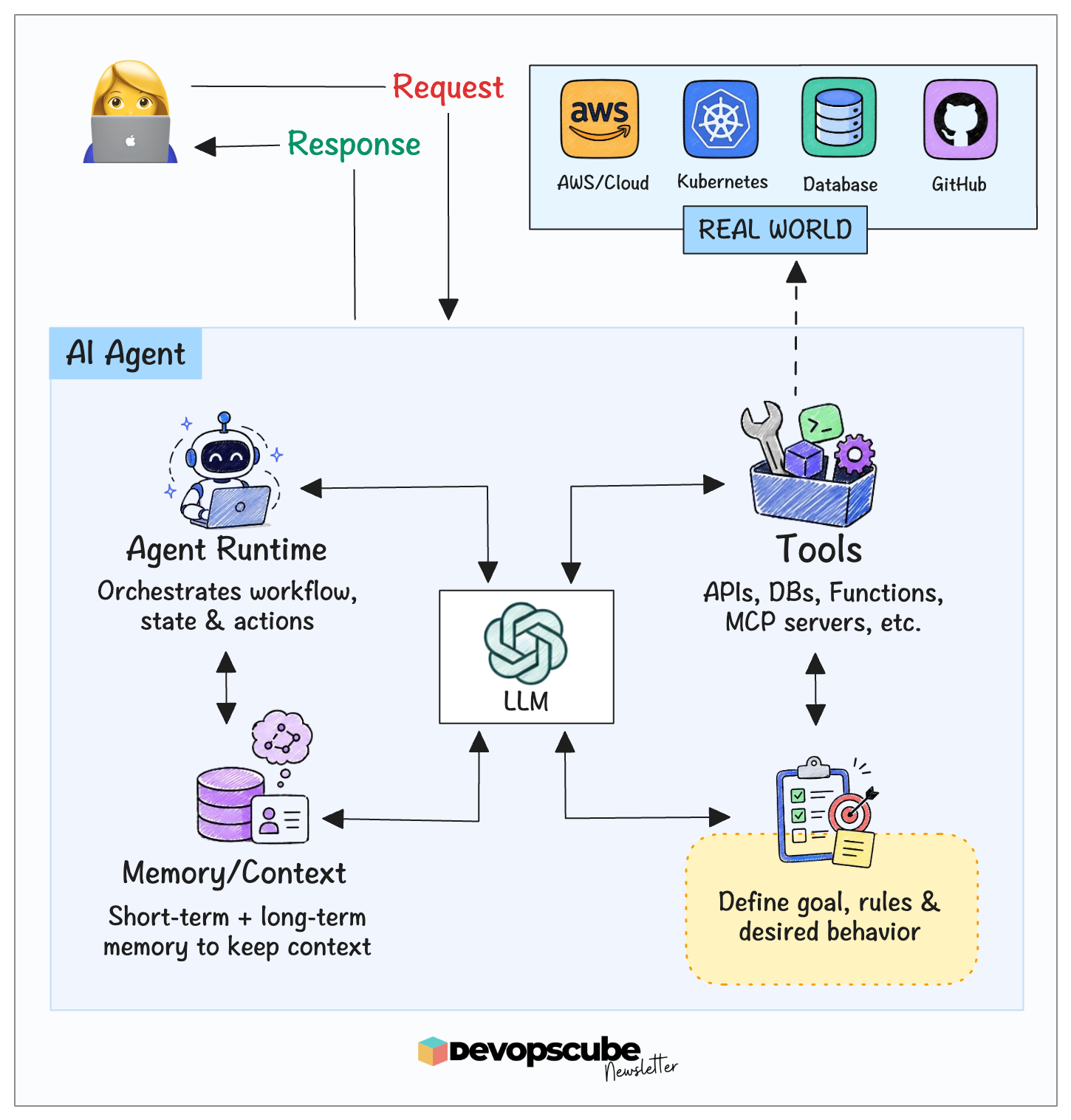
At a high level, you can think of an AI Agent as a combination of these components:
AI Agent = Agent Runtime + LLM + Tools + Memory/Context + InstructionsThe following image illustrates a typical AI agent architecture.
Let's understand each component.
- LLM: Think of the LLM as the brain of the agent. It helps the agent understand the request, reason, plan, and decide what to do next.
- Agent Runtime: This is where the agent logic runs and coordinates different actions.
- Tools: Tools let the agent perform actions. For example, a tool could be an API, custom function, CLI, or a database.
- Memory/Context: Agents can maintain short-term or long-term memory. This helps them keep useful context while working on a task.
- Instructions and Goals: These define what the agent should achieve, how it should behave, and the rules it must follow. Instructions may also define a role or persona for the agent.
Kubernetes Troubleshooting Agent Architecture
Throughout this blog, we will use a Kubernetes troubleshooting agent as an example to explain the concepts.
The AI Agent investigates the live cluster using resource details, events, and logs, identifies the likely root cause, and proposes a fix.
It applies a change only after a person approves it, then checks whether the change worked.
The following image illustrates the high-level architecture of a Kubernetes troubleshooting agent.
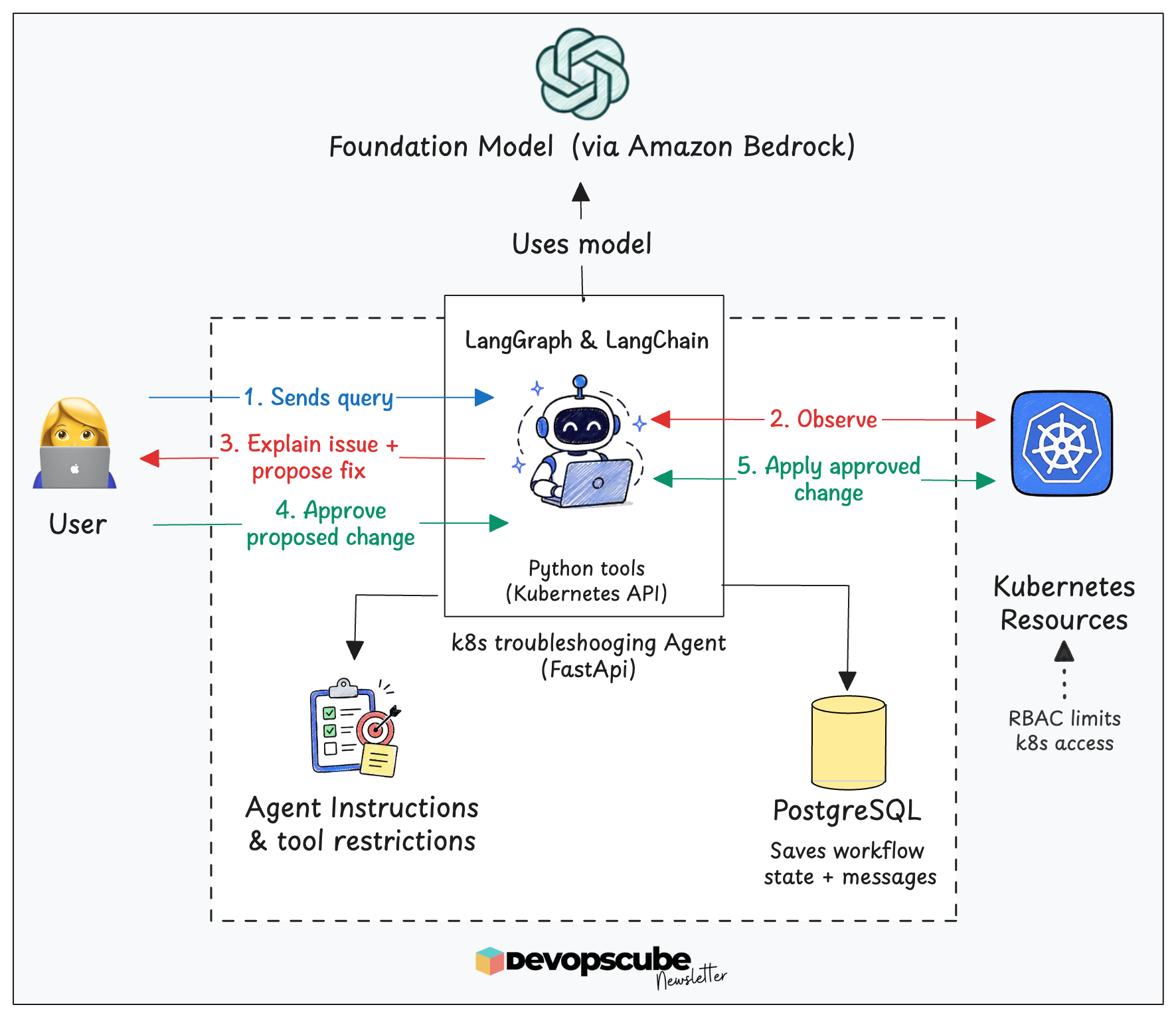
In the above image,
- LangChain provides the agent layer that connects the model, tools, instructions, and agent loop.
- LangGraph provides the execution and state-management layer. It runs the workflow, tracks its state, and pauses before important actions to request human approval.
- The agent calls Python tools that use the Kubernetes Python client to read and modify resources through the Kubernetes API.
- Agent instructions define its goals and expected behavior. Tool restrictions, Kubernetes RBAC, and approval gates enforce what actions it is allowed to perform.
- PostgreSQL stores the workflow state and messages through a LangGraph checkpointer, allowing the agent to pause and resume after an approval pause.
- FastAPI provides the interface through which users send requests and approvals to the agent.
Let's look at the key fundamentals of agents one by one.
Agent Frameworks
We don't have to code the agent from scratch. There are frameworks that help us build it with the required agent features.
For example, agent frameworks provide common features such as:
- Connecting the LLM to tools
- Maintaining context
- Asking for human approval
- Adding safety checks and more.
The following are two popular open-source agent frameworks (Python libraries)
1. LangChain
LangChain is a framework for building agents and LLM-powered applications. It provides standard interfaces for connecting models, tools, messages, and the agent loop.
Some of the key things LangChain handles in an agent are:
- Defining and connecting tools
- Creating and managing messages in the format expected by the model
- Connecting to the LLMs via integrations such as Amazon Bedrock
2. LangGraph
LangGraph is a low-level orchestration framework and runtime for building long-running, stateful agents.
It defines which step runs next, what information it carries, and where it pauses. It also supports saving and resuming progress.
One of LangGraph’s key features is StateGraph, which lets us build an agent as a state machine (a stateful workflow) with clearly defined stages and transitions. This makes it easier to control the agent’s execution flow.
Choosing Agent Loop vs State Machine
In agent development, you need to understand two important concepts.
- Agent loop
- State machine
Let's understand what they mean.
Agent loop
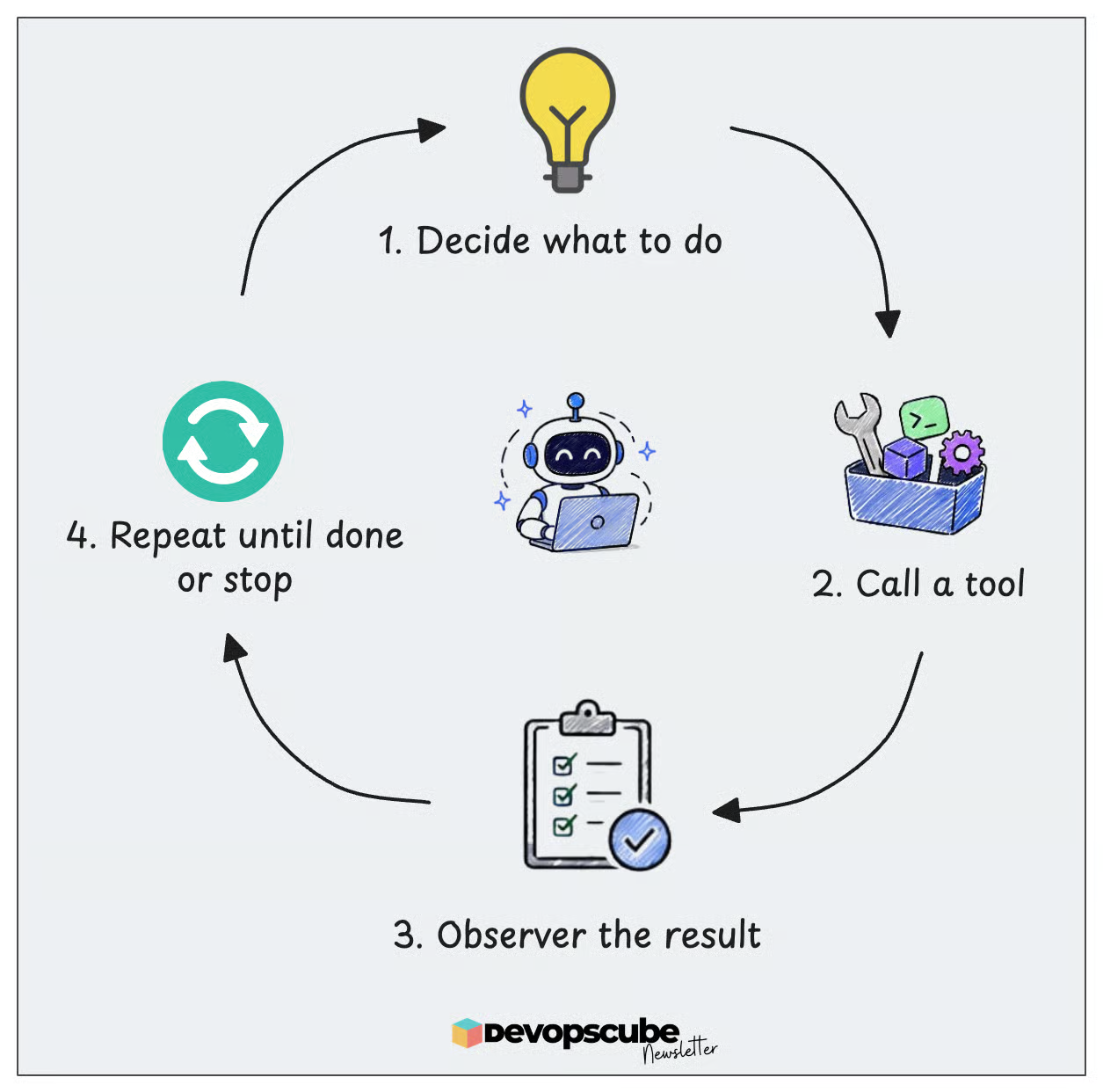
An agent loop allows the model to decide what to do next. It chooses an action, calls a tool, observes the result, and repeats the process until the task is complete.
State machine
In a state machine, you define each step. The agent moves through each in order based on the workflow logic and can configure human approval before making changes.
Combining both approaches
In a typical agent setup, we use a combination of an agent loop with a state machine. Loops are required at each step because the model calls tools repeatedly until it has enough information to answer.
Also, loops can be configured to trigger when a fix fails. For example, during the verification step, if the issue is not fixed, a retry loop is triggered.
The following example image illustrates how loops and the state machine flow can be used in an agent setup.
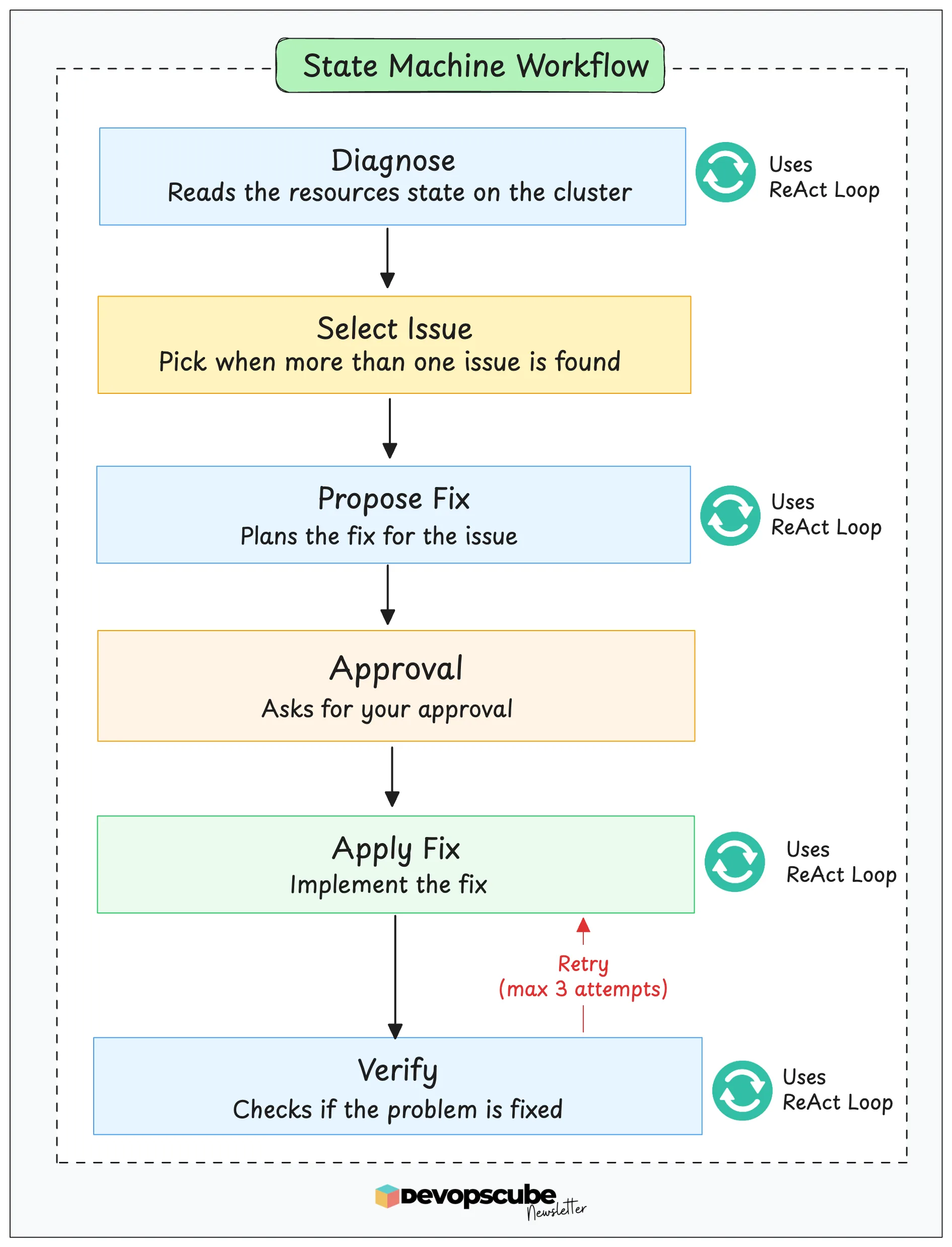
The workflow shown in the above image is implemented as a state machine, while ReAct loops are used within steps that involve the model.
Next, let's look at tools.
Tools in an AI Agent
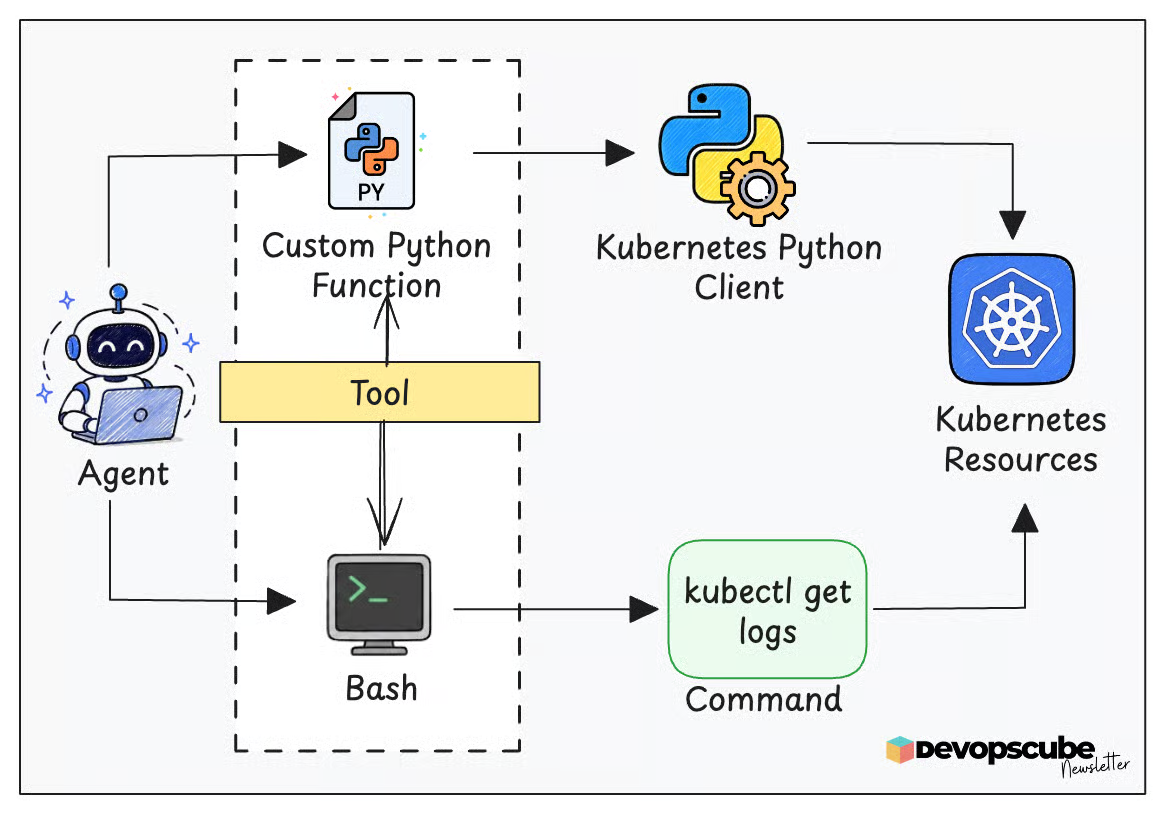
There are API's and command-line tools to interact with an application.
If an agent uses those APIs or command-line tools to perform actions such as reading data or updating a resource, you can refer to them as tools from the agent's perspective.
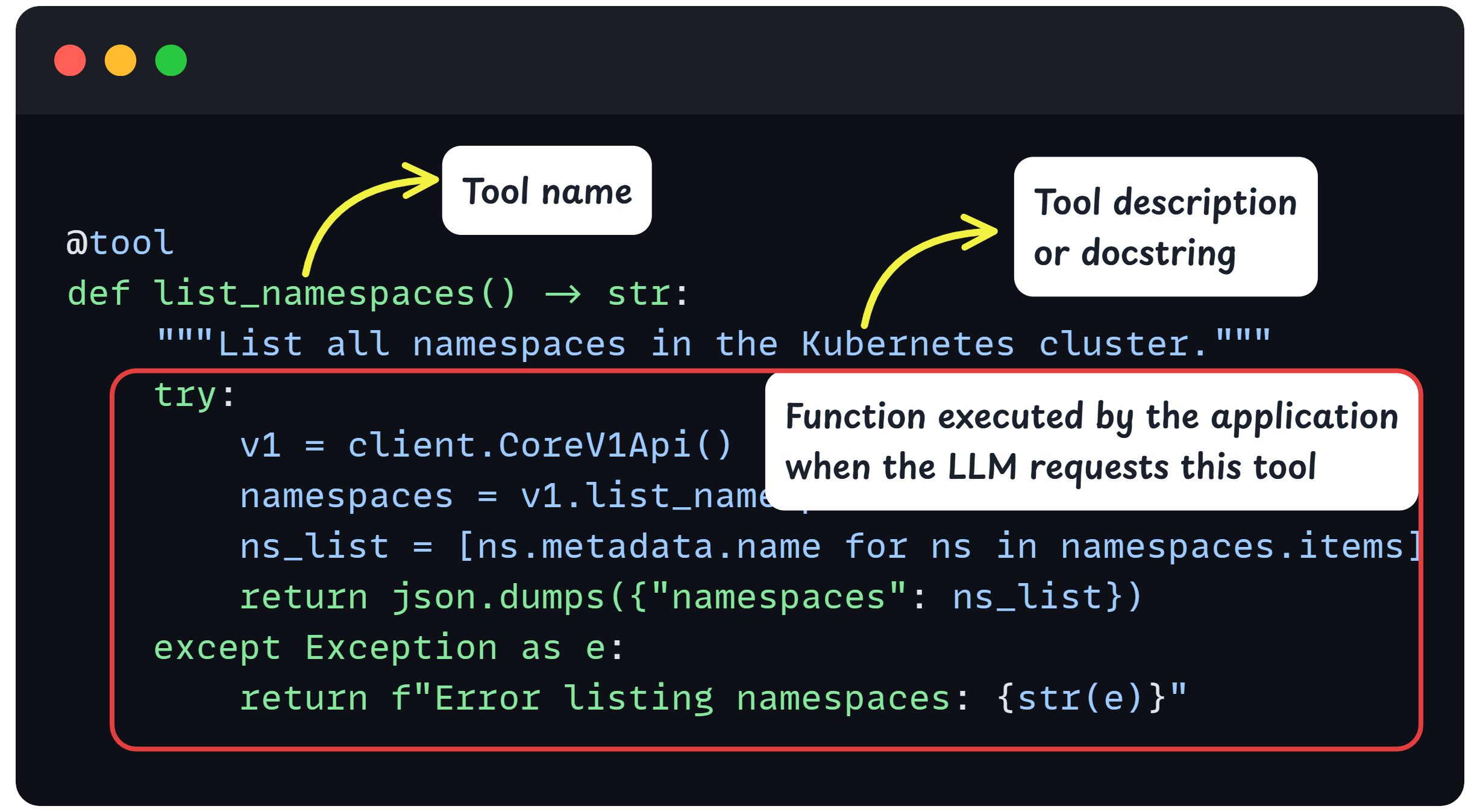
For example, if you create a custom Python function, get_pod_logs, that calls the k8s API, it is a custom agent tool.
However, if you use the kubectl logs command in bash, bash is the tool exposed to the agent, while kubectl logs is the command executed through it.
How about MCP Servers?
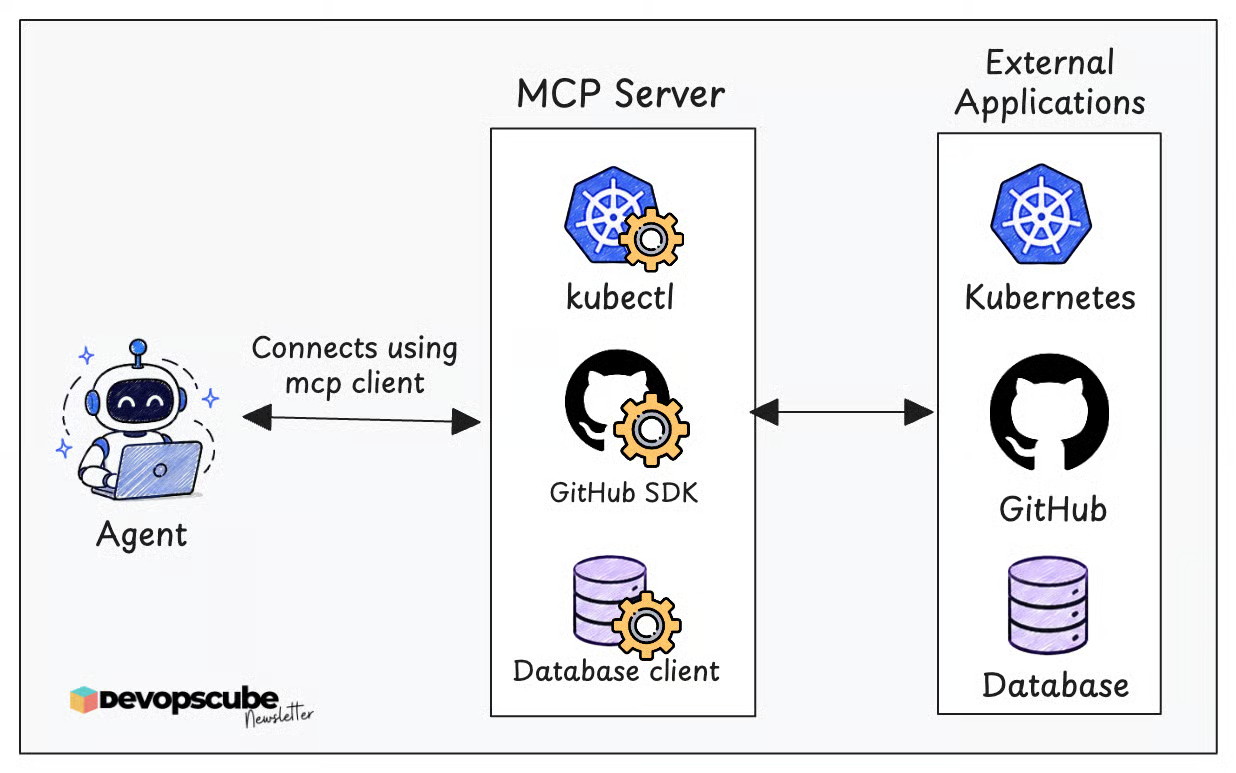
MCP (Model Context Protocol) servers have built-in implementations to communicate with other apps via APIs, command lines, etc. So MCP servers expose tools directly to the AI agent. The agent just uses them.
For example, a Kubernetes MCP server might expose tools such as,
- get_pod_logs
- list_pods
The AI application connects to the MCP server through an MCP client and discovers the available tools. The agent can then select and call the appropriate tool for the task, as shown below.
The following code snippet gives you an example of how a dedicated tool can be implemented.
Now that you have an idea of the tool, let's see how the tool's actions are decided.
Agent Approval Gate
Should we let the agent perform fixes automatically?
Not by default. Here is why.
Let's say there is a pod stuck in CrashLoopBackOff, and the logs show it's because the application can't connect to the database. But the agent may think the database URL is incorrect and plan to change it.
But the actual cause could be that the database is restarting or that a NetworkPolicy is blocking the connection. If the agent automatically changes the Deployment, it may trigger an unnecessary rollout.
One reported real-world incident involved a Cursor AI coding agent running Claude Opus 4.6. The agent reportedly deleted PocketOS’s production database and its volume-level backups through a Railway API call while working on a staging task.
Approval gates solve these kinds of problems.
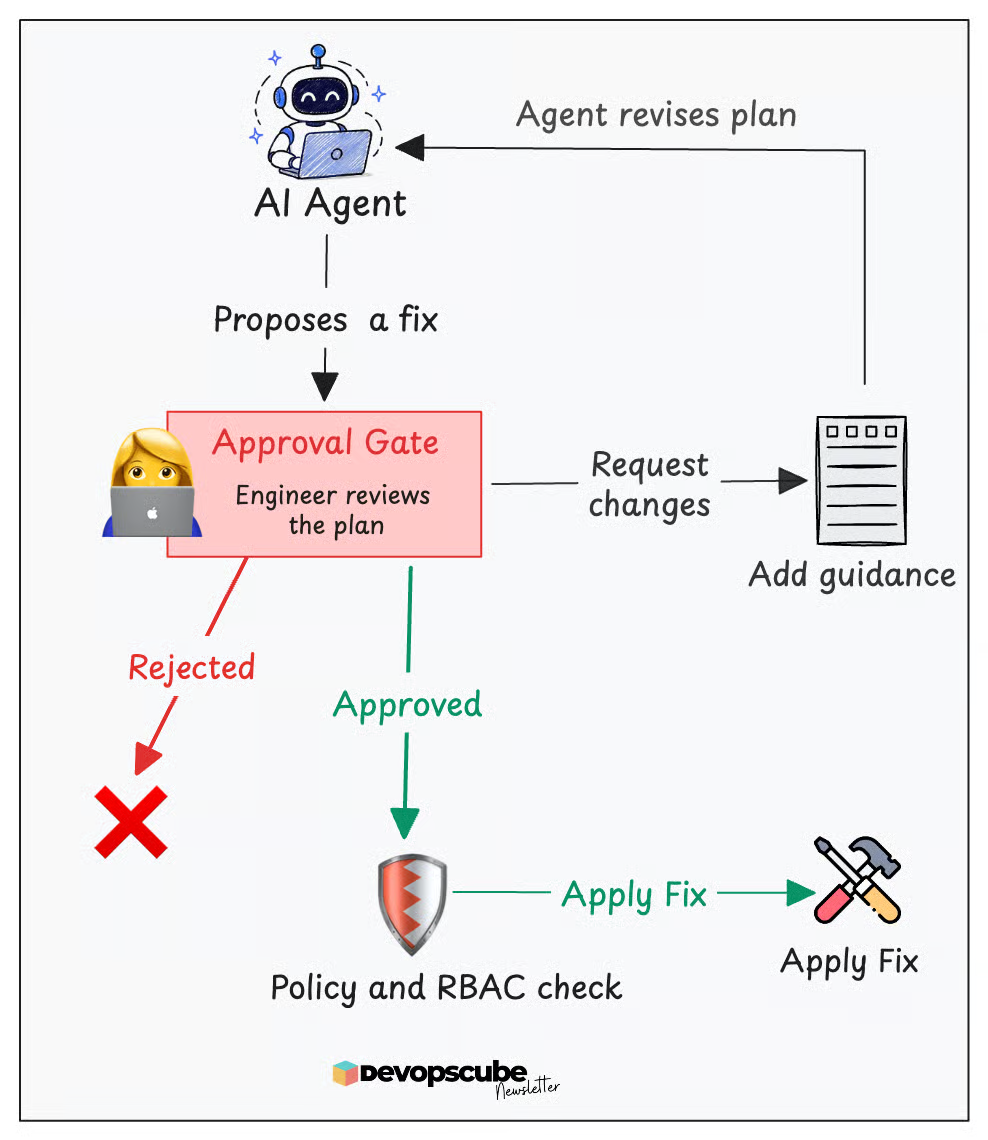
An Agent with approval gates provides a fix and asks you to approve, reject, or provide a custom solution, and it waits until you give an answer.
But even after a person approves the plan, the agent can be configured to perform additional safety checks before applying it.
For example, you can configure custom functions to verify whether the agent guardrail permits write action, as shown below.
Agent Memory
When you ask the agent, "Are my cluster pods healthy?"
Here, the first request may be simple, but the follow-up requests depend on information from the previous conversations.
For example, after the agent investigates it, you may ask again, "What is their status now?"
Here, “their” refers to the cluster pods. The agent needs the previous conversation and investigation details to determine which Pods to check.
Memory is also important when the workflow pauses for approval. For example, the agent may have already identified the unhealthy Pod, found the likely cause, and proposed a fix, and paused the workflow for your approval.
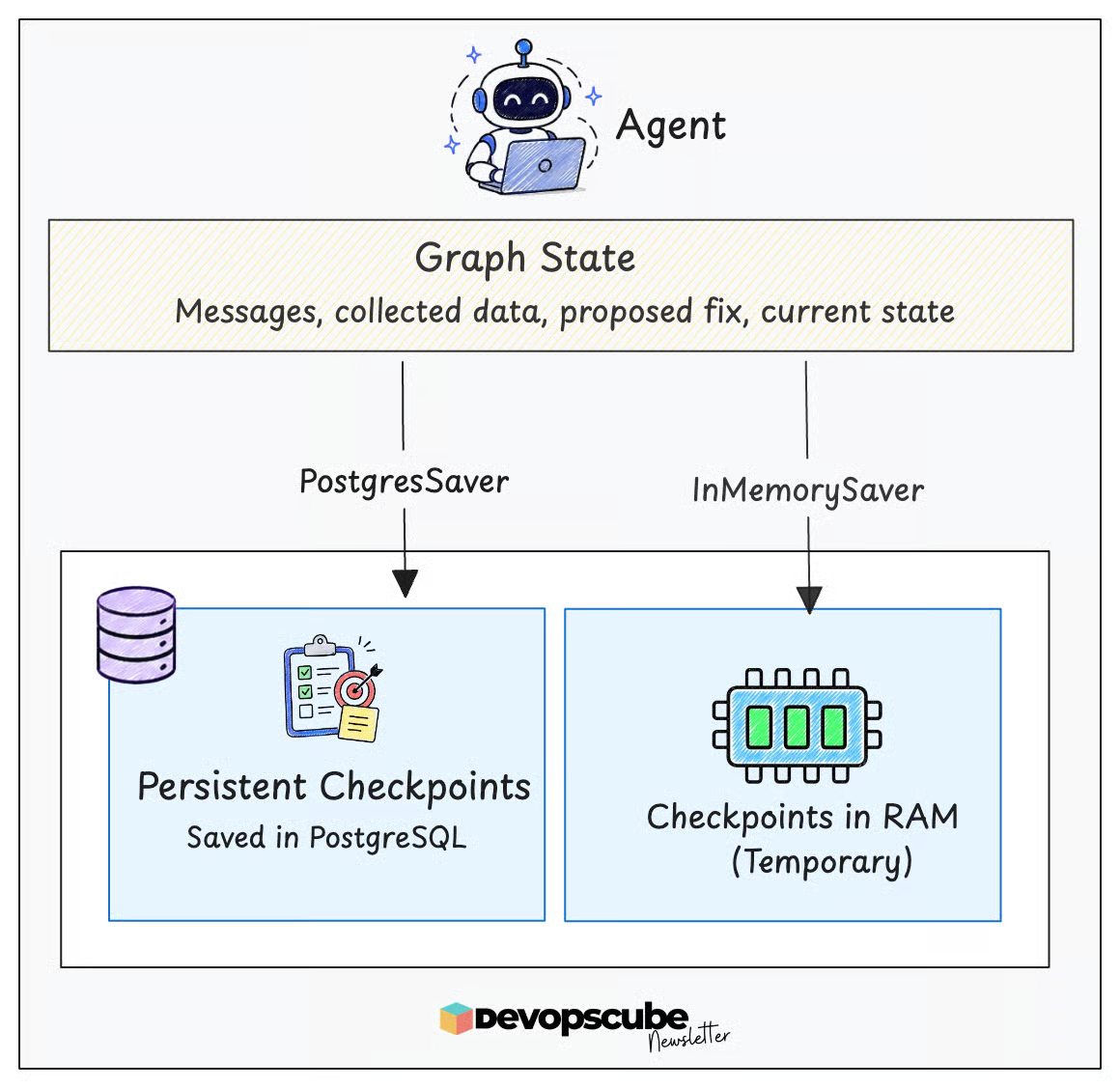
At this point, the agent saves a checkpoint containing the messages, the collected information, the proposed fix, and the current workflow stage.
When you approve the fix, the agent loads the saved checkpoint and continues the workflow. It does not need to restart the investigation.
The LLM does not automatically remember all of this across separate requests. So, the agent needs memory to save and load the correct state for every request.
During development, InMemorySaver can be used to keep checkpoints in RAM. However, this data is temporary and will be lost when the application restarts.
For persistent checkpointing, LangGraph provides PostgresSaver, which uses PostgreSQL as its storage backend. It stores snapshots of the graph state, including the message history and other workflow data.
Key Insight:
Production AI agents often use a combination of storage systems. Each storage type serves a different purpose.
- PostgreSQL can store conversation history, workflow checkpoints, agent state, and other persistent data.
- Redis can store cached results and temporary data. It can also help with queues and communication between agent workers.
- A vector database can help the agent find related documents, runbooks, and past incidents based on meaning rather than exact keywords.
However, not every agent needs all three. The storage design depends on what the agent needs to remember and retrieve.
For example, a simple agent may only need PostgreSQL.
Agent Identity and Authentication
Approval gates control when an action can proceed. Permissions control what actions the agent can perform. We must also verify the identity the agent uses when connecting to another system.
For example, an Agent backend running on a Kubernetes pod can use the assigned ServiceAccount to connect with the Kubernetes API.
In larger environments where agents connect to remote MCP servers, internal APIs, or other agents, workload identity systems such as SPIFFE and SPIRE can provide short-lived, verifiable identities without relying on long-lived credentials.
Each workload receives a SPIFFE ID in the following syntax:
spiffe://<trust-domain>/<workload-path>The workload proves this identity using a short-lived credential called an SVID. An SVID can be X.509 certificate or a JWT.
For example, if both the agent and an MCP support X.509 SVIDs, it can be used to create an encrypted and mutually authenticated connection between them.
SPIFFE/SPIRE can be used to secure connections such as:
- Agent backend to MCP server
- Agent backend to an internal tool API
- Agent to agent
- Services running across multiple clusters
Conclusion
In this blog, we covered the fundamental concepts behind AI agents.
In the next blog, we will build a Kubernetes SRE agent from scratch using LangChain and LangGraph.
The agent will investigate Kubernetes issues, collect logs and events, identify the likely cause, propose a fix, wait for approval, apply the fix, and verify the result.
This hands-on project will bring all the concepts we discussed today together and show you how they work in a real agent.