


Argo CD has become the widely used GitOps tool for Kubernetes. But here is the thing. Knowing how to use it and knowing how it works are two very different things.
By the end of this blog, you will have the clear mental model of the following.
- Every core component in Argo CD and what it actually does
- How components communicate and hand off work to each other
- How Argo CD stores data and how to back it up properly
- How to run Argo CD in high availability mode
- Security features you should know and use
- How to monitor Argo CD with Prometheus and Grafana
Let's get started.
Argo CD Architecture Overview
Argo CD has the following seven key components.
- Argocd Server (API Server)
- Application Controller
- ApplicationSet Controller
- Repository Server
- Dex (optional SSO)
- Redis
- Notification Controller
The following diagram shows you the overall architecture of Argocd.
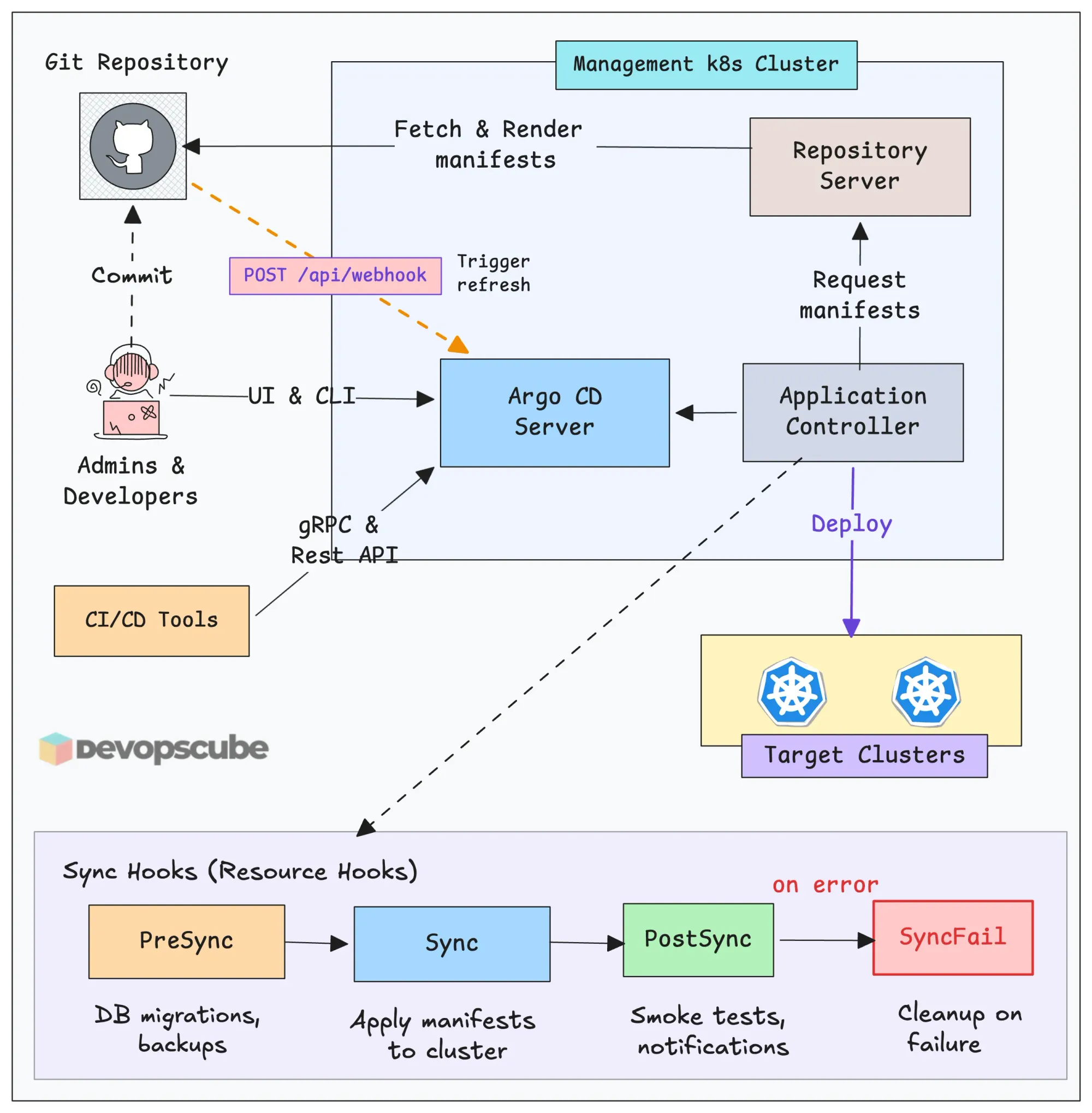
The diagram shown only three components of Argo CD, but there are also other components that work with these components.
In the next section, we will look into each component in detail.
Component Deep Dive
Now lets look at each component in detail.
Argo CD Server
This is the API server of Argo CD that exposes Argo CD REST APIs, which we use to interact with Argo CD through UI, CLI, and CI/CD tools.
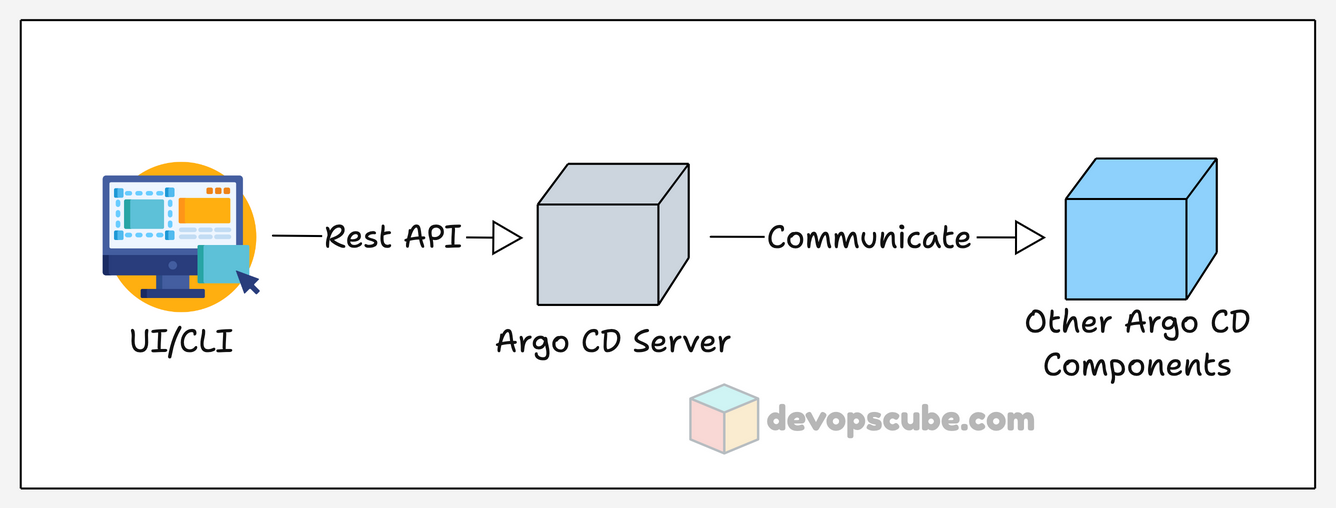
By default, the Argo CD server saves and manages the user credentials in a Kubernetes secret, the user account configuration and permissions in a Kubernetes configmap.
Also, this is the component that saves the data of custom resources like Application, ApplicationSet, and Projects in ETCD. This is important for backup and recovery, which we will cover later.
Argo CD Application Controller
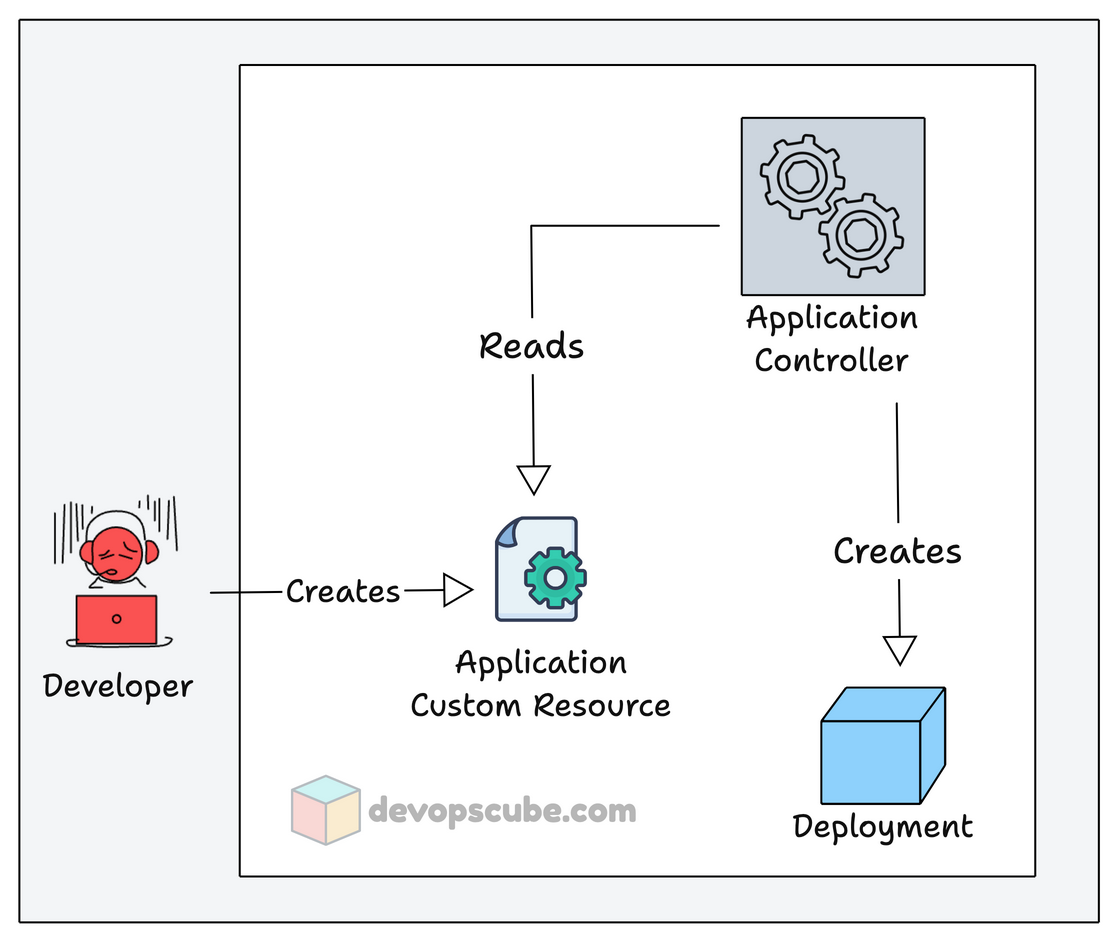
Application Controller is the core component of Argo CD and a Kubernetes controller, which deploys and manages the application.
Its key roles are to deploy and continuously monitor the Applications created by it and compare their live state with the desired state in Git.
Given below is a simple image that shows how Argo CD Application Controller reads and creates applications.
Argo CD ApplicationSet Controller
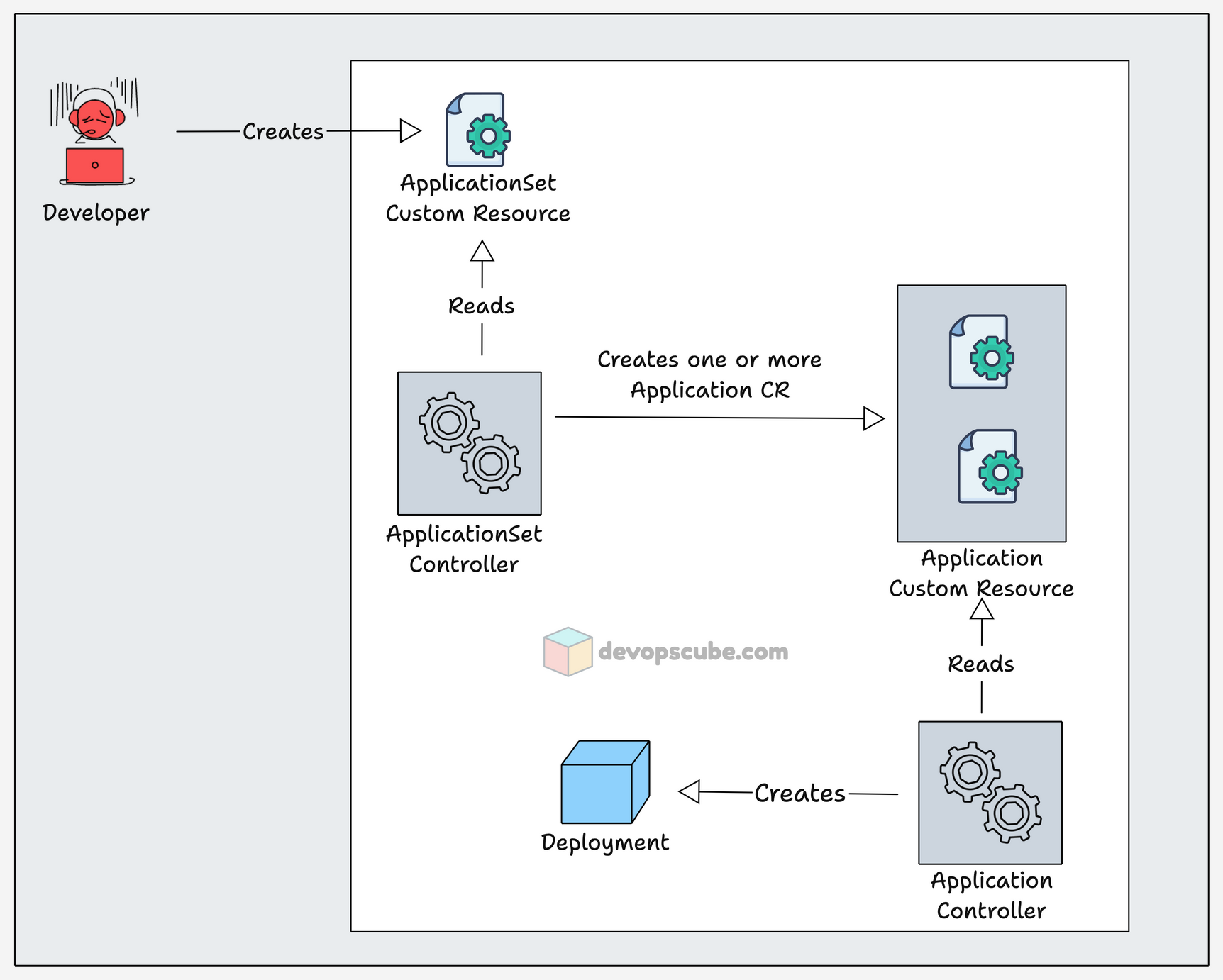
ApplicationSet Controller is a Controller to manage ApplicationSet custom resource that helps you to deploy multiple applications using a single custom resource.
When an ApplicationSet custom resource is created, the ApplicationSet Controller service reads it and creates multiple Application custom resources.
Then the Application Controller reads the custom resources to deploy applications.
This is helpful in deploying the same application to multiple environments and deploying all services of an application using a single custom resource.
Argo CD Repo Server
The repo server is the service that interacts with Git repositories and pulls the templates from the Git repository for the application deployment.
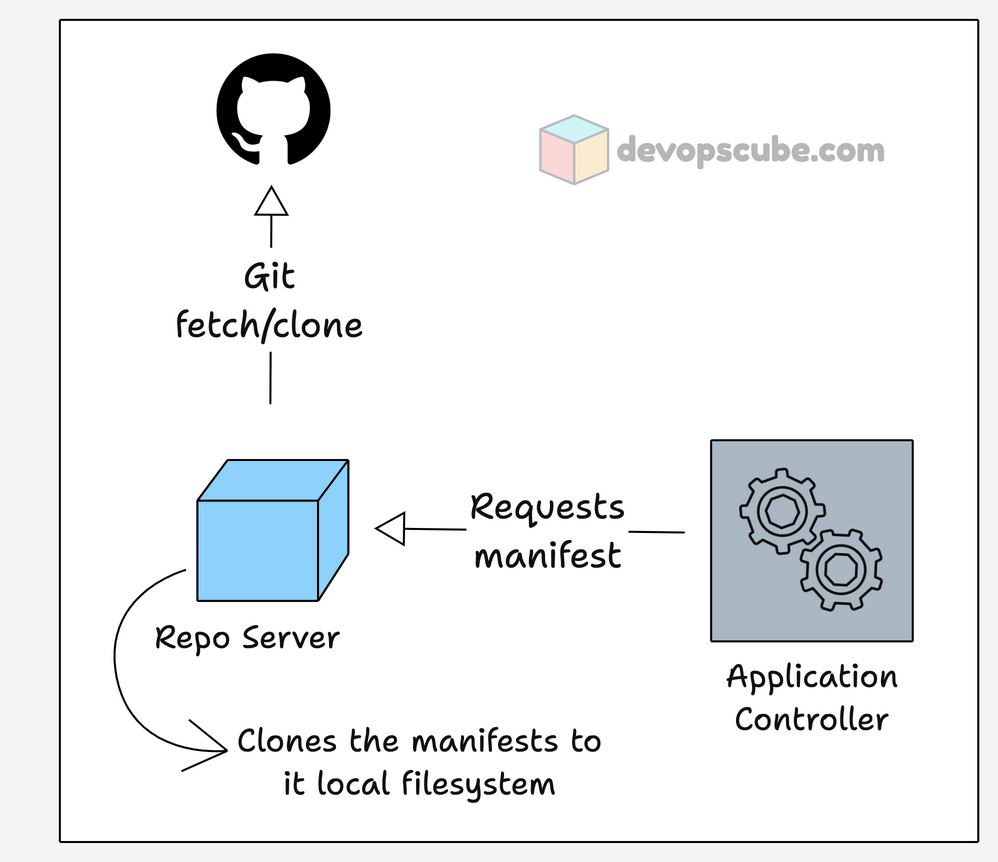
When the Application Controller requests a manifest to create an application, the Repo server clones it locally and saves the cache in Redis for 24 hours.
The Repo server polls Git every 3 minutes by default to check for new changes, and you can also configure a webhook for Git.
The templates from Git can be in formats like,
- Plain manifest files,
- Helm charts, and
- Kustomize.
Argo CD Dex Server
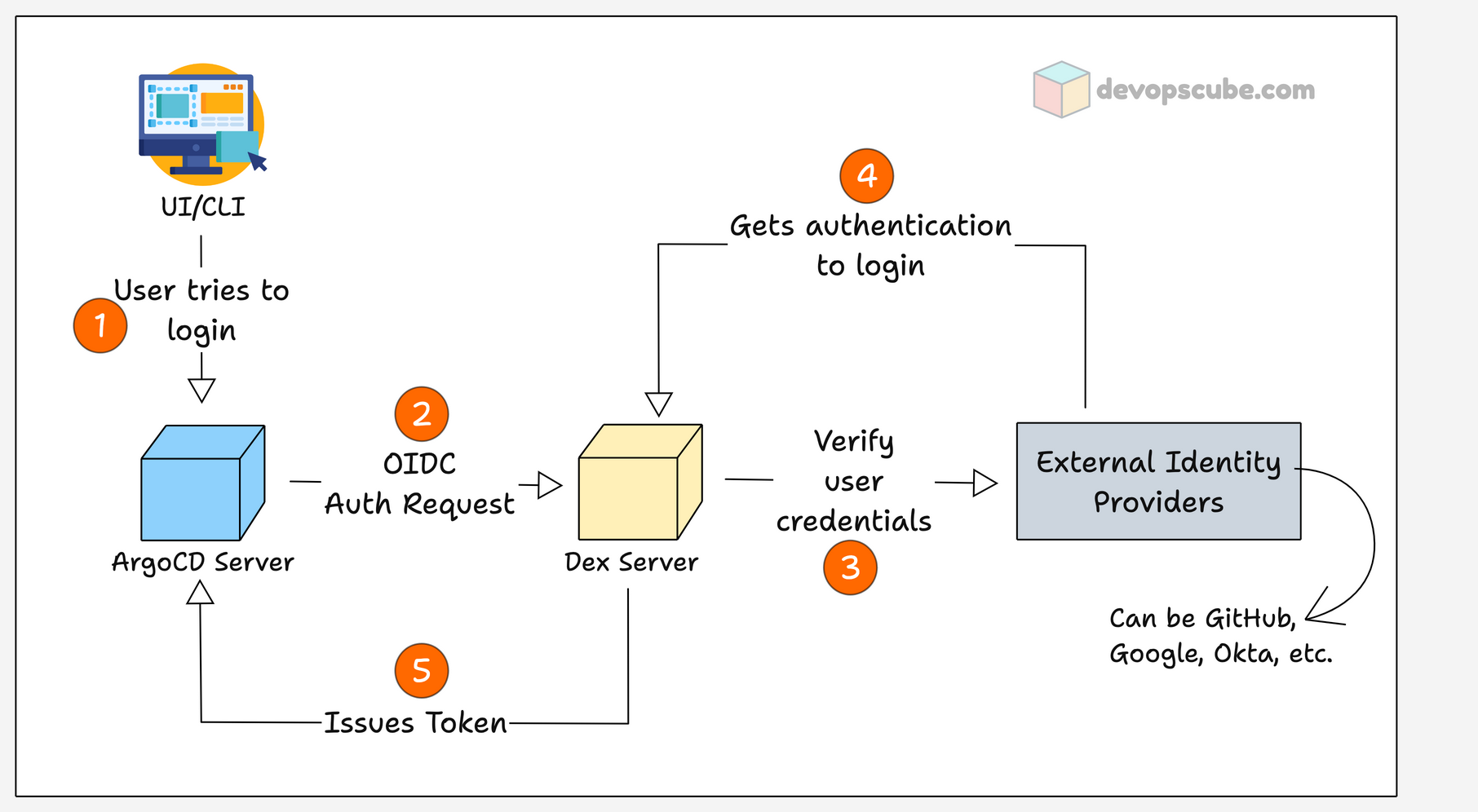
Dex server is an OIDC (OpenID Connect) provider for Argo CD, which helps to authenticate and authorize with external identity providers.
It supports a wide range of OIDC providers like,
- AWS SSO
- Okta
- Microsoft (Azure AD)
- GitHub, etc.
In enterprise environments, you usually have a centralized identity manager. If it's a supported OIDC provider, you can configure it to Argo CD, and you can allow people in a certain group to access Argo CD.
In Argo CD, not allowing everyone to do anything is a best practice. You can use OIDC combined with RBAC to limit their permissions.
For example,
- DevOps engineers can create, delete, and sync applications
- Developers can only access the UI to view the application and its logs.
Redis
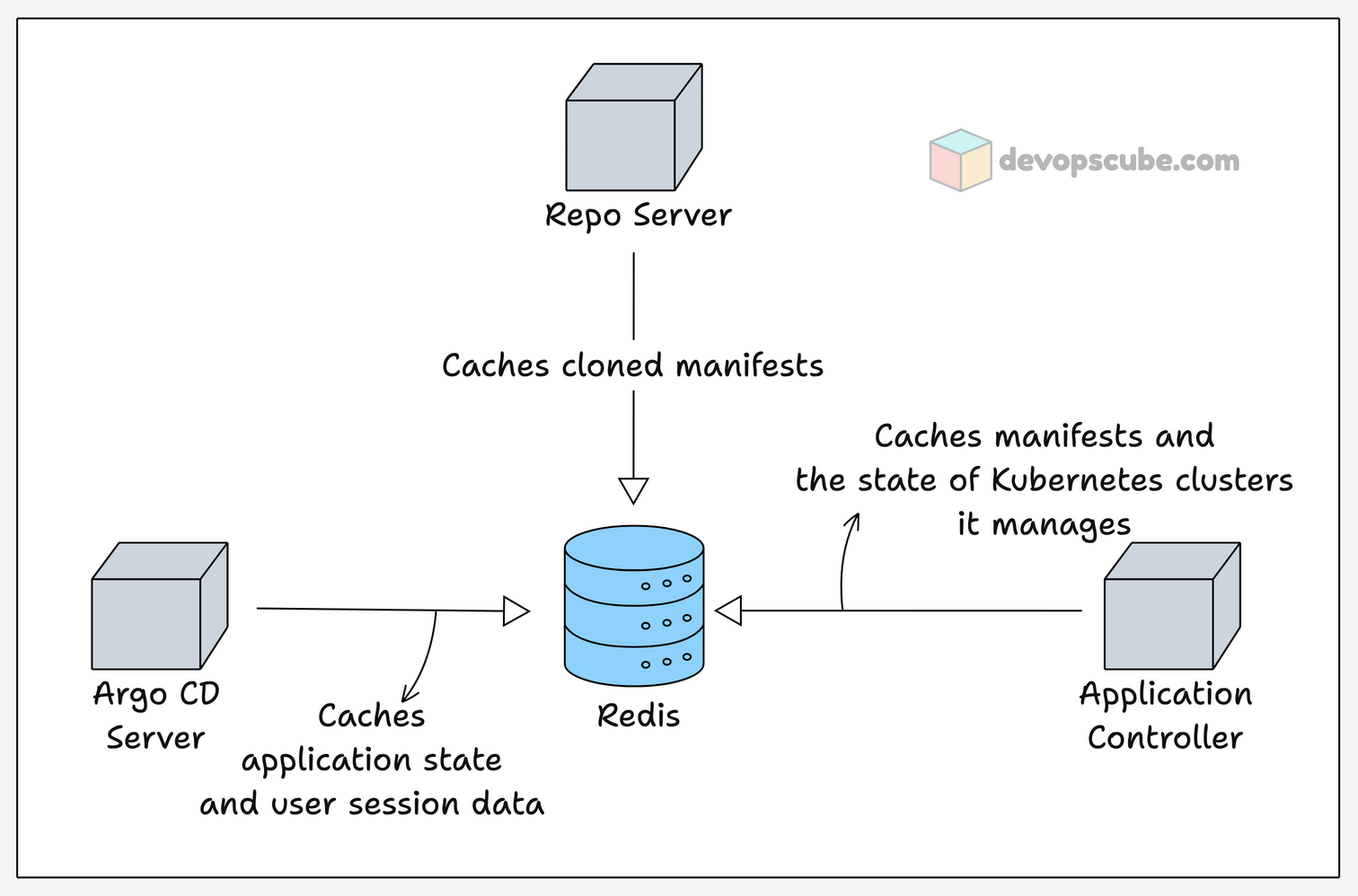
Redis is used in Argo CD for caching, which makes the request fast and reduces the stress on other components by caching repeated API calls.
As we see in the Repo server, the manifest cloned by the repo server during application deployment will be cached for 24 hrs. And it also caches the information of the resource Argo CD creates, caches the application state like its status, sync state.
It does not store any credentials or configuration temporarily, they are stored in Kubernetes secrets and configmap.
With Redis, there will be low resource usage, syncing applications get faster, and frequent requests to Git will be reduced if the cache is present.
Argo CD Notification Controller
The Notification Controller monitors the Application custom resource for new events (changes) and sends them as notifications, such as emails and Slack messages.
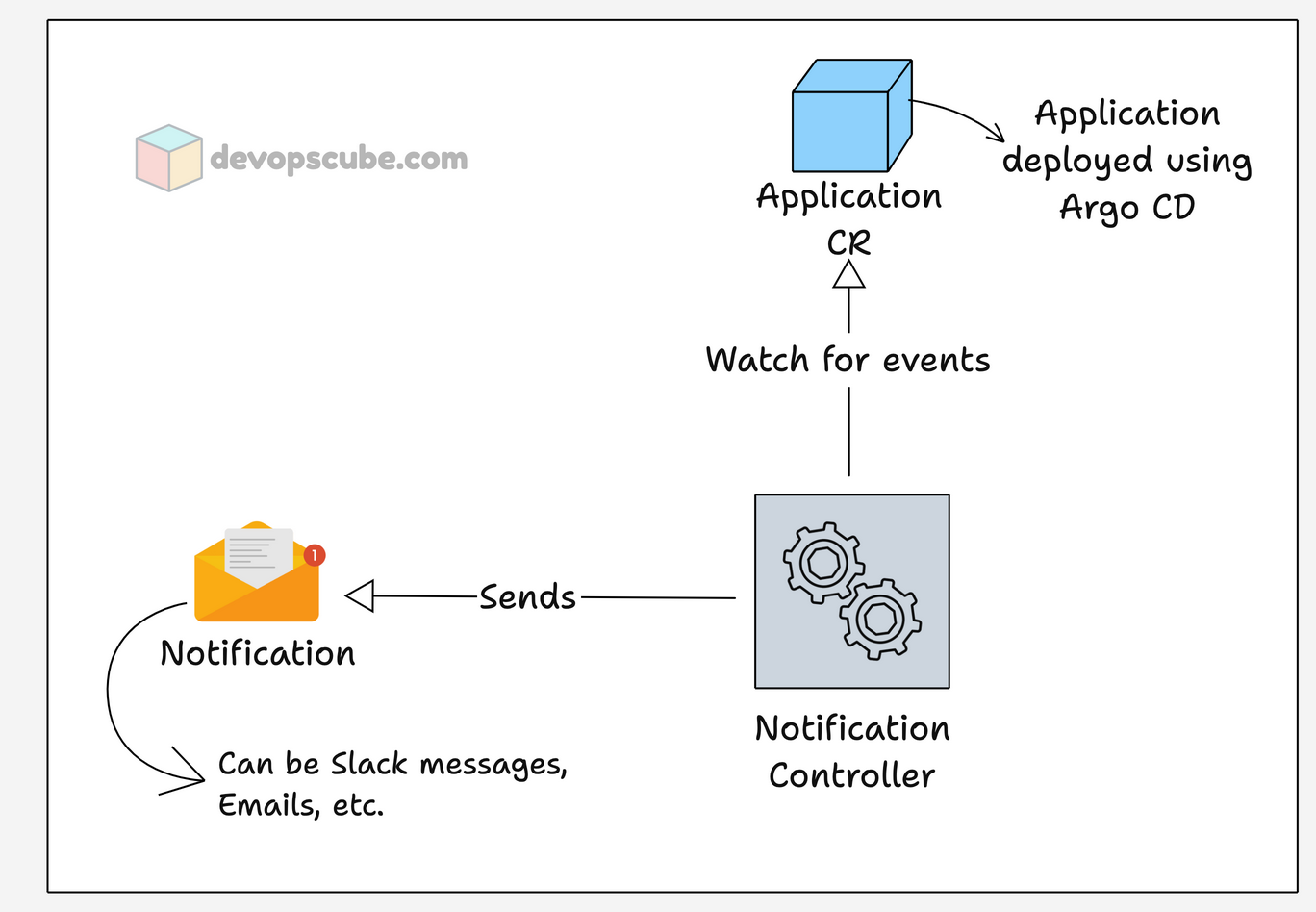
Argo CD events such as changes in sync status, health status, when a new version is deployed, etc., can be configured to send notifications. And, you can use custom messages or templates to send in the notifications.
Argo CD supports a wide range of notification services like ,
- AWS SQS,
- Slack,
- Email,
- Microsoft Teams
- PagerDuty
- And more..
Now that you have an understanding of each component, let's see how Argo CD saves its data.
Argo CD Storage and Backup
Unlike other tools, Argo CD does not store its data in PV for persistence.
It has a Redis database, but it is only for caching. The actual configuration data is stored as native Kubernetes objects.
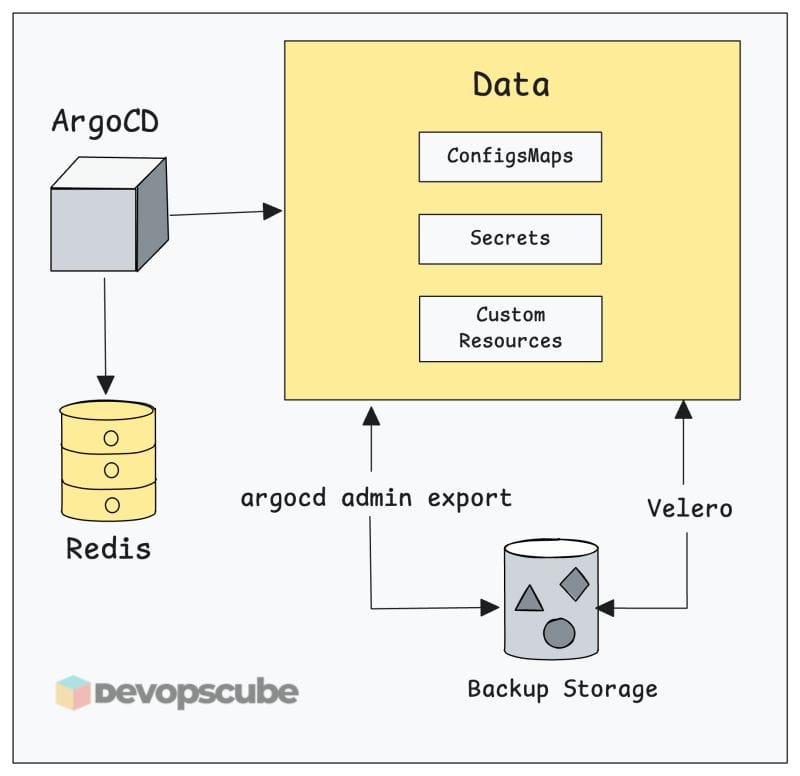
The CRDs of Argo CD store data related to applications and projects.
The configmaps in the argocd namespace contain general server configurations such as UI settings, RBAC, etc.
The secrets in the argocd namespace store all credentials, such as account username and password, cluster credentials, and all other authentication credentials.
You can change the configurations on the configmap to make the changes, or when you change settings by CLI or UI, Argo CD will update the related configmap automatically.
If you lose this data, recreating the configs manually can be time consuming.
To perform a backup, you just need to back up the Argo CD namespace and the related CRDs.
There are two main backup options:
- Option 1: Using argocd admin - It's a built-in method, which is good for quick backups.
- Option 2: Using Velero (Recommended for Production) Velero performs full namespace-level backups including all Secrets, ConfigMaps, and CRDs. This is the recommended approach for disaster recovery, as it captures everything and supports scheduled, automated backups.
Argo CD High Availability & Scaling
A single-replica Argo CD setup is a single point of failure. For production, you need to deploy Argo CD in high availability mode.
Scaling the API and Repo Servers
Argo CD provides a separate high availability setup manifest to make the setup simple.
Instead of relying on 1 replica, you can scale the replicas so even if one replica goes down, the other keeps the processes running.
A single node cluster will not work for Argo CD HA setup.
Redis HA with Sentinel
In the HA setup, the pods Argocd server, and repo server are scaled to a minimum of 2 replicas, and Redis will use HA mode with 3 sentinels.
Application Controller Sharding
Since Application Controller is deployed as a StatefulSet, even in an HA setup, the replicas will be 1 by default.
But if you are managing more cluster using Argo CD, the Application Controller will consume more memory.
In such a case, you can increase the replica of the Application Controller and enable Sharding to split workloads among the replicas.
For example, there are 30 clusters managed by a single Application Controller, by enabling Sharding and increasing the replicas to 3, each replica will manage 10 clusters each.
By default, it uses a hash-based shard algorithm, but it can be modified to use round-robin or other custom algorithms.
Argo CD Security
Given below are some of the security features in Argo CD
Authorization
When setting up Argo CD, there will be only one user present which is an admin user.
The admin user gets a random password to log in to Argo CD, and you need to update the password once you log in.
The updated password is stored in argocd-secret secret as an encrypted bcrypt hash ($2a$10$), not just the password of the user, but also all the credentials are saved as Kubernetes secrets.
For example, even though the repo-server is responsible for getting the manifest from Git, the Git authentication credentials are saved as Kubernetes secrets.
TLS Communication
All the communication in Argo CD happens over TLS.
Even the service-to-service communication between the components argocd-server, repo-server, and application-controller are on TLS.
We can also set up TLS communication for Redis, but by default, the Redis communication is unencrypted.
RBAC
By default, Argo CD has two roles, readonly and admin.
But you can create custom roles for users to limit their permissions, such as watch, deploy, update, delete, etc.
You can even limit the namespace permission for argocd-server and application-controller by modifying their cluster roles. This will prevent Argo CD from accessing sensitive information in other applications that are not deployed by Argo CD.
Monitoring Argo CD
The status and health of the application created by Argo CD is not monitored from Argo CD, you have to configure Prometheus and Grafana for it.
All components are exposed on /metrics endpoint and the port used by each component is given in the table below.
| Application Controller | 8082 |
| API Server | 8083 |
| Repo Server | 8084 |
| ApplicationSet Controller | 8080 |
| Notification Controller | 9001 |
| Dex Server | 5558 |
The metrics, such as check application health, sync status, git request, and number of clusters managed, are some of the key metrics monitored.
The Argo CD community maintains a set of Grafana dashboards you can import directly. Pair these with alerting rules on sync failure rate and controller queue depth to catch problems before they become incidents.
Conclusion
In summary, we have learned about the components of Argo CD, how they work, storage, High Availability security features, and monitoring of Argo CD.
As a DevOps engineer or SRE, understanding the core architecture of Argo CD helps you in troubleshooting, scaling, and security.
If you have any questions, drop a comment below.
