


In an earlier blog embeddings, we explored how text, images, and unstructured data can be turned into vectors using models like BERT, CLIP, or OpenAI Embeddings.
These vectors help capture the meaning behind the data.
But once you create these vectors, you need a place to store them and a fast way to search through millions of them. That's where a vector database becomes important.
In this blog, you will learn,
- What a vector database
- How it works and the key features
- How popular vector databases compare
- Real-world use-cases
- Common challenges and best practices for production
What is a Vector Database?
A vector database is a special type of storage system designed to store and search embeddings. Embeddings are nothing but a numerical representation of text, images or audio.
These embeddings capture the meaning behind the data, not just the words.
Now the key questions. Why do we need a Vector database? What does it actually solve?
When we build AI systems, matching exact words is not enough. We want the system to understand meaning.
Traditional keyword-search fails when the words change but the intent stays the same. That's where embeddings and vector databases help.
The following image illustrates the vector database workflow.
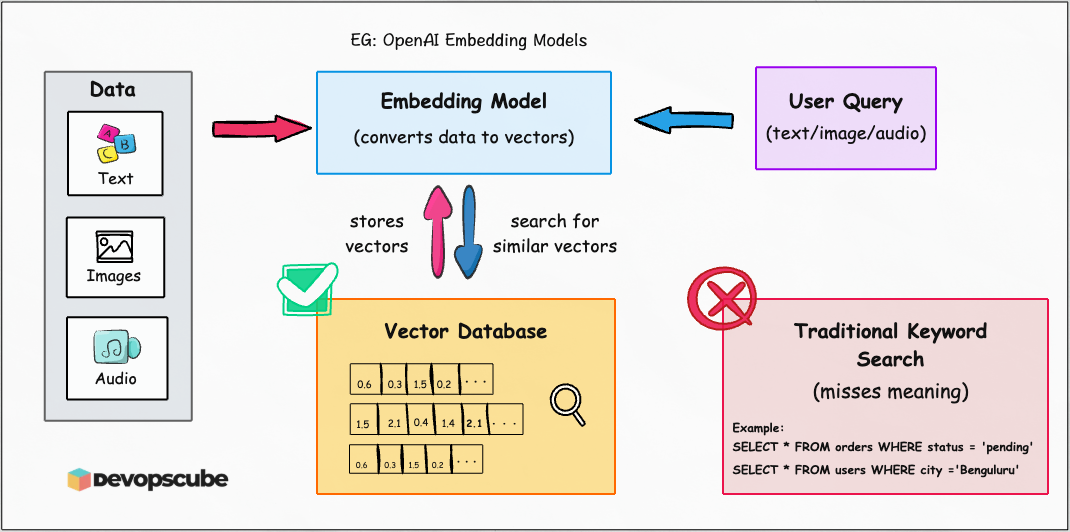
Why traditional databases don't work?
Databases like SQL (MySQL, PostgreSQL) or NoSQL (MongoDB, DynamoDB) are great for structured data such as user IDs, product names or order details.
They work great for simple queries like:
# Fetching all orders where status = 'pending'
SELECT * FROM orders WHERE status = 'pending'

# Listing all users from city='Bengaluru'
SELECT * FROM users WHERE city  ='Benguluru'
But they fail when you ask something like:
Show me all support tickets similar to "I don't have an account"This is where traditional databases struggle because they store plain text and querying such is not possible.
On the other hand, embeddings solve this by turning text into vectors, for example:
"I forgot my password"  ->   [0.23, -0.15, ....., 0.53]
"I don't have an account"  ->  [0.54, 0.64, ...-0.34, 0.25]
Now we can measure how close these two vectors using cosine similarity or Euclidean distance.
Closer vectors = more similar meaning.
A = [1, 1], B = [2, 2].
Cosine = A.B/(|A| X |B|) = 4/(√2 X 2*√2) = 4/4 = 1The angle is 0°, so cosine similarity = 1 → meaning they are very close in meaning.
With Euclidean distance, we measure the straight-line gap. For example:
A = [1, 1], C = [5, 5].
Euclidean distance = √((5–1)² + (5–1)²) = √32 ≈ 5.65,Traditional SQL/NoSQL systems are not built to search millions of vectors efficiently. Even if you store them, the search becomes extremely slow.
That's why vector databases exist. They are optimized to store embeddings and find similar vectors quickly.
Now let's look at how they work.
How do Vector Databases Work?
Vector databases are built to store and search through embeddings. It stores the embeddings in long lists of vectors that represent meaning.
Here's how they work in simple steps:
Convert text into embeddings
First, an AI model like OpenAI Embeddings or BERT converts your sentence into a vector.
Example: "I can't access my account" can convert to [0.12, 0.89, -0.44, ..., 0.34].
Store the vector with metadata
Each vector is saved along with the original text and extra info like category, date, or user ID.
A typical record looks like:
{
  "id": "ticket_12345",
  "vector": [0.12, 0.89, -0.44, ..., 0.45],
  "content": "I can’t access my account",
  "metadata": {
    "category": "support",
    "language": "English",
    "date": "2025-07-23",
    "user_id": "u_9876"
  }
}
This helps filter results later like searching only with billing tickets from 2025.
For example: category = "billing" and date > 2025-01-01 when you search.
Find similar vectors
When user ask question, the query also goes through embedding model and convert to vectors.
The database then compares your query vector to stored ones using similarity measures like cosine or Euclidean distance.
Also you can optimize vector databases by,
- Indexing: Searching millions of vectors is slow, so vector databases use clever indexing tricks to make it fast, often in milliseconds.
- Filters: You can combine vector search with filters like
category = "support"ordate > "2024-01-01". This is called hybrid search. - Rank results: The database gives you the closest matches. Some systems re-rank them using business logic like showing newer results first.
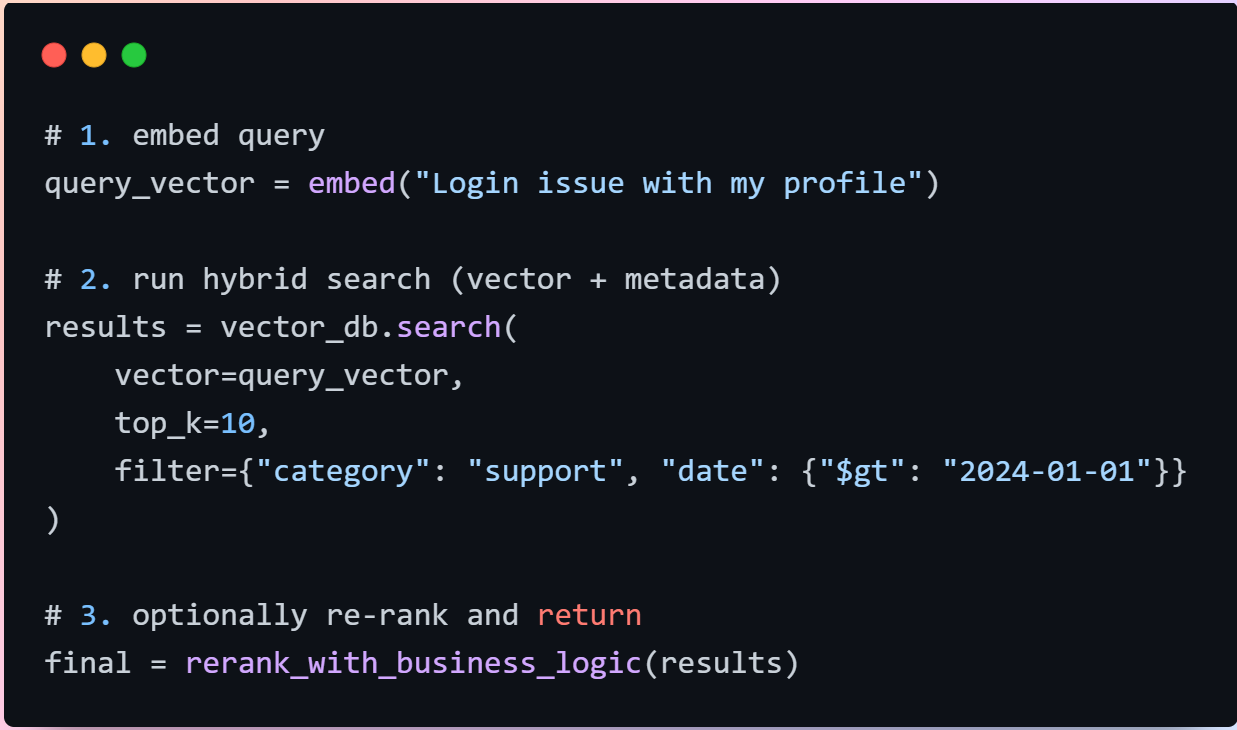
Key Features of Vector Databases
Let's look at the features that make vector databases powerful for real-world AI systems.
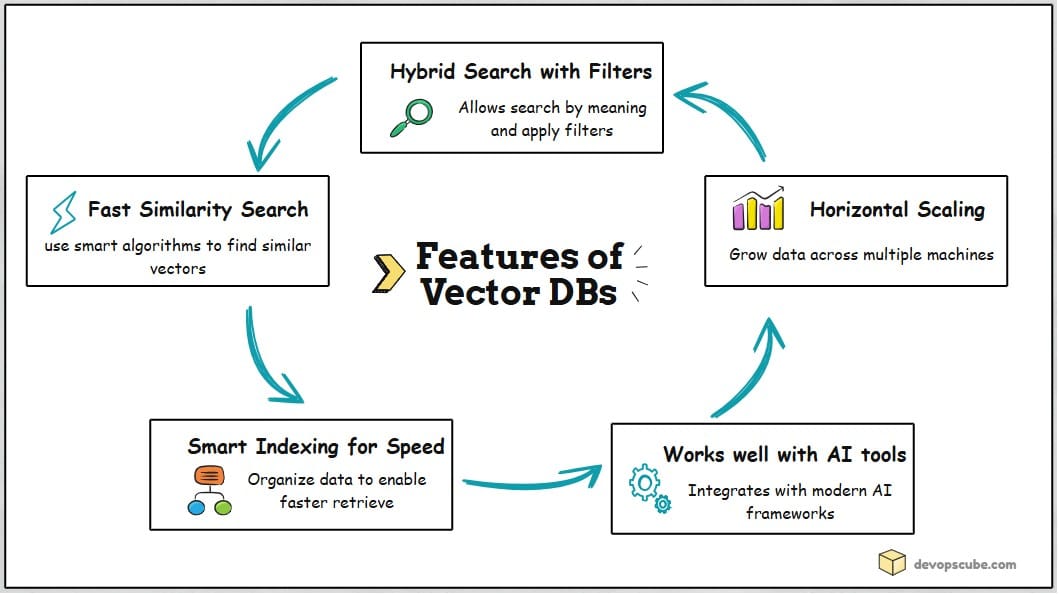
Fast Similarity Search
Vector databases don't scan millions of records one by one. They use smart shortcuts (like ANN algorithms) to quickly find similar items, saving time and computer power.
Hybrid Search with Filters
It is a combination of vector search with filters.
Example: "Find tickets similar to 'I was overcharged' but only from billing after Jan 2025"
This helps you get relevant results that also match your business rules.
Smart Indexing for Speed
To make searches faster, vector databases organize data using different methods:
- IndexFlatL2 - The most basic way. Checks every vector one by one. Accurate but slow if the data is huge.
- IVF (Inverted File Index) - Think of it like searching in a library. Instead of checking every book, it only looks at the right section.
- HNSW (Hierarchical Navigable Small World) - Uses a graph to jump quickly between similar items.
- PQ (Product Quantization) - Compresses vectors to save memory and speed things up.
Horizontal Scaling
As data grows, one server is not enough. Modern vector databases like Weaviate, Qdrant, Pinecone, and Milvus are designed for distributed scaling across multiple machines.
They support:
- Sharding: Splits data into chunks.
- Replication: Keeps backup copies.
- Autoscaling: Adds more power when needed.
- Streaming: Updates data in real-time.
Integration with AI Tools
Modern vector databases easily integrate with AI frameworks. They work natively with:
- LangChain and LlamaIndex for chatbots.
- Hugging Face, OpenAI embeddings for embeddings.
- Kubernetes, Docker for deployment.
Popular vector databases
The vector databases market is expanding quickly, with analysts predicting it could grow 4–8X in about a decade
The following table shows some of the popular vector databases with their use cases.
| Vector Database | Description | Ideal use-case |
|---|---|---|
| FAISS | Developed by Facebook, it is an open-source library for in-memory indexing and fast similarity search. | Best for local setups, experimentation, and research environments. |
| Pinecone | Fully managed cloud-native vector database with built-in scalability and production-ready APIs. It handles sharding, replication and indexing automatically. | Best for production-ready systems, semantic search engines and recommendation systems where uptime and scalability are key. |
| Weaviate | An open-source and cloud-hosted vector databse built for hybrid search and supports GraphQL and REST APIs. | Ideal for hybrid search with metadata filtering and semantic similarity search. Perfect for document search and RAG chatbots. |
| Qdrant | An open-source vector databases known for its speed and efficiency. It supports real-time filtering, payload based search and Docker/Kubernetes deployments. | Best for self-hosted environments and applications needing fast filtering, like chatbots, personalization engines, or recommendation APIs. |
| Milvus | An enterprise-grade vector dtabase that supports horizontal scaling. | Ideal for large-scale enterprise AI systems, multi-modal search (images + text), and production clusters with petabytes of embeddings. |
Choosing the Right Vector Database
Now the key question.
Which vector database should you choose?
With so many options, picking the right database can be confusing. Choosing the right tool early saves time, money and rework.
The short answer is, choosing the right vector database depends on your project size, budget, and whether you need cloud scaling or local experimentation.
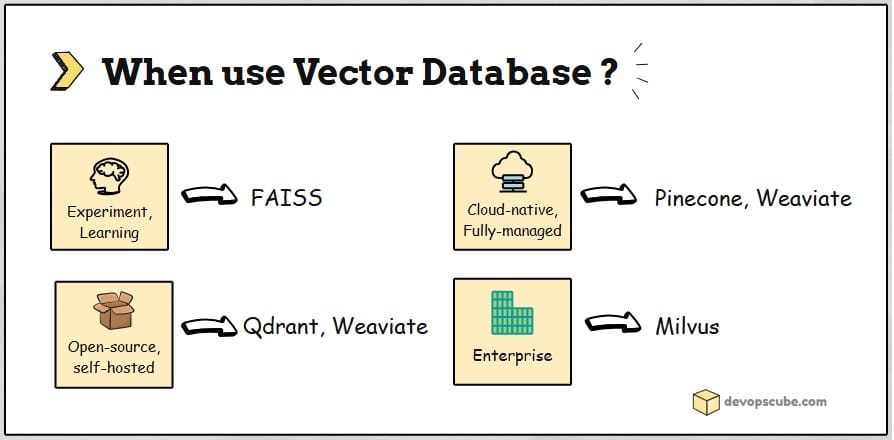
Here is my two cents in choosing a vector database.
- For startups or MVPs, go with FAISS or Qdrant (self-hosted). They are simple, lightweight and open-source.
- For enterprise applications, Milvus is strong and reliable choice.
- For cloud scalability, consider Pinecone and Weaviate. They are great for fully-managed services with built-in support.
- For heavy filtering needs, Qdrant and Weaviate work best because they handle metadata filters very well.
Now that you have a good understanding of vector databases, the following question naturally arises.
But which industries are actually using vector databases?
Let’s look at that in the next section.
Real-World Use Cases
Vector databases are used across industries to power smarter search, recommendations, and AI assistants.
Lets look at some of the real world examples.
1. eCommerce & SaaS
Shopify and eBay use Pinecone to improve product search and recommendation engines. It helps customers find what they need faster, even if they don't use exact keywords.
Notion uses Pinecone to help users find notes and documents quickly using natural language. It helps users search the workspace like you talk, no need to remember exact titles.
2. Media & Content Search
Netflix uses FAISS (Facebook AI Similarity Search) to search through millions of videos and images quickly. They built their own infrastructure to make it work at scale.
It helps recommend similar shows or scenes based on visual or semantic similarity.
3. Enterprise Search & Data Integration
Weaviate helps companies like SOS International and Synology build semantic search systems. Employees can find relevant documents even if they don’t know the exact phrasing.
Weaviate also works with Snowflake, so teams can search directly inside their data warehouses. This way there is no need to move data, search happens where your business data already lives.
4. AI Assistants & Chatbots
Qdrant is trusted by Microsoft, HP, Disney, and Mozilla for fast vector search. t powers smarter chatbots that understand user intent and give better answers.
Qdrant is often used in RAG chatbots and AI-powered search tools with frameworks like LangChain and LlamaIndex. These tools help build AI systems that can pull in relevant facts while chatting.
Now that we have seen how companies use vector databases in the real world, let's look at the common challenges teams face and the best practices to handle them.
Challenges and Best Practices
Even though vector databases are powerful, they come with a few challenges. Here are the most common ones and how to handle them in simple, practical ways.
Handling Vector Drift Over Time
When embedding models change or get updated, old vectors may no longer match new ones. Keeping vectors consistent ensures your search results stay accurate.
Best practice is to:
- Tag vectors with the model version used.
- Test search accuracy regularly.
- Re‑index your data when switching models or when results start to degrade.
Managing Cost and Latency
Large datasets and frequent queries can get expensive, especially if every search calls an LLM. So smart optimization keeps your system fast and affordable.
Best practice is to:
- Use batch indexing to reduce processing costs.
- Add a cache to store common queries so you don’t recompute them.
Balancing Relevance and Business Logic
Semantic similarity alone isn't enough for businesses needs. With filtering, you get results that are not only relevant but also aligned with real business needs.
Best practice is to:
- Use hybrid search: vector similarity + metadata filters.
- Re‑rank results using both meaning and business rules.
Conclusion
Vector databases are changing the way we build AI systems. They help apps understand meaning, not just exact words, whether you are building a chatbot, a search tool, or a recommendation engine.
They don't just store vectors. They let you search, filter, and manage them at scale. When you choose the right database and follow good practices, you get fast, accurate, and cost‑efficient AI search.
As AI continues to grow, vector databases will become a normal part of modern tech stacks just like SQL databases are today.
In fact, in a recent project implementation, we used a vector database for a RAG solution to search internal DevOps documentation effectively. I will cover the full RAG implementation workflow in a separate hands-on blog.
Over to you!
Are you planning to use any Vector databases?
Do you think you have use cases where Vector databases would be a right fit?
Let us know your thought in the comments below.
