


In the AI Agent Basics and Building an Agent blogs, we have covered agent concepts and how to build and deploy one in a Kubernetes cluster.
Here is what you will learn in the blog.
- Why AI agents need an isolated workspace to run untrusted code
- How Kubernetes Agent Sandbox manages these workspaces
- How gVisor and Kata Containers isolate agent workloads
- Key Agent Sandbox features like hibernation and scheduled deletion.
Let's get started.
Why do AI Agents need an isolated workspace?
An AI agent may need a workspace to finish a task. In this workspace, the agent runs commands, installs tools, and saves files.
However, the agent may generate some of this code itself. Or it may download it from external sources like a public GitHub repository. So we should treat this code as untrusted code. That is why it should run it in an isolated workspace with limited access.
This is where Kubernetes Agent Sandbox helps. Agent sandbox runs each agent workspace as a separate, single pod.
For example, a coding agent can get a sandbox. Inside the sandbox, the agent downloads a repository, installs dependencies, and runs tests. When the agent is idle, you can pause the sandbox. When the work is done, you can delete it.
What is Kubernetes Agent Sandbox?
Agent Sandbox is a Kubernetes SIG Apps project. It runs isolated, stateful, singleton sandboxes for AI agents and agent-generated untrusted code. Singleton means each sandbox runs only one Pod.
Here are the main things it gives you:
- Warm Pods: Pods created in advance, so agents can start work faster.
- Stable identity: Each sandbox keeps the same name and network address.
- Scheduled deletion: The sandbox is deleted automatically at a time you set.
- Suspend and resume: You can stop a sandbox when it is idle and start it again when you need it.
However, Agent Sandbox doesn’t isolate the workload by itself. It uses secure runtimes like gVisor to run each sandbox as a sandboxed container. You choose the runtime with a Kubernetes RuntimeClass. So the runtime provides the isolation, and Agent Sandbox manages the sandboxes.
Now, let’s look at the resources that Agent Sandbox adds to your cluster.
Kubernetes Agent Sandbox CRDs
Kubernetes Agent Sandbox provides one core CRD, Sandbox, and three extension CRDs: SandboxTemplate, SandboxWarmPool, and SandboxClaim.
This means you can create a Sandbox directly or use the extension CRDs to create reusable templates and ready-to-use Sandboxes.
Let's understand each CRD one by one.
Sandbox
Sandbox is the core CRD of Agent Sandbox where Kubernetes pods run. When you create a sandbox custom resource, the Agent Sandbox controller creates and manages the underlying pod.
Sandboxes are designed to run singleton workloads, meaning only one pod runs inside a single sandbox; there are no replicas.
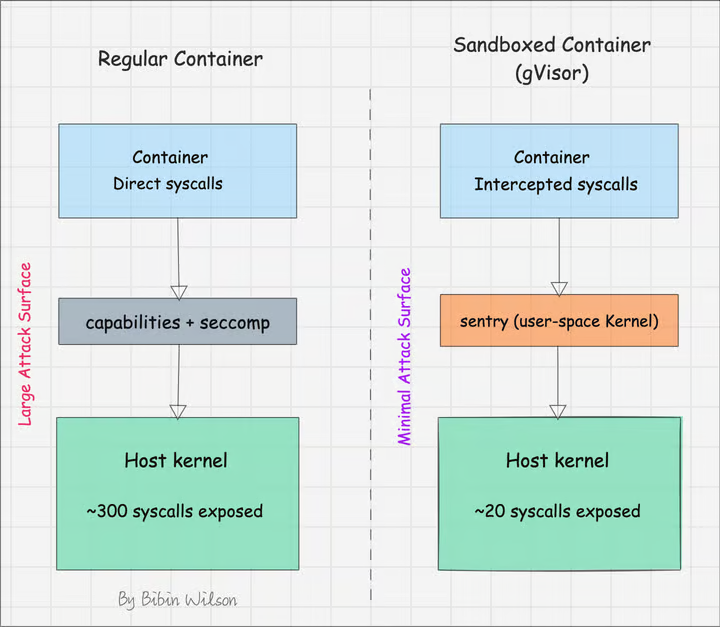
To provide strong isolation for agent workloads, the Agent Sandbox uses sandboxed containers. For example, it can use gVisor to separate the agent’s code from the host system. We covered this in our gVisor security and sandboxed containers guide.
The following image shows the difference between a regular container and a sandboxed container.
If you create every Sandbox with the full Pod details, you repeat the same work each time. This is where SandboxTemplate helps.
SandboxTemplate
A SandboxTemplate is like a blueprint for creating sandboxes. You add the workload configuration once. Then you reuse it.
Let’s say you need many sandboxes with the same image, storage, and runtime. Instead of adding these details to each Sandbox, you add them to one SandboxTemplate. Then you create sandboxes from it.
The following code block shows the structure of a SandboxTemplate.
apiVersion: extensions.agents.x-k8s.io/v1beta1
kind: SandboxTemplate
metadata:
  name: python-sandbox
spec:
  podTemplate:
    spec:
      containers:
        - name: workspace
          image: python:3.11-slim
          ports:
            - containerPort: 8080
          resources:
            requests:
              cpu: "250m"
              memory: "512Mi"
      restartPolicy: OnFailure
  volumeClaimTemplates:
    - metadata:
        name: workspace
      spec:
        accessModes:
          - ReadWriteOnce
        resources:
          requests:
            storage: 1Gi
A template sets what a sandbox looks like. But each new sandbox still needs time to start.
So how do you keep sandboxes ready before an agent asks for one?
SandboxWarmPool
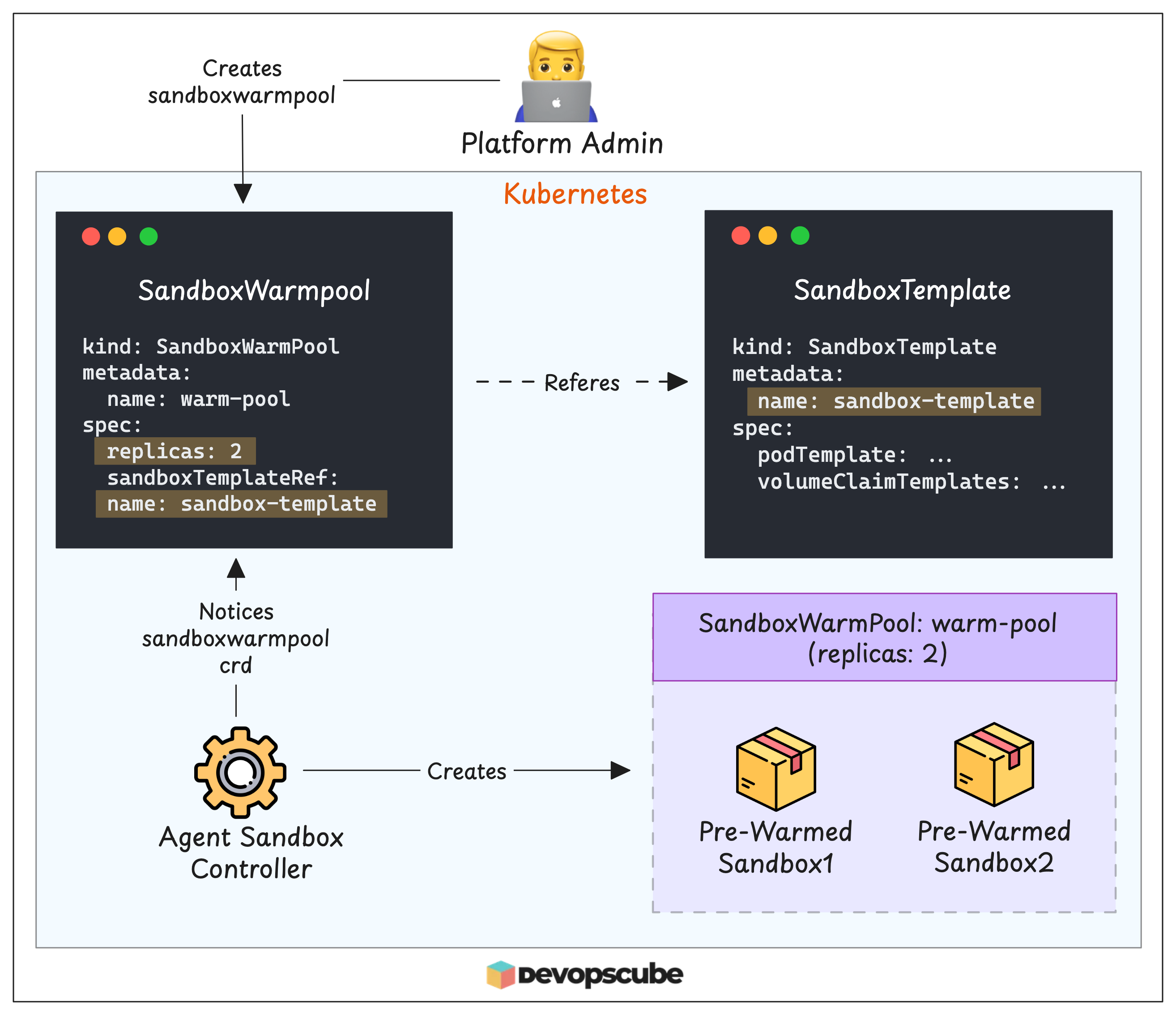
A SandboxWarmPool keeps a set number of sandboxes ready in advance. It creates them from a SandboxTemplate. These are called pre-warmed sandboxes.
For example, if you create a warm pool with 2 replicas, the controller creates 2 pre-warmed sandboxes and keeps them ready. This reduces startup time. Because when an agent needs a sandbox, one is already running.
The following image shows how a SandboxWarmPool uses a SandboxTemplate to create 2 pre-warmed sandboxes.
So the sandboxes are ready.
Now, how does an agent get one of them?
SandboxClaim
A SandboxClaim is the CRD you use to get a sandbox from a SandboxWarmPool. Here is what happens when you create a SandboxClaim.
The controller assigns a pre-warmed Sandbox from the warm pool to the claim. Then the warm pool creates a new pre-warmed sandbox to keep its replica count.
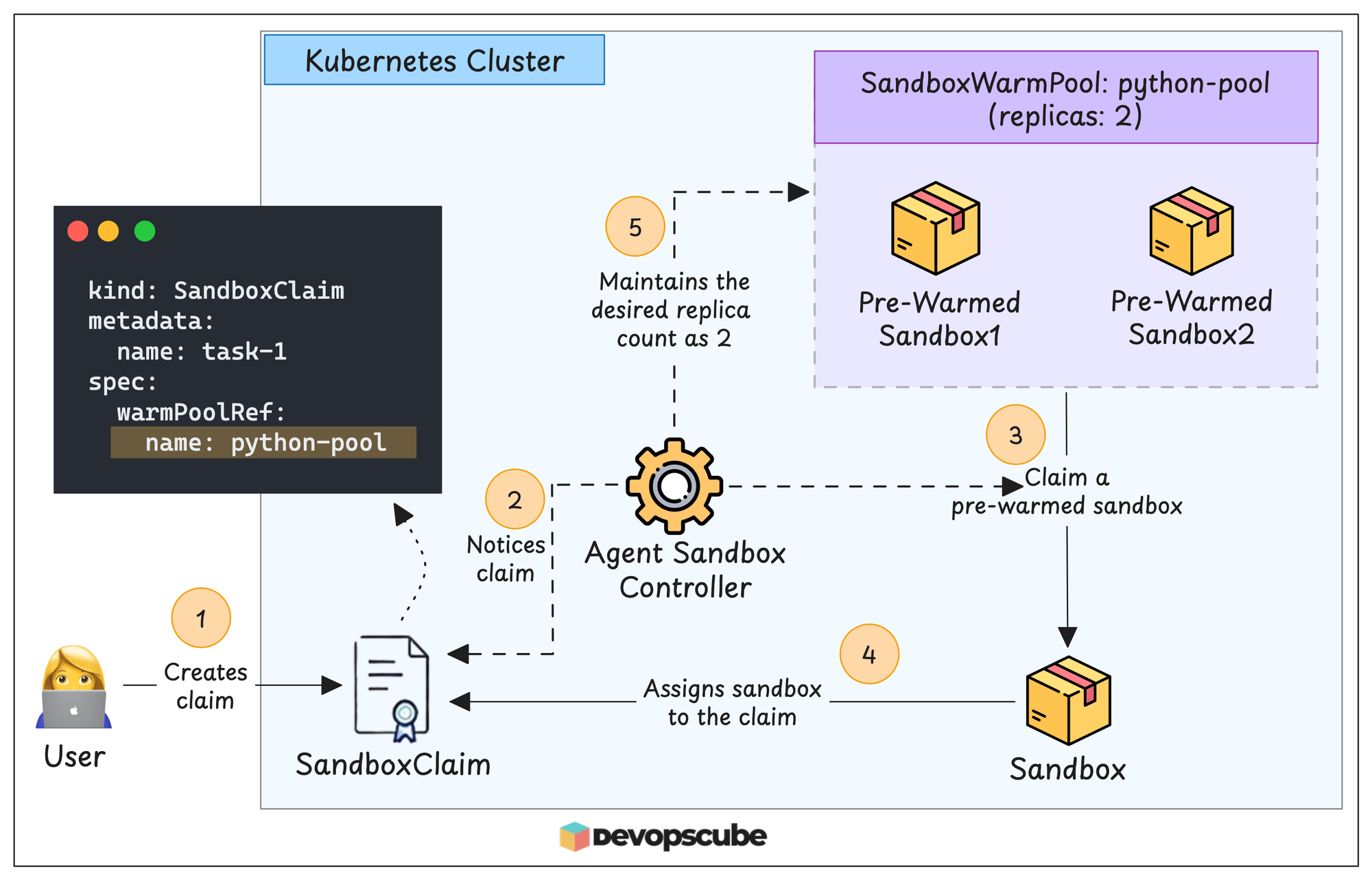
Now suppose the warm pool has no pre-warmed sandboxes left. In this case, the controller creates a new Sandbox from the warm pool’s SandboxTemplate. Then it assigns this Sandbox to the claim.
You now know how to create and claim sandboxes. Next, you need a way to send requests to them.
Sandbox Router
Let’s say you want to send a request to a sandbox from your laptop. Normally, you could use kubectl port-forward to reach the Pod.
However, this doesn’t work with secure runtimes like gVisor. gVisor uses its own network stack, called Netstack, instead of the host kernel’s network stack. Because of this, port forwarding can’t reach the sandbox.
We tested this. We tried port forwarding to the sandbox Pod, but the request never reached the sandbox.
This is where the Sandbox Router helps.
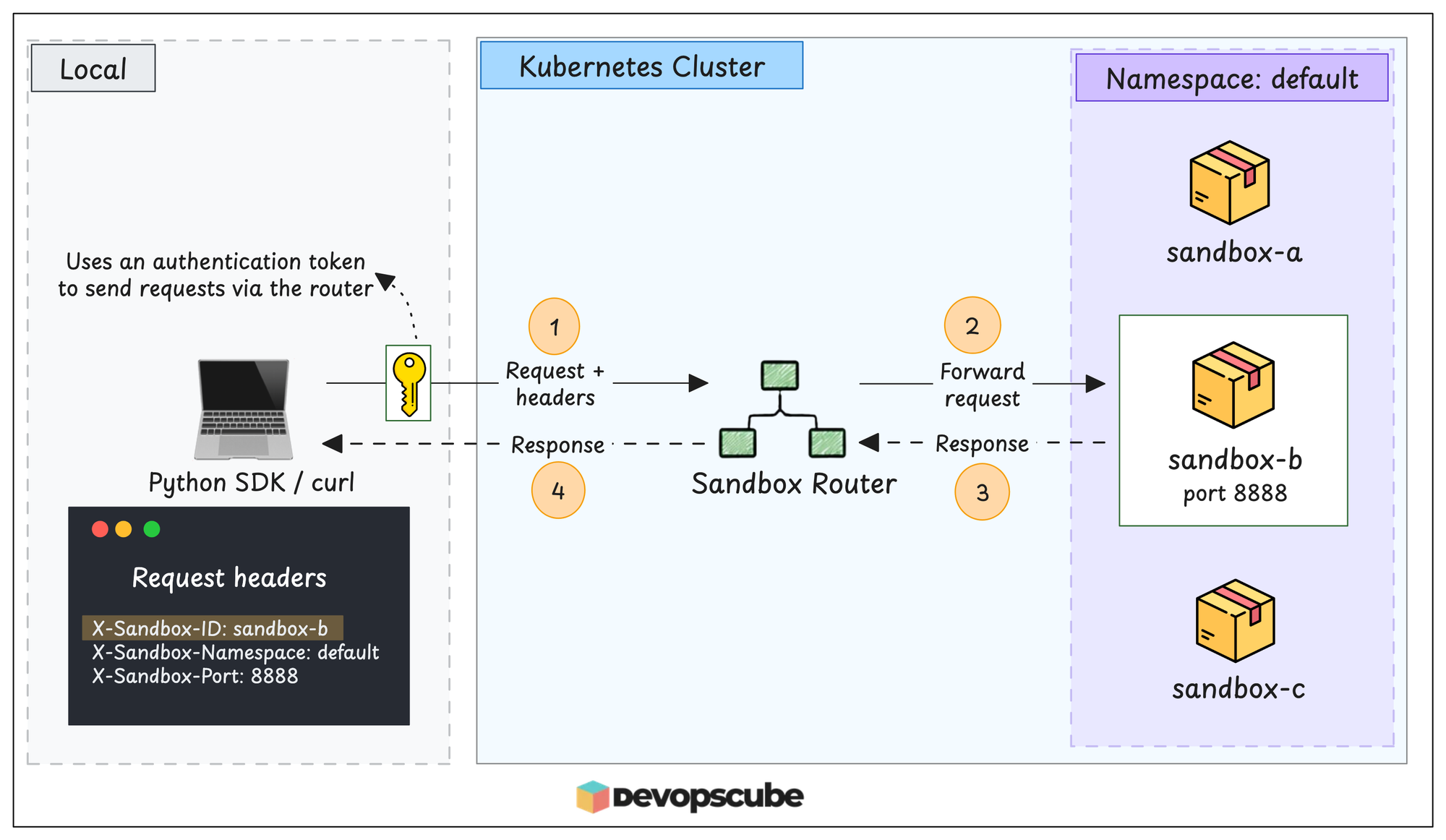
The Sandbox Router is an optional component. It lets SDKs and other external clients reach sandboxes. Think of it as a reverse proxy inside the cluster. It acts as a gateway to all private sandboxes.
To reach a sandbox, the client adds routing headers to the request. The router uses these headers to find the correct sandbox. Here is how they look:
X-Sandbox-ID: <sandbox-name>
X-Sandbox-Namespace: default
X-Sandbox-Port: 8888
X-Sandbox-ID is the sandbox name. X-Sandbox-Namespace is the namespace of the sandbox. X-Sandbox-Port is the port that the application listens on inside the sandbox.
If you use the Agent Sandbox Python SDK, the SDK adds these headers for you. But if you use curl, you must add them yourself.
The router can also check an authentication token.
When token-based authorization is turned on, the client sends the token in the Authorization header. By default, this check is off.
The following image shows how the router receives a client request, finds the correct sandbox, and forwards it.
You need the router only for clients outside the cluster. Pods inside the cluster can connect to a sandbox directly.
For example, say your agent backend runs inside a sandbox. And the agent frontend runs as a normal Pod in the same cluster. In this case, the frontend can connect to the backend directly, without the router.
Now, let’s see how you use the router through the Python SDK.
Agent Sandbox Python SDK
Let's say you are developing code from scratch and have tested it multiple times; it is safe to run.
But what about code that was generated by an LLM?
It may contain unsafe functions or commands that may delete important resources. In such cases, you need a secure, temporary, isolated environment to test it.
You can use the Kubernetes Agent Sandbox Python SDK.
The Python SDK allows you to claim a temporary Sandbox and run code files inside the Sandbox. Once the code execution is completed, the Sandbox will be deleted.
To run code inside a Sandbox, we install the SDK locally and use the local kubeconfig file to communicate with the cluster.
Even though the SDK uses the local kubeconfig file, it can only claim Sandboxes, not run scripts inside them to test them.
This is where we use Sandbox Router, which lets the execution script run inside the Sandbox, as shown below.
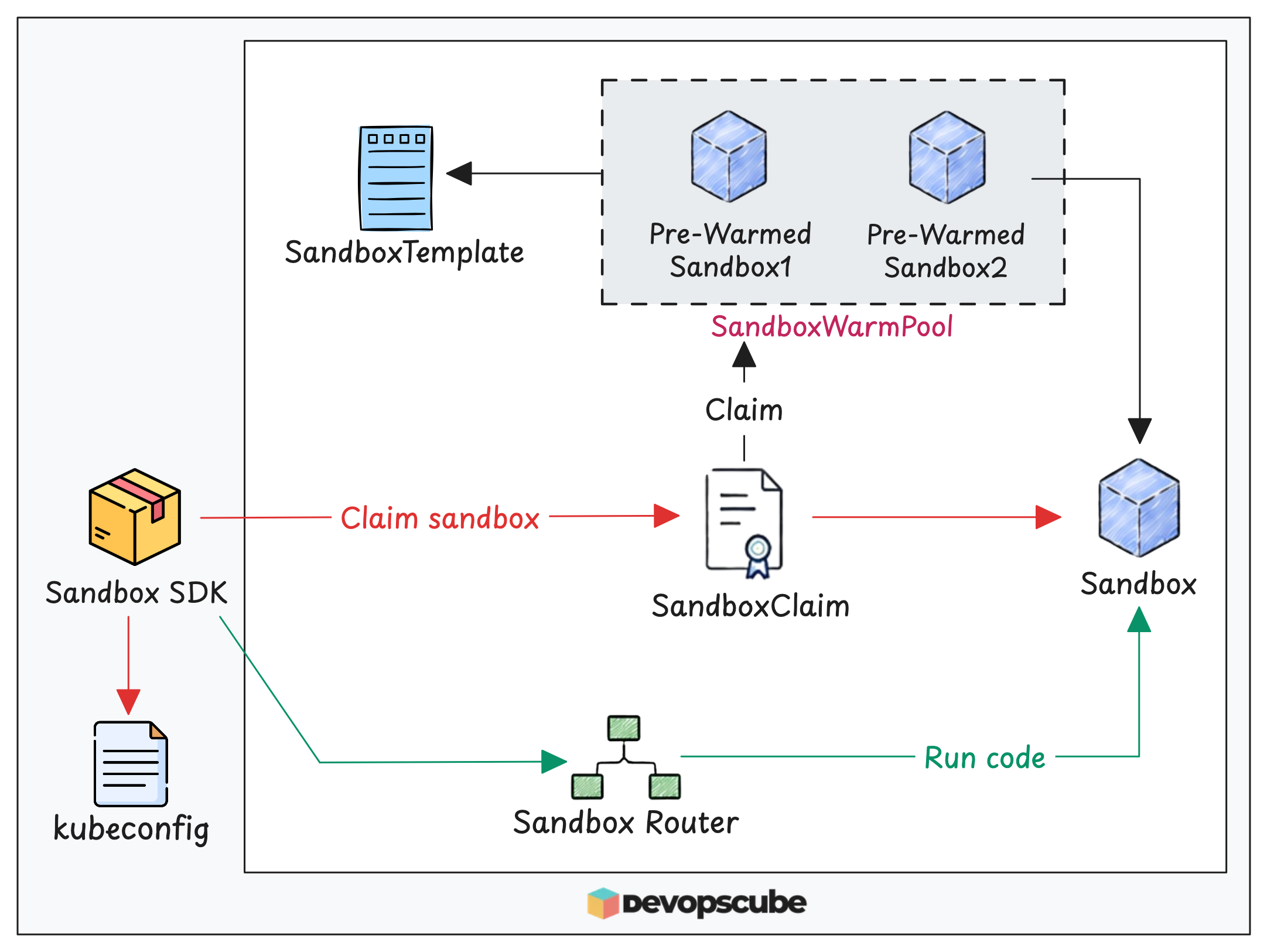
So even if the code secretly installs a malicious package, the package stays inside the sandbox. When you delete the sandbox, the package is deleted with it.
Along with the Python SDK, the Agent Sandbox also has a Go SDK.
Kubernetes Agent Sandbox Workflow
You now understand each Agent Sandbox CRD and component. Now let’s see how they work together. This image gives a high-level view of the full Agent Sandbox workflow.
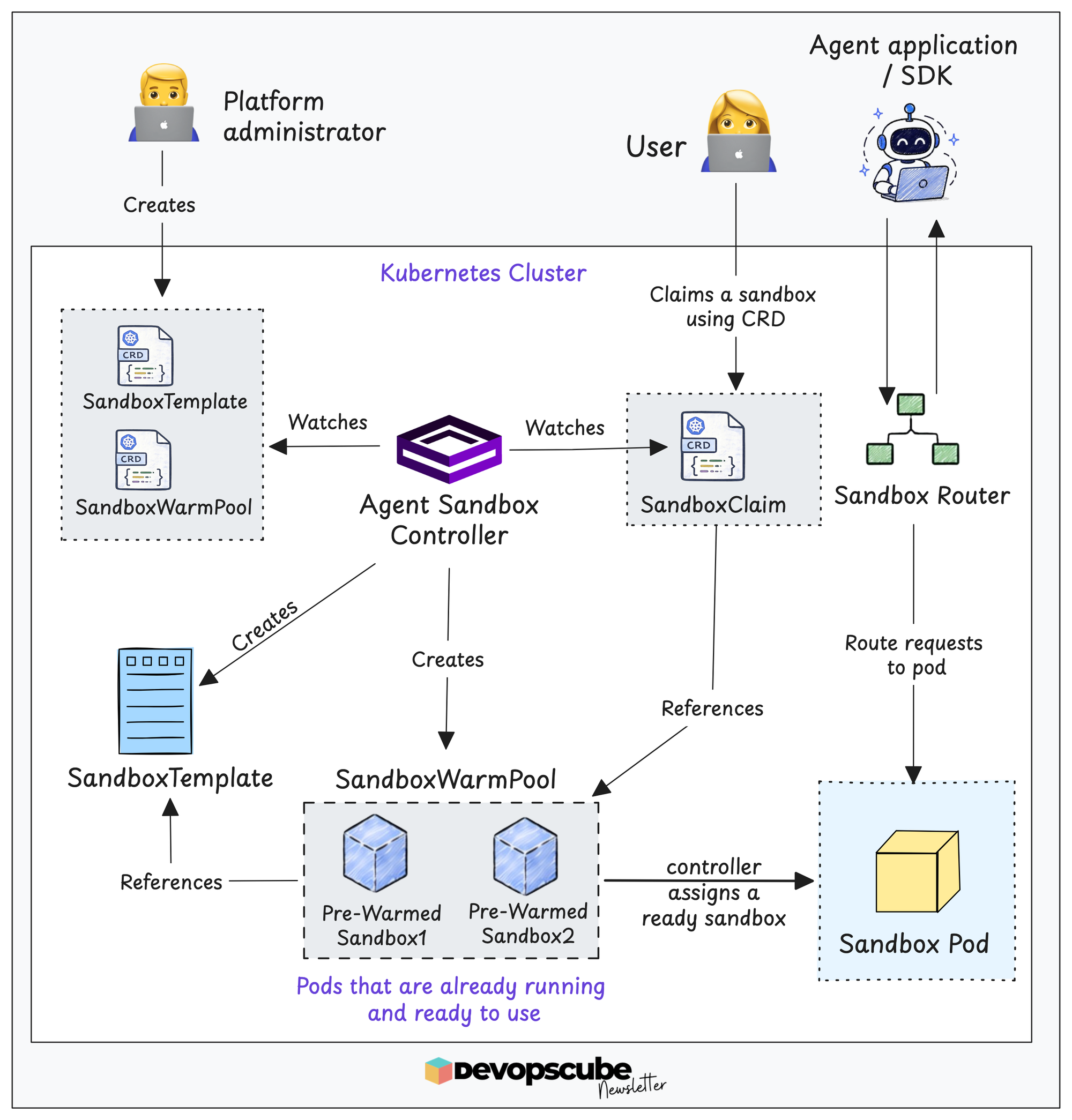
As shown in the image, the workflow starts with the platform administrator creating two resources: SandboxTemplate and SandboxWarmPool.
First, the administrator creates a SandboxTemplate with the image and Pod configuration.
Next, the administrator creates a SandboxWarmPool that points to the template. The controller then creates the number of sandboxes set in the replicas field. These are pre-warmed sandboxes. Their Pods are already running and ready to use.
When a user or an agent application needs a sandbox, it creates a SandboxClaim that points to the warm pool. The controller sees the claim and assigns an available sandbox from the pool. Then the warm pool creates a new sandbox to keep the replica count.
In this setup, the agent application sends requests through the Sandbox Router. The router forwards them to the assigned sandbox Pod. Then it returns the results to the application.
This setup separates the roles. The platform administrator manages the sandbox configuration and the warm pool. Users and applications only request sandboxes through claims.
Agent Sandbox Features
Below are the agent sandbox features that help you manage sandboxes better.
Hibernation & resume
Even though the sandbox Pod is idle, it still uses CPU and memory on the node. What if you could pause the sandbox so it stops using node resources?
This is where the Kubernetes Agent Sandbox Hibernation and resume feature helps.
With this, you can stop an idle sandbox without losing the data in its PersistentVolume (PV). This frees the node resources.
A Sandbox has two operating modes: Running and Suspended. You set the mode in the operatingMode field. A new sandbox starts in Running mode.
When you change the mode to Suspended, the controller deletes the sandbox Pod. But it keeps the PV and its data. When you change the mode back to Running, the controller creates the Pod again with the same name. Then it attaches the same PV.
Scheduled Deletion
By default, a Sandbox runs until you delete it manually. So, there may be times when you create a Sandbox and forget to delete it when its work is done.
Kubernetes Agent Sandbox Scheduled Deletion feature solves this.
When creating a sandbox, we can set a time when we want to delete it. When the time comes, the controller deletes the sandbox.
To do this, we use two fields,
- shutdownTime - In this, we specify the exact time the sandbox should be deleted.
- shutdownPolicy - Here, we specify the action the controller needs to take when the time is up. By setting it to
Delete, it removes the sandbox, andRetainkeeps it.Retainis the default option.
Add these two fields in the Sandbox manifest as shown below.
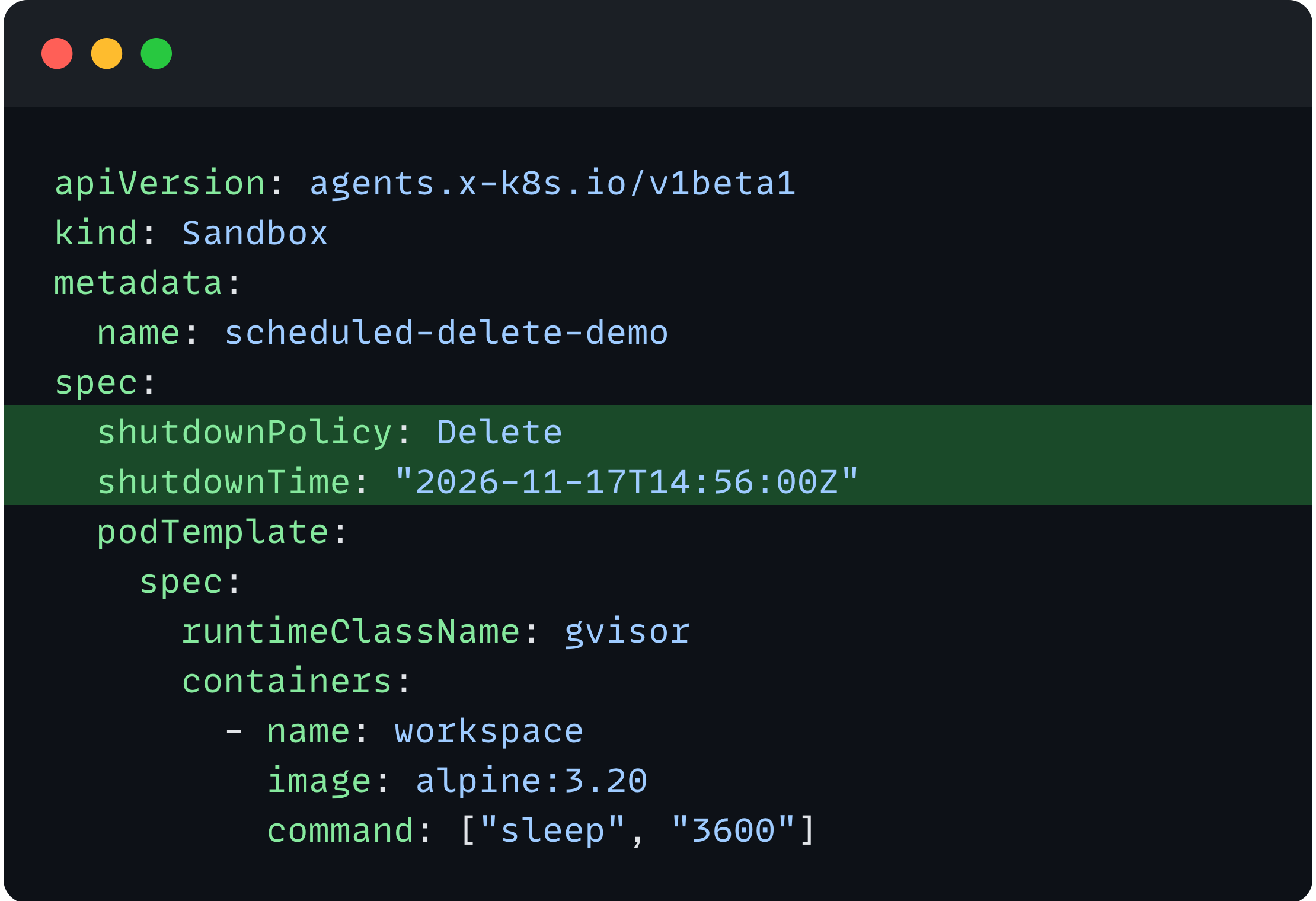
Here, the sandbox's deletion policy is set to delete the sandbox at 14:46 UTC on November 17, 2026. Like this, we can schedule Sandbox deletion after a specific time.
Conclusion
In this blog, we have learned about Kubernetes Agent Sandbox, how it works, and its CRDs.
In summary, Sandbox provides an isolated environment, SandboxTemplate provides a reusable template, SandboxWarmPool keeps Sandboxes ready for use, and SandboxClaim is used for claiming Sandboxes to run workloads.
In the next blog, we will put everything we learned here into hands-on practice.