


If you are looking to grow your newsletter with the Beehiiv platform and are confused about whether to choose Beehiiv or another newsletter platform, you are in the right place.
In short, Beehiiv is one of the best platforms to grow your newsletter and improve your email marketing.
At DevOpsCube, we have been using Beehiiv for more than a year, and we have grown our subscriber base to around 20,000 subscribers.
In this blog, I shared a detailed Beehiiv review, including its features, pricing, pros and cons, and our personal experience using the platform.
By the end of this blog, you will understand why we chose Beehiiv and whether it is the right platform for you as well.
Let’s get started.
What is Beehiiv?
Beehiiv is built to help creators publish and grow newsletters while also making money from them, and also for email marketing purposes.
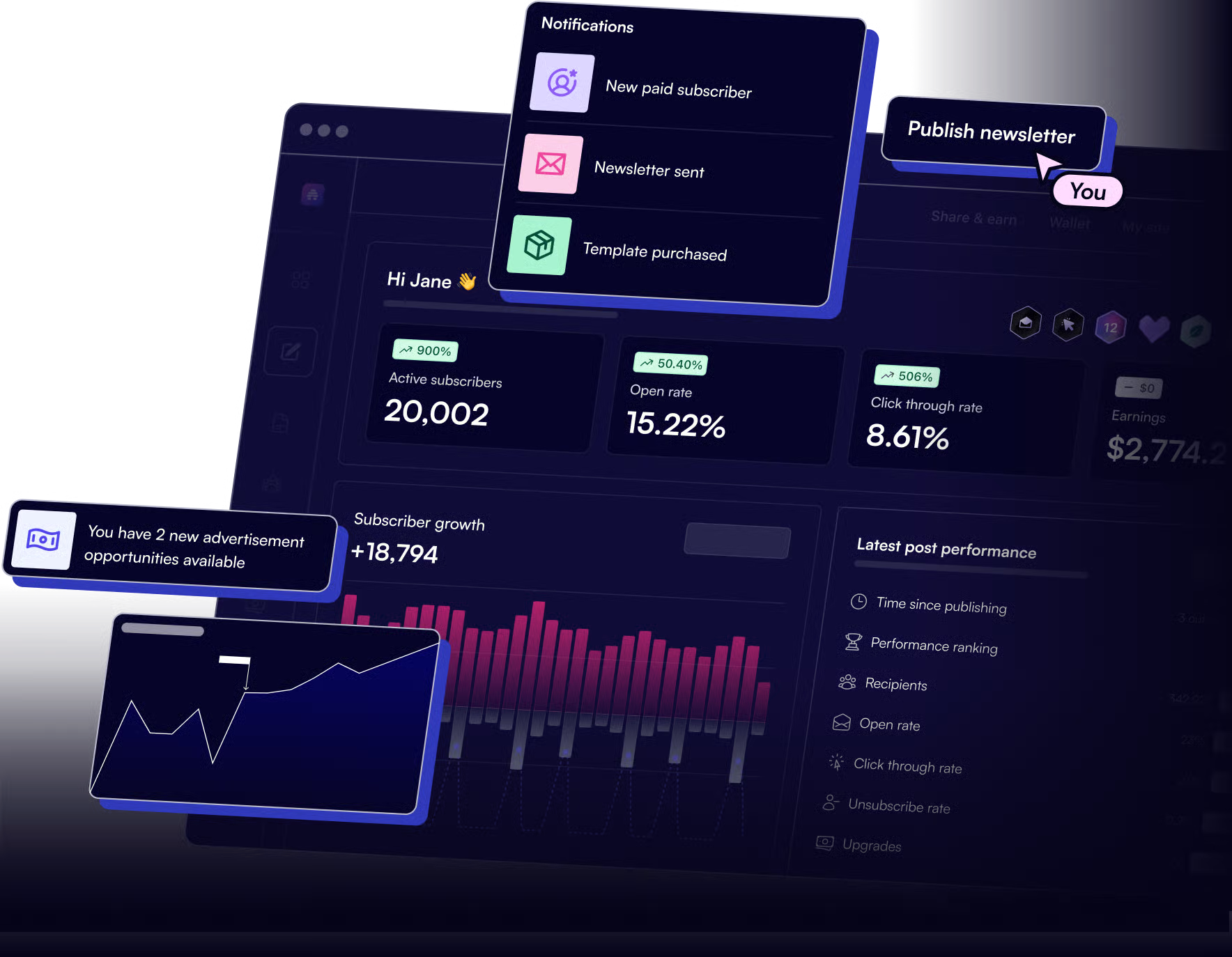
Unlike regular email marketing tools, Beehiiv is built specifically for creators and marketers who want full control to write, share, track, and monetize their content in one place.
Also, this platform lets you write newsletters using a simple editor, publish newsletters as SEO-friendly blog pages, grow your audience with referral and growth tools, track engagement with analytics like open rates and clicks, and monetize with subscriptions, ads, or sponsorships
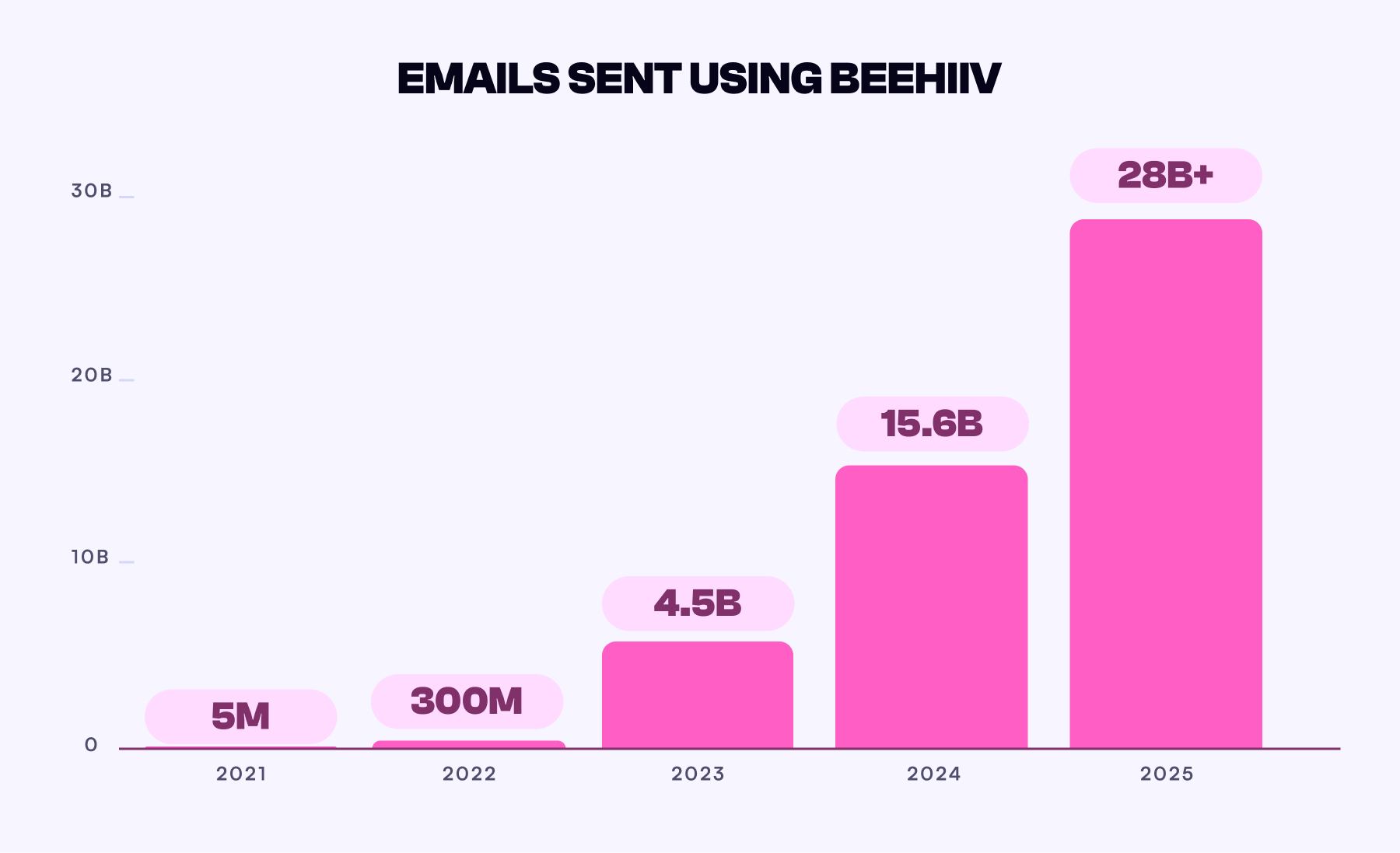
According to the Beehiiv report, in 2025, Beehiiv publishers sent 28 billion emails and gained almost 255 million unique readers.
Key Features of Beehiiv
Let me explain the core features you get with Beehiiv.
Dashboard Overview
The dashboard works as an analytical overview for your newsletter.
You can view active subscribers, total open rate, click through rate(CTR), earnings, subscriber growth, last post performance, subscribers acquisition sources, and active subscribers in a graph view.
You also get quick links to your homepage, tutorial guides, and the knowledge base for help.
Beehiiv Dashboard page
This feature helps you quickly understand the basic performance of your newsletter in one place and is very useful for tracking growth.
Post & Newsletter Editor
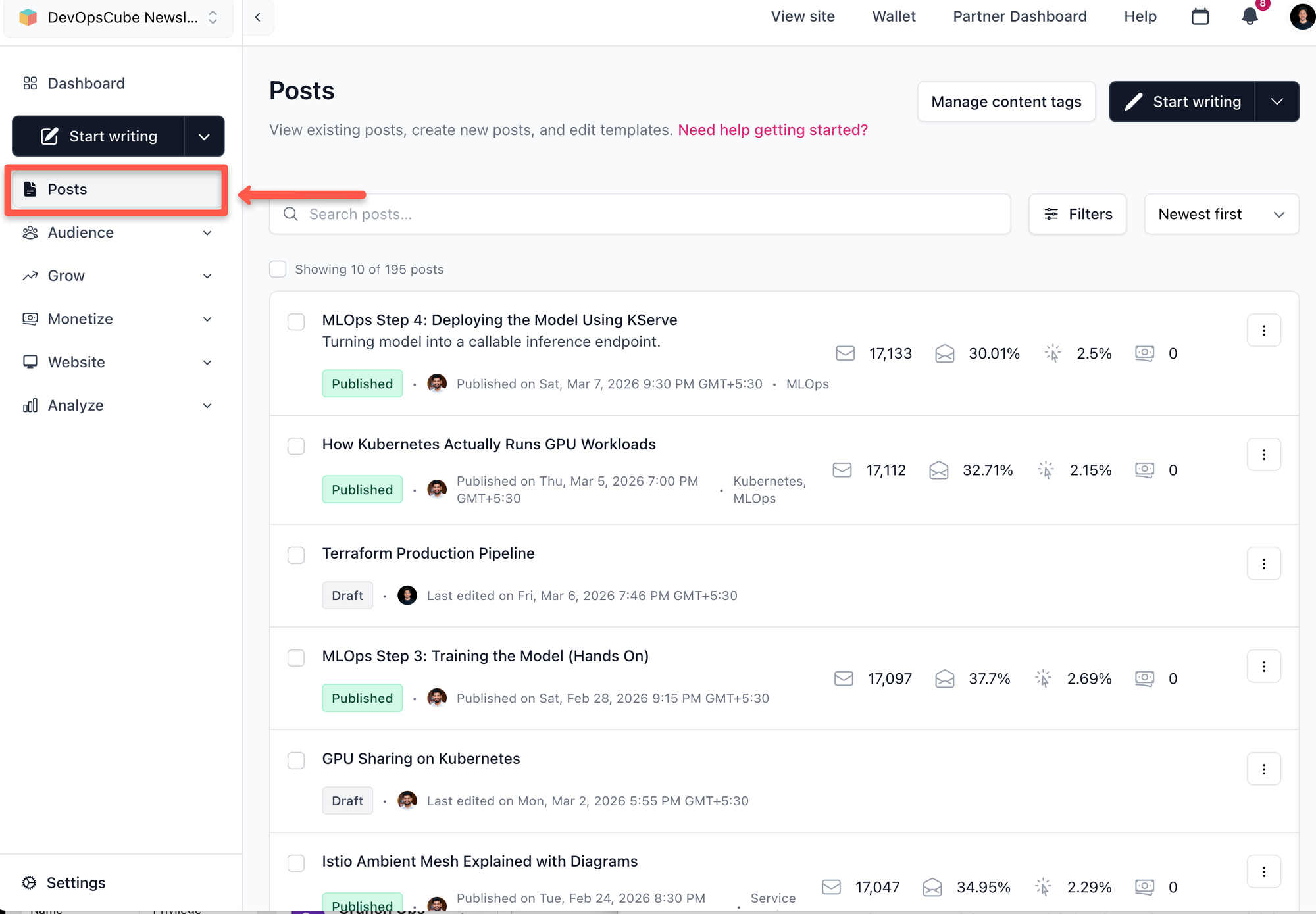
In the post section, you can view both draft and published posts, and edit them directly.
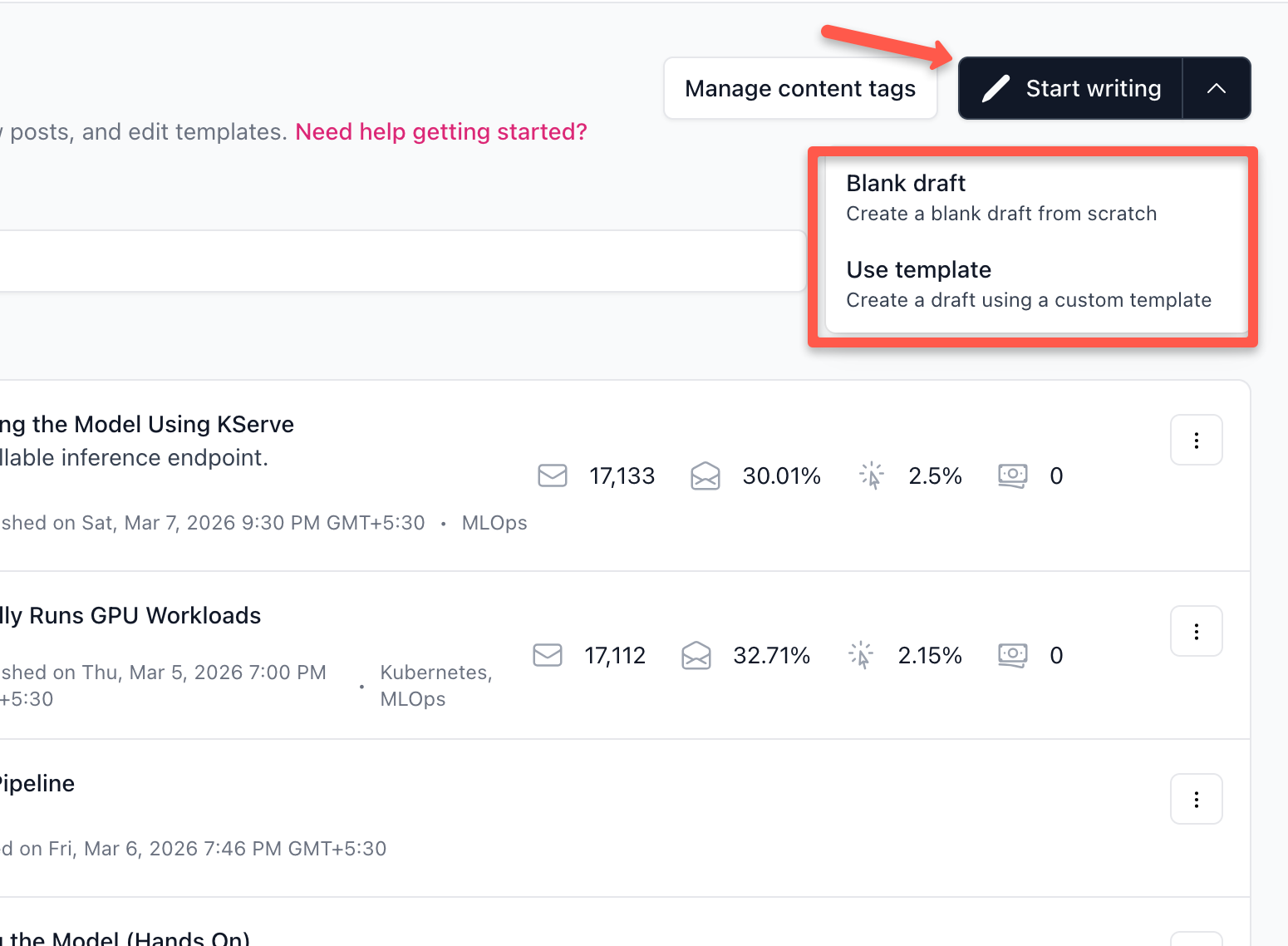
In the top right corner, you will see options like Start Writing, Blank Draft, and Use Template. These options allow you to start writing a new post on a blank page, use a default template, or start with your own saved template.
Now, you can edit and customise your post style as needed.
In the editing panel, you can make basic customizations such as changing colors, typography, spacing, and borders.
Post Editing and Customization options
For advanced editing, Beehiiv also provides options like background customization, email headers, body sections, widgets, and email footers.
The editing options mentioned here are only the main categories. Inside each section, there are many more customization settings that are not commonly available in other newsletter platforms.
Audience Section
In the Audience section, you can manage subscribers, create segments, set up automations, run polls and surveys, and create subscribe forms.
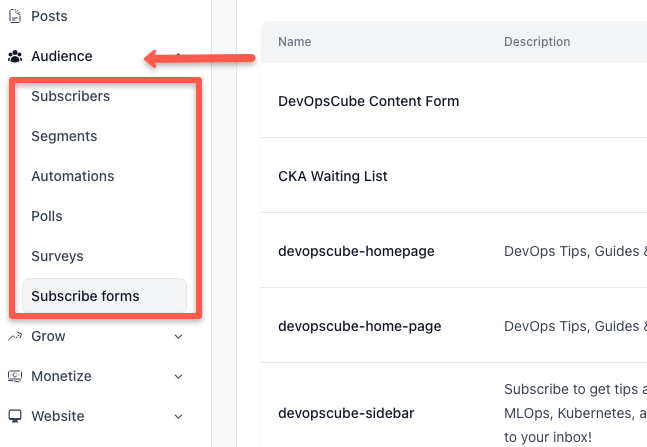
Let me explain what each option helps us with, and it will help you, too.
- Subscribers - View and manage all your subscribers along with their email addresses.
- Segments - Group subscribers based on behavior or interests so you can send targeted newsletters.
- Automations - Automatically send emails based on triggers or specific actions.
- Polls - Create polls and include them in newsletters to collect quick feedback from readers.
- Surveys - Collect detailed insights about your readers’ preferences, satisfaction, or content ideas.
- Subscribe forms - Create forms and integrate them into your website or landing pages to collect emails and grow your subscriber base.
This section helps you better understand your audience and grow your subscriber list effectively.
Website Section
In the website section, you will see four options such as builder, analytics, settings, and builder (Legacy).
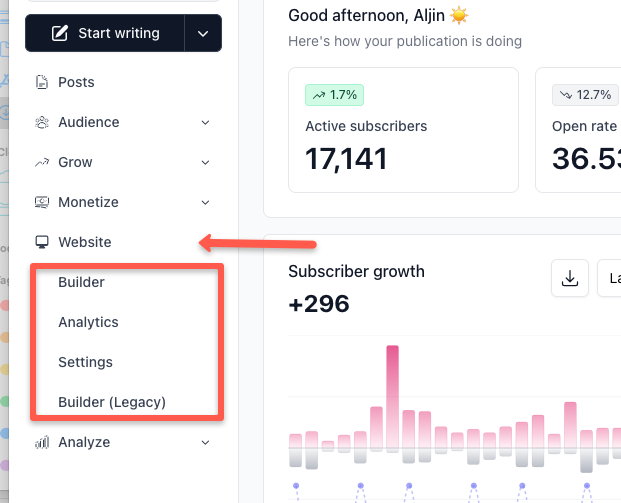
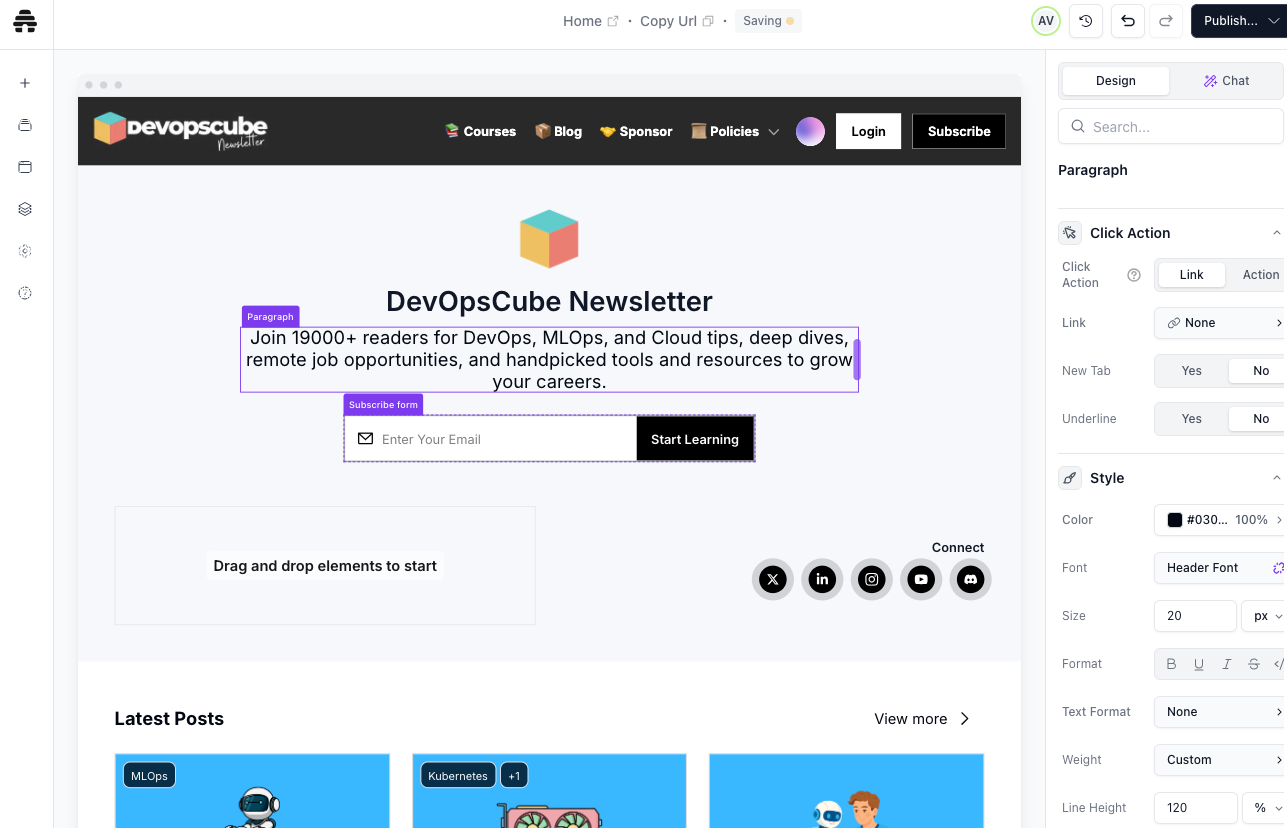
The Builder option is where we edit and customize your newsletter website. Initially, we used it because it is more beginner-friendly and easier to use. After completing the basic customization, we moved to Builder V2, which offers more customization options.
But, Builder V2 may feel slightly difficult at first. Once you get familiar with it, it becomes easier to use.
Website SEO
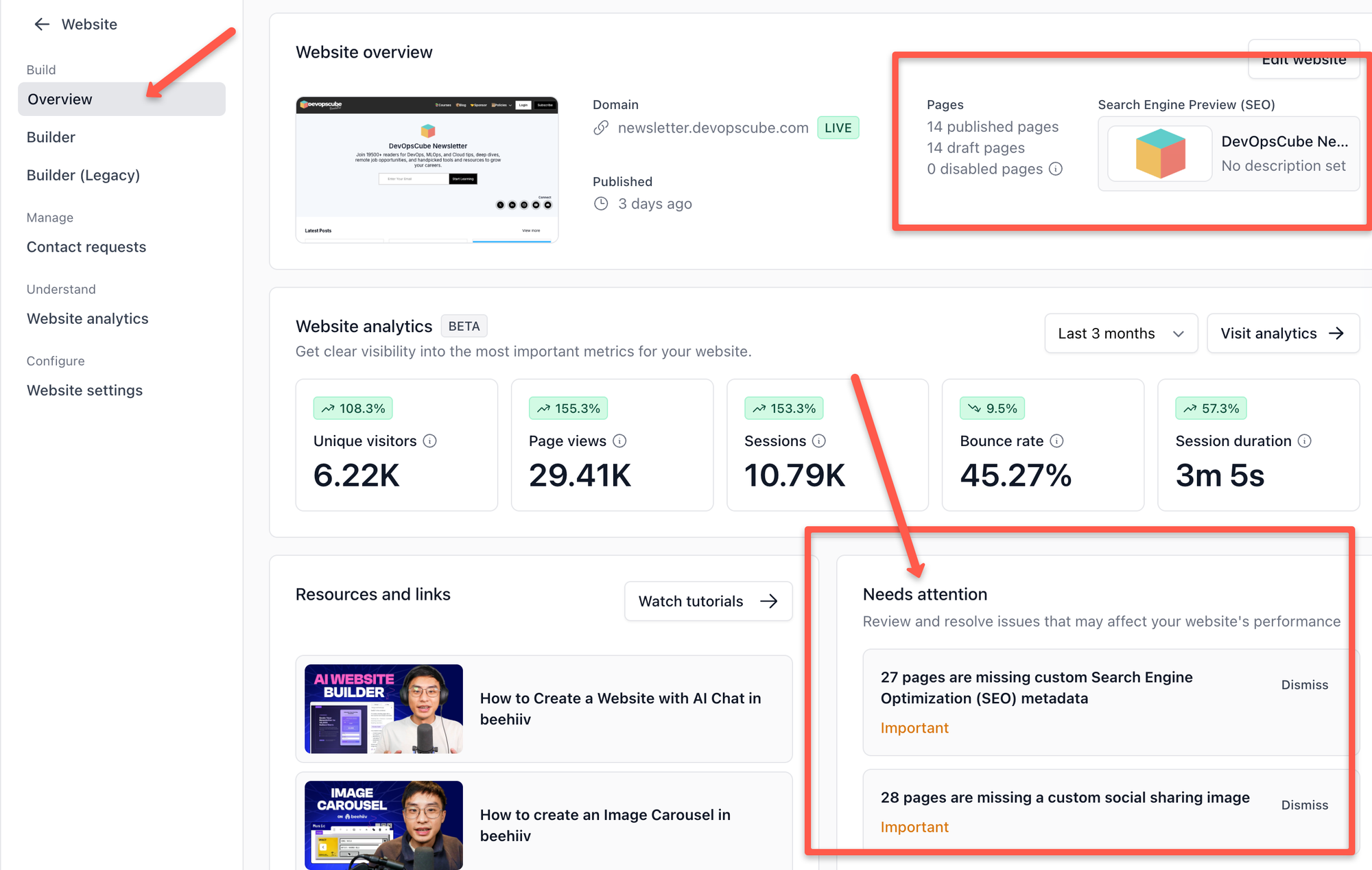
You can view an overview of SEO status in the websiste overview. It shows the search engine preview of your website, and things that needs attention as shown below.
Website Analytics
The Analytics section shows all your website and newsletter analytics on one page.
You can also filter data based on different time periods such as all time, last 24 hours, 7 hours, last 4 weeks, last 3 months, last 12 months, month to date, quarter to date, and year to date.
You can select the time range based on the analytics you want to analyze.
Newsletter Analytics
Here are the things you can view in this section.
- Unique website visitors
- Total page views
- Number of sessions
- Bounce rate
- Average session duration
- Visitors of each pages getting
- Traffice referrers and sources platforms(eg, LinkedIn, direct, Instagram)
- From which country are you getting traffic, and
- Platforms like Windows, Android, IOS, macOS, Linux, ChromeOS etc.
The Settings option in this section allows you to change general configuration options for your newsletter.
Analyze Section
The Analyze section provides detailed reports about subscribers, posts, and link clicks.
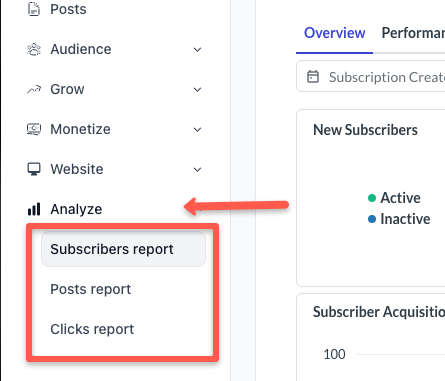
First lets see about the Subscribers report.
In the subscriber report, you can see how many new subscribers you gained during a selected period.
You can also view active and inactive subscribers and see which sources brought in those subscribers.
Most of the essential analytics are already available in the website analytics section. However, if you want deeper insights, this section provides more detailed reports.
Detailed Subscribers Report Page
The next one is post report page.
The post report shows detailed performance metrics for every newsletter you send.
You can see:
- Email open rates
- Unsubscribes
- Unique link clicks
- Overall engagement metrics
These insights help you understand how your audience interacts with your newsletter and improve your content strategy.
You can see a visual view in the following video to get a better understanding.
Detailed Post Report Page
The last one is the Clicks report.
The click report shows all the links your subscribers clicked inside your newsletters.
You can view each link in a separate view with verified total clicks, verified unique clicks, total web clicks, and total unique web clicks.
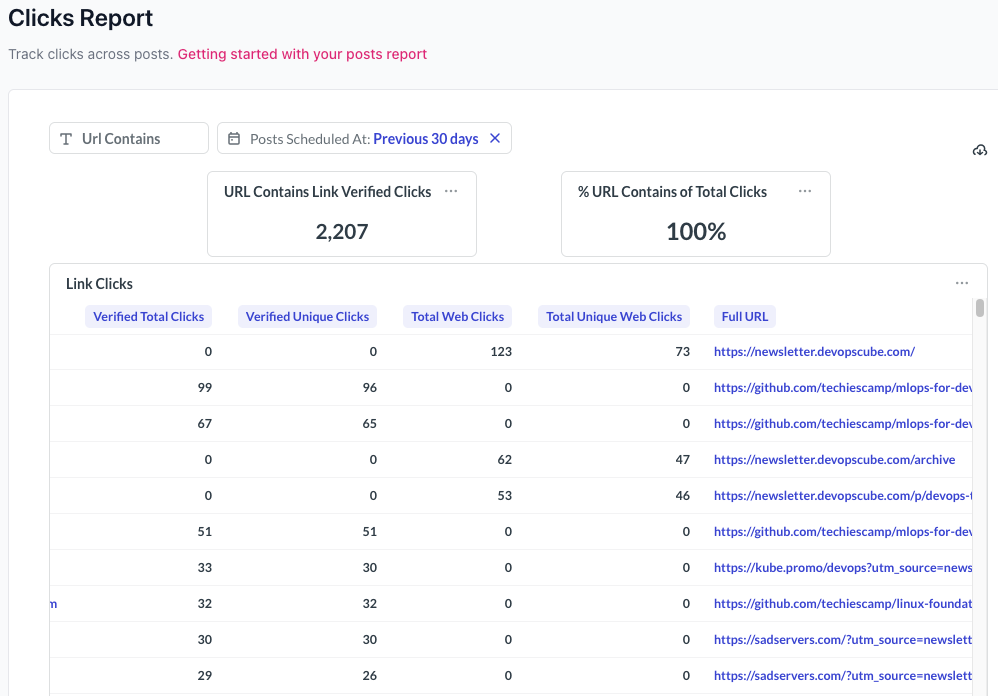
This feature is particularly useful when tracking sponsor links or affiliate links. If a link receives fewer clicks, you can adjust your content placement or call-to-action to improve the click rate.
Overall, the Analyze feature is beginner-friendly and provides deep insights into your newsletter performance.
Also, it will be beneficial for you too, if you know how to use it.
Overall, Beehiiv offers powerful features for newsletter creation, audience management, and analytics. Based on my experience, I would rate Beehiiv 4.8 out of 5 for its overall features and usability.
Beehiiv MCP
With Beehiiv MCP, you can connect your Beehiiv account with LLMs such as Claude, Claude Code, Cursor, Codex, and any AI tool that supports a remotely hosted MCP server.
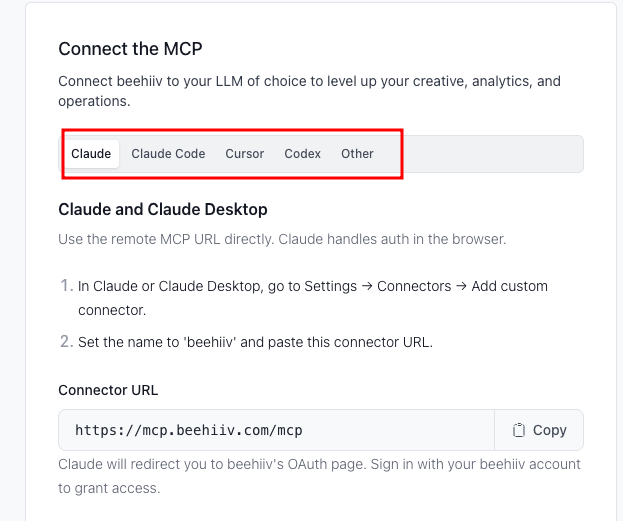
Once connected, you can access your Beehiiv data directly from your AI tool, just using a prompt.
You can analyze the performance of your posts, identify subscriber segments, see where users drop off during the subscription process, and audit your Beehiiv account’s SEO.
We connect with our Claude account to scrape the data.
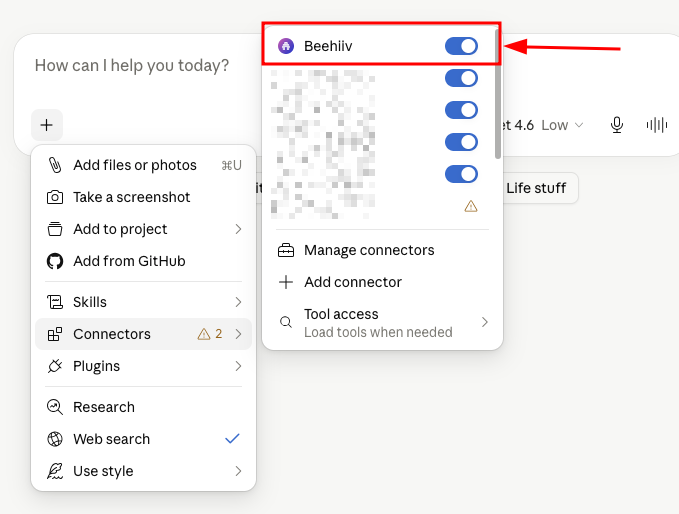
Overall, with this MCP, you can analyze your posts performance and metrics. If you want to know more, please refer our detailed guide on Beehiiv MCP server setup and usage.
Podcasts
Beehiiv has an in-built podcast hosting platform. The interesting part is that you can create shows, upload episodes, and distribute your content to platforms such as Spotify, Apple Podcasts, and other podcast listening apps.
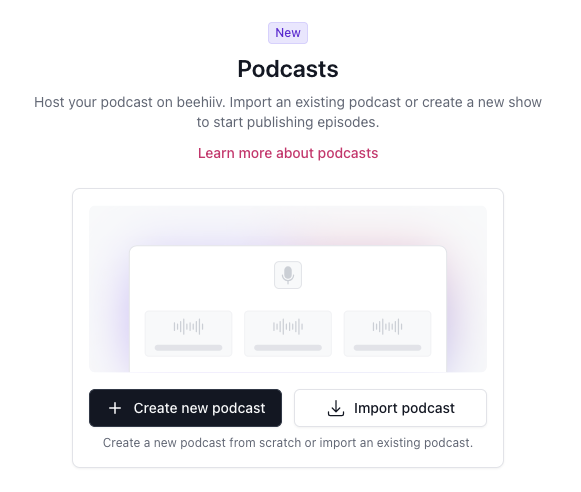
But, here are the plan limitations that you should know.
- Launch - You get 1 show, and 1 episode per month.
- Scale - 1 show, and 4 episodes per month.
- Max - 3 shows, and unlimited episodes.
- Enterprise - Unlimited shows and episodes.
Who should use Beehiiv?
Let me briefly explain who Beehiiv is best suited for.
1. Bloggers
To be honest, I am a blogger myself, and our team also includes several bloggers. Based on our experience and feedback from the team, Beehiiv has been very helpful in building a newsletter and growing a community around our content.
It also comes with built-in SEO features, which help attract audiences from Google and bring in new subscribers. Additionally, you can connect a custom domain, which makes your newsletter look more professional.
2. Creators
If you are a creator who prefers producing content directly to the audience, Beehiiv is a great option.
The platform provides built-in monetization tools that allow you to earn income while doing what you enjoy. This means you can publish content, grow your audience, and turn your passion into a revenue stream.
3. Media Newsletters
Media companies can use Beehiiv to streamline how they distribute content to their subscribers.
With features that support subscriptions and advertisements, publishers can monetize their newsletters while also tracking audience engagement and performance.
4. Agencies Running Multiple Newsletters
If you run an agency that manages newsletters for multiple clients, Beehiiv makes the process much easier.
The dashboard allows you to manage several newsletters from a single place, helping you monitor performance and optimize campaigns efficiently.
Beehiiv Pricing & Plans
I have listed the plans, starting price of monthly & annually, and subscribers based on the price.
| Plan | Monthly Price | Annual Cost | UpTo Subscribers |
|---|---|---|---|
| Launch | $0 | $0 | Up to 2,500 subscribers |
| Scale | $49/month | $43/month | Up to 1,000 subscribers |
| Max | $109/month | $96/month | Up to 1,000 subscribers |
| Enterprise | Custom pricing | Custom | 100K+ subscribers |
You might feel a little confused about how the subscriber limits work in these plans, so let me clarify it.
The Launch plan is completely free and allows up to 2,500 subscribers. This is a good option when you are just starting your newsletter.
Once you cross the free subscriber limit, you can upgrade to one of the paid plans.
In the table above, I have shown the starting price of the paid plans. However, the actual pricing changes based on the number of subscribers you choose.
For example, if you select a plan that supports up to 5,000 subscribers, the price may increase to around $78 per month.
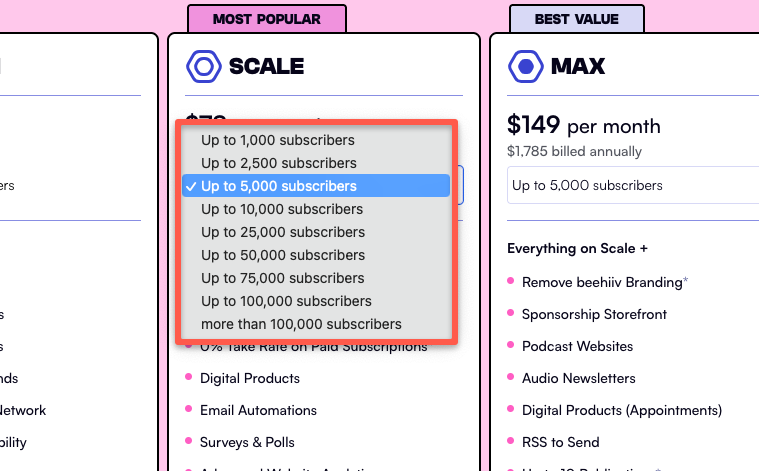
So the key thing to understand is that Beehiiv pricing scales with your subscriber count. As your audience grows, the plan cost increases accordingly.
Beehiiv Pros and Cons
Like any other platform, Beehiiv also has its own advantages and limitations. Let’s quickly look at the pros and cons.
Pros:
- All-in-one creator platform
- Built-in monetization
- SEO blog hosting
- Easy-to-use interface
- It is a website + newsletter platform
Cons:
- Limited integrations
- Automation is weaker than dedicated email marketing tools
- Big price jump after free tier
My Beehiiv Review (Personal Experience)
I have been using Beehiiv for a year now for our DevOpsCube newsletter.
We chose Beehiiv because it works much better for newsletters compared to traditional email marketing tools such as Convertkit. We moved from convertkit to substack to Beehiiv. Beehiiv works perfectly for all our newsletter requirements.
Another important advantage that we have with Beehiiv is, it helps us monetize directly on the platform through ads, sponsorships, paid subscriptions, and digital products.
This makes it a great option for generating passive income from our newsletter.
Setting up the platform was also very quick. It doesn’t take much time because Beehiiv provides pre-built templates. I usually use one of those templates since it has a clean, minimalist design that fits well for newsletters.
We also connected a custom domain, and the setup took only a few minutes. We just followed a few simple steps, and the domain was ready.
The dashboard is beginner-friendly, the newsletter editor is simple to use, and all the features are easy to find
Personally, the features I use the most are the editor, website builder and the analytics section. While we occasionally use other features, these two help us the most when adjusting and improving our content strategy.
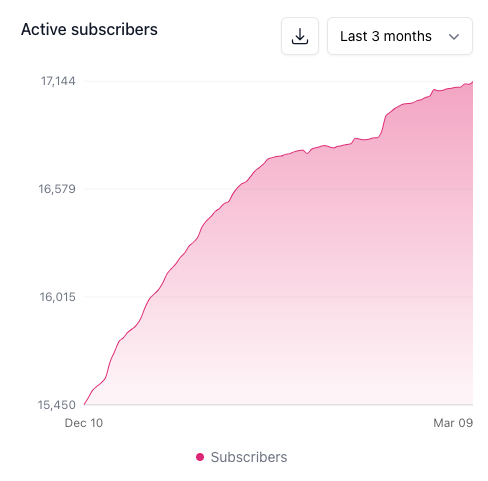
In the image below, you can see how the number of active subscribers has increased over the last three months.
You can also notice improvements in unique visitors, page views, bounce rate, and session duration during the same period.
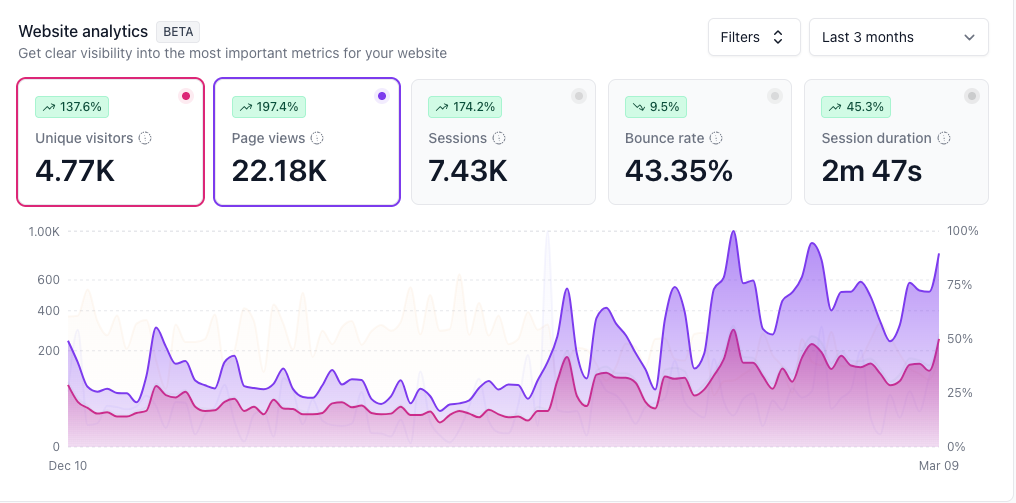
We achieved this growth mainly through consistent publishing, sharing valuable content, and actively distributing the newsletter within our community.
Overall, our experience with Beehiiv has been very positive so far.
Beehiiv Alternatives
Here are some alternative to Beehiiv that you can consider:
Each of these platforms offers newsletter publishing and email marketing features, but they differ in terms of monetization tools, customization, and automation capabilities.
FAQs
Here are some frequently asked questions about Beehiiv.
1. Is Beehiiv free?
Yes, Beehiiv offers a free plan called Launch. You can use this plan for up to 2,500 subscribers and send unlimited emails. However, the free plan does not include advanced features such as monetization tools, advanced analytics, and certain automation capabilities.
2. Is Beehiiv better than Substack?
Both platforms serve slightly different needs. If you are a creator who wants growth tools, customization, and better analytics, Beehiiv is a good option.
Also Beehiiv doesnt a take cut from paid subscriptions. If you prefer simple publishing with minimal setup, Substack may be a better fit. However, when you move to paid newsletter, Substack will take a percentage from the subscription fee.
I have published a detailed comparison in the Beehiiv vs Substack blog.
3. Can you make money with Beehiiv?
Yes, you can earn money using Beehiiv in several ways, including paid newsletter subscriptions, advertising through Beehiiv’s ad network, newsletter sponsorships, affiliate marketing, and boosted recommendations.
4. Does Beehiiv have automation?
Yes, Beehiiv includes basic automation features such as welcome emails, onboarding email sequences, scheduled newsletters, and basic subscriber segmentation. These features help automate communication with your subscribers.
Conclusion
In this Beehiiv review guide, I shared my experience with the platform, along with its key features and limitations.
If your serious and the goal is to start or grow a professional newsletter, Beehiiv is a strong option because it combines publishing, audience growth tools, analytics, and monetization in a single platform.
Overall, it is a great choice for content-focused newsletters that want to grow and scale steadily.
If you decide to try Beehiiv, you can also check our Beehiiv promo code, where we list the latest discounts that can help you save money when upgrading from the free plan.
I hope this guide helps you decide whether Beehiiv is the right platform for your needs.
If you have any questions about Beehiiv, feel free to drop them in the comments.
We are happy to help.