


In this blog, you will learn how to start working in Azure DevOps in a step by step manner.
In this beginner's guide, you will learn the following.
- What is Azure DevOps?
- Components of Azure DevOps
- Advantages of Azure DevOps
- Set up of Azure DevOps Organization and Project
Let us start by looking into what Azure DevOps is.
What is Azure DevOps?
Azure DevOps is a Software as a Service (SaaS) and is part of the Azure Cloud.
It provides a set of tools to manage the entire software lifecycle, from planning to deployment. It is similar to GitLab CI/CD.
Now, we can move to the components of Azure DevOps.
Components of Azure DevOps
If you want to get started with Azure DevOps, you should know about the following key components.
The following image illustrates the workflow of how these Azure DevOps components align the entire software development lifecycle.
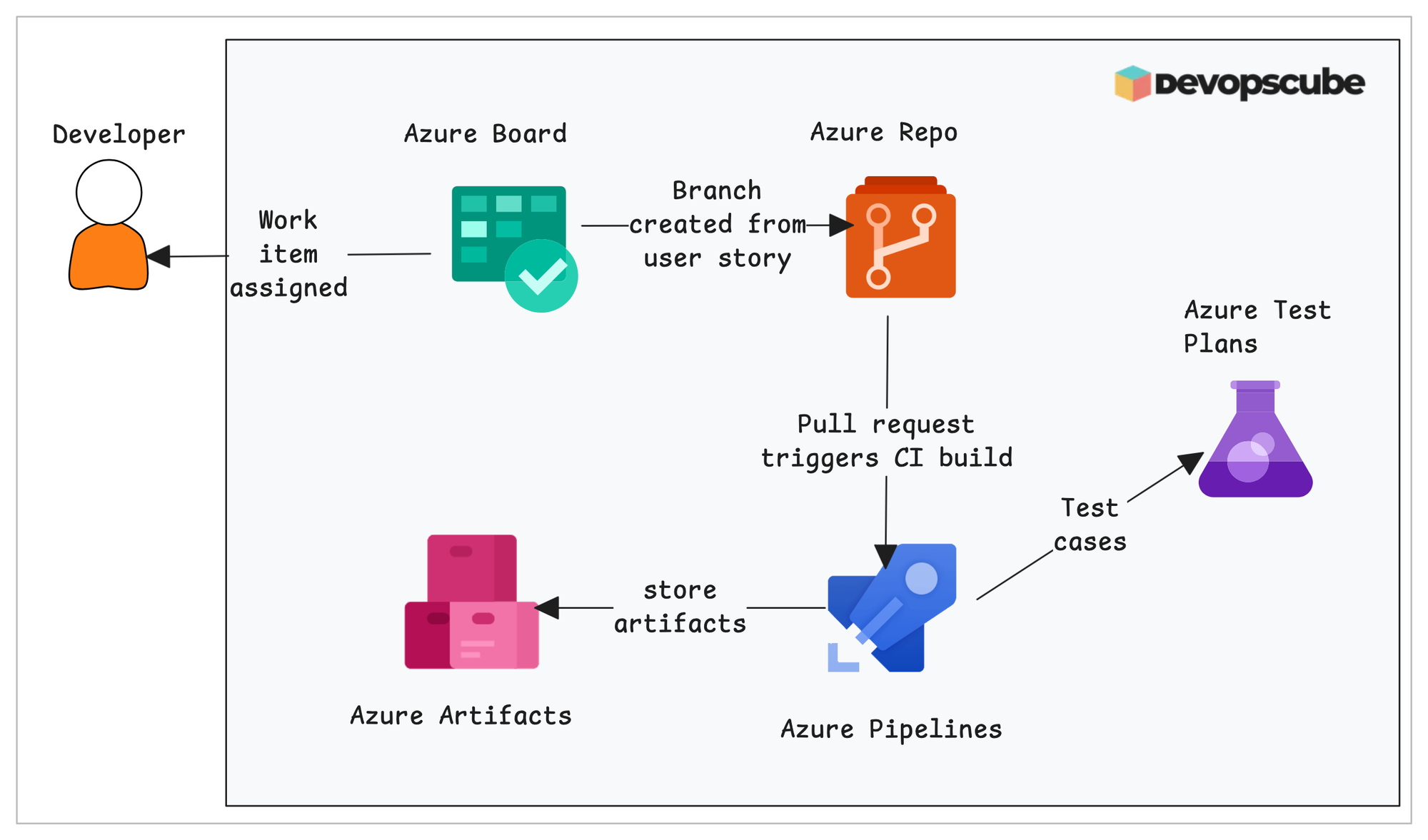
Let us start by knowing about the Azure Boards, where all the work begins.
1. Azure Boards
This service is to plan the project and work in the Agile method, like organizing tasks, features, bugs, etc, similar to Jira boards.
2. Azure Repos
This is for storing our code in central private storage and is a version control system, similar to GitHub, BitBucket, etc.
3. Azure Pipelines
This service is to automate the building, testing, and deployment of our application, similar to CI/CD tools like Jenkins, GitHub Actions, etc.
4. Azure Test Plans
This is for creating test cases and tracking them for the project.
5. Azure Artifacts
It is a private storage to store our software packages and libraries for our application.
These are the components of the Azure DevOps.
In the next section, we can look into the difference between Azure DevOps Server vs Service, where most of them get confused initially.
Azure DevOps Server vs Azure DevOps Service
Azure DevOps Server is designed to run the full Azure DevOps service on your own servers.
It is suitable for organizations that want to run Azure DevOps on-premises due to strict security and compliance requirements.
On the other hand, the Azure DevOps service is managed by Microsoft, so we do not have to worry about the underlying infrastructure. All the resources and servers will be managed by Microsoft.
In the next section, we will look at why you might choose to use Azure DevOps.
Advantages of Azure DevOps
The main advantage of Azure DevOps is that you can manage the entire software lifecycle in one place. This includes planning, coding, testing, and releasing the software.
Another benefit is that you do not need to manage the infrastructure yourself, because it is handled by the Azure cloud.
Let us look at some more advantages:
- The whole team can track progress in one tool instead of using separate tools. You can use Scrum or Kanban boards to manage work.
- You can set up the full CI/CD process (build and deployment) in a single place.
- Azure DevOps works well for both small teams and large organizations.
In the next section, we will see how to get started with Azure DevOps by creating an Azure DevOps organization and a project.
Azure DevOps Initial Setup
Here, we cover the initial setup of the Azure DevOps, which includes the following.
- Organization Creation
- Project Creation
The first step is creating an Azure DevOps organization.
Create an Azure DevOps Organization
An organization in Azure DevOps refers to the top-level workspace where all our projects and teams are managed.
Inside an organization, we can manage
- Users
- Permissions
- Billing
- Authentication (e.g., Azure Active Directory (AAD))
To create an organization, first, we need to reach the Azure DevOps console.
Azure DevOps is a dedicated page that you can directly reach from the Azure Cloud itself.
In Azure Cloud, search for Azure DevOps.
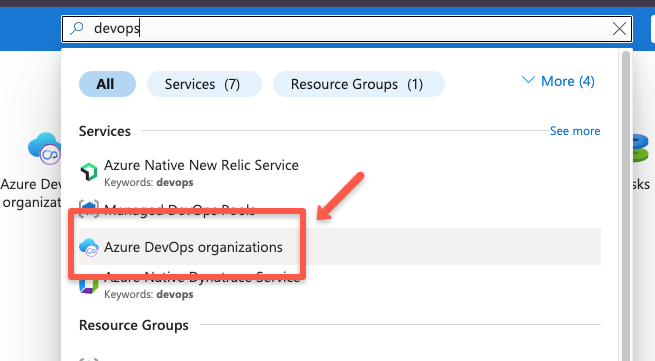
On the next page, select the My Azure DevOps Organizations to reach the Azure DevOps page.
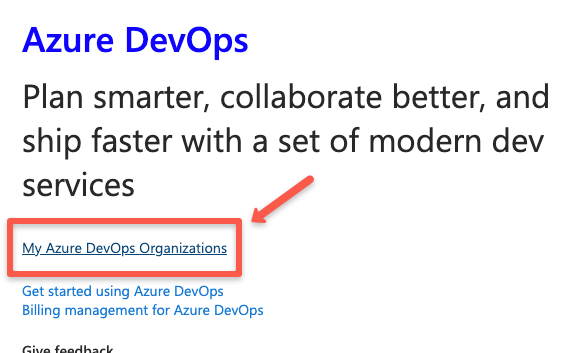
Now, you will be in the Azure DevOps page, where you will get an option to create an organization.
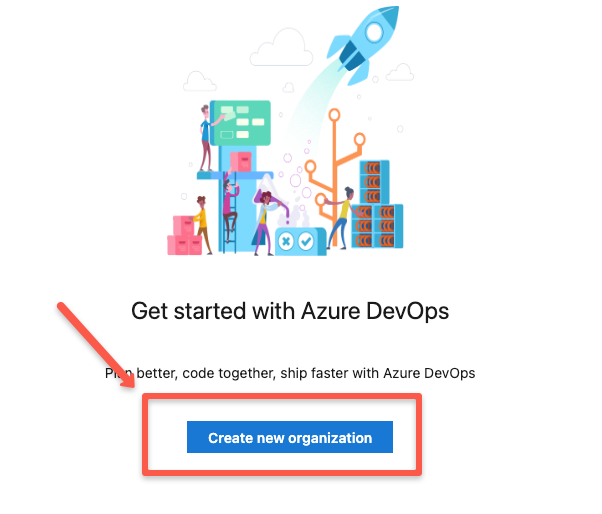
On the next page, you will be asked to give a name for the organization.
Once the organization creation is completed, we can start creating projects.
Create an Azure DevOps Project
A project in Azure DevOps is an isolated workspace to manage our application code, pipelines, artifacts, and other related items.
Projects can only be created inside an organization, and one or more projects can be created in a single organization.
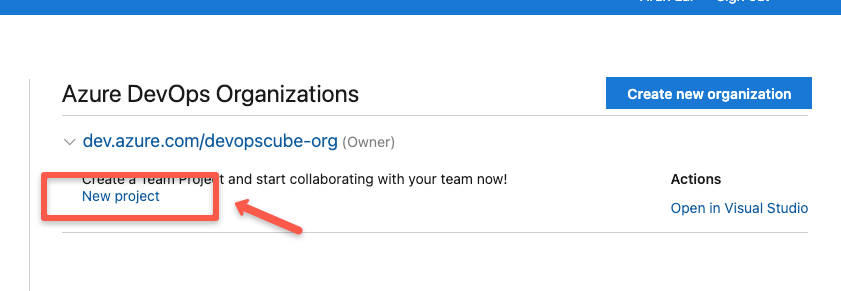
To create a project, go to the organization console, select an organization where you want to create the project, and click "New Project" to create a new one.
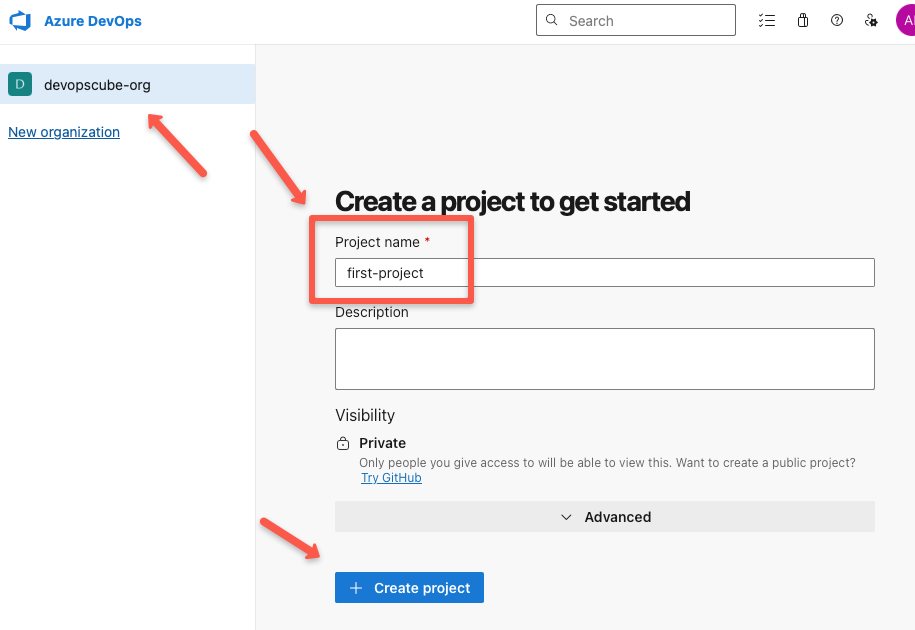
On the next page, give a name and description for your project, then click the "Create Project" button to complete the project creation.
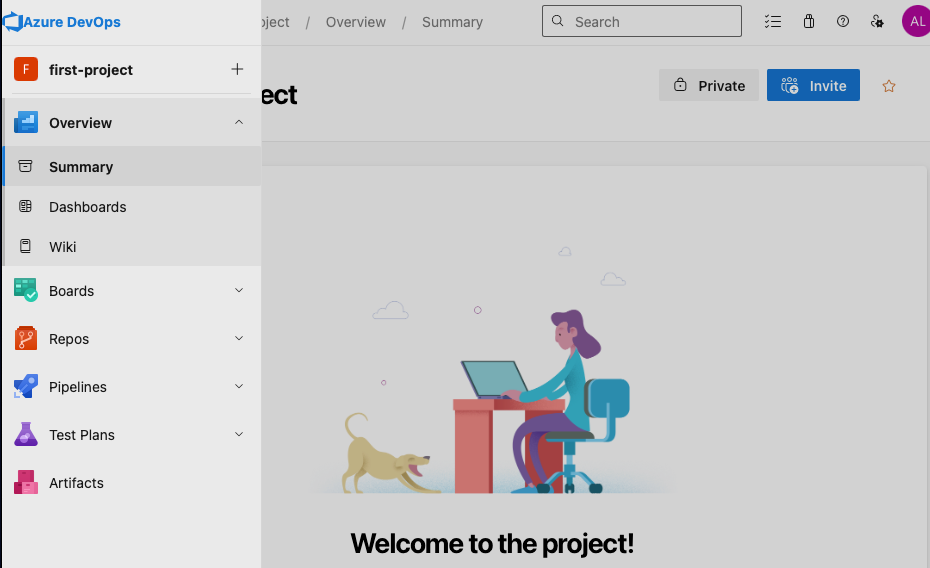
Once the project is created, we can see the project home page, similar to the following.
Now, we are ready to upload the application code and automate the application build, test, and deploy.
Conclusion
This is a beginner’s guide to help you get started with Azure DevOps for your projects.
In the upcoming blog posts, we will cover integrations and how to set up pipelines.
