


In this blog we will look at how to use the Gateway API for internal Istio traffic management (east-west traffic) using the GAMMA approach.
We will also look at a real world case study of GAMMA approach used in production.
In the earlier blog about Istio ingress with Gateway API, we learned how Gateway API works with the Istio gateway controller to manage ingress and egress traffic.
But the Gateway API is not only for ingress. With the GAMMA initiative, we can now use Gateway API for internal service-to-service routing inside the mesh as well.
Also, when using Istio Ambient Mesh mode, the L7 traffic management is managed using gateway API.
First, let’s understand what GAMMA is.
GAMMA: The Future of Mesh Routing
GAMMA stands for Gateway API for Mesh Management and Administration.
Kubernetes Gateway API was originally designed to manage ingress traffic. That means routing requests coming from outside the cluster to services inside the cluster (north-south traffic).
GAMMA extends Gateway API to support internal service-to-service traffic (east-west traffic). This allows us to use the same Gateway API resources like HTTPRoute and GRPCRoute for both ingress and mesh traffic.
VirtualService and use the Kubernetes standard HTTPRouteAlthough we use the same HTTPRoute object, there is one key difference when using it for internal mesh traffic.
When HTTPRoute is used for ingress traffic, we normally set the parentRefs to a Gateway, because the Gateway owns the IP and ports that receive external requests.
But in the GAMMA approach, HTTPRoute parentRefs references a Kubernetes Service instead of Gateways. The HTTPRoute then controls how traffic arriving at that service is routed (weighting, traffic splitting, and more).
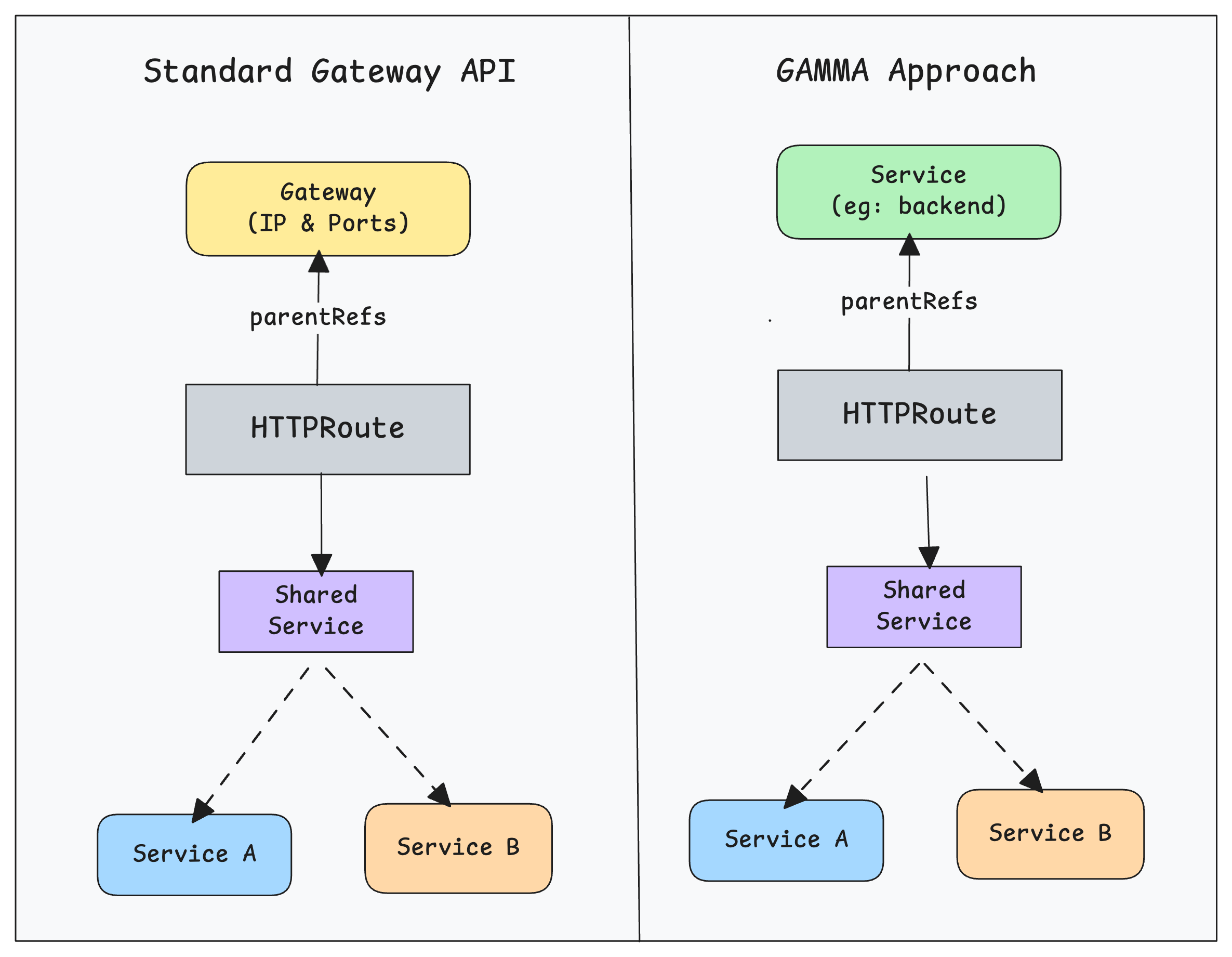
Another important point is that you cannot use the shared service + subsets pattern like we do in Istio with VirtualService and DestinationRule. The reason is that Gateway API is designed to be a vendor-neutral standard that works across different service mesh implementations, not only Istio.
Now that we have an understanding of GAMMA, lets look at how to implement it practically.
Implementing Canary Deployments with GAMMA
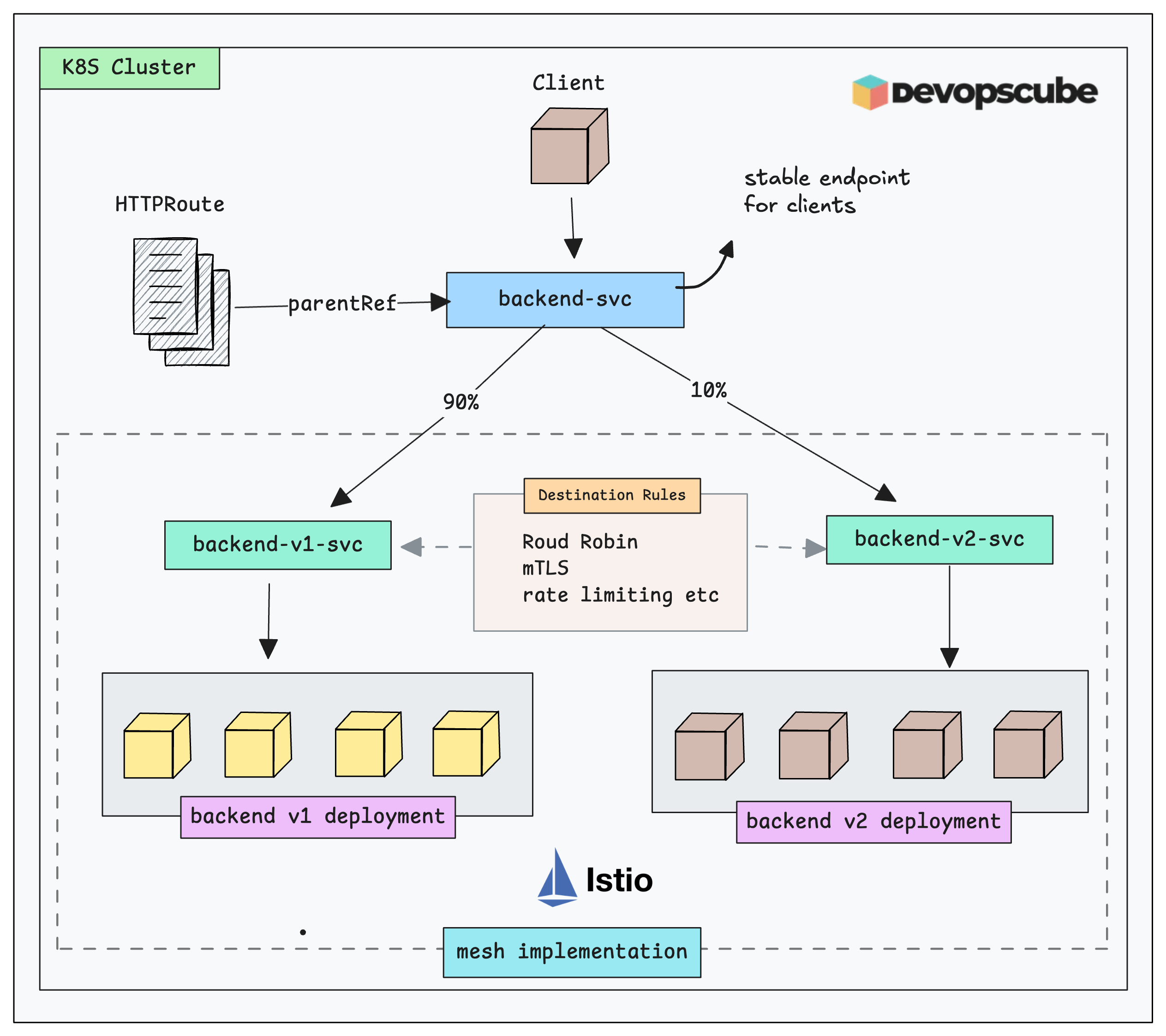
In this hands-on setup, we will implement a canary deployment with GAMMA approach.
Here is what we are going to build.
- Deploy two versions of the app
- Expose them through their own services
- Create a shared service that acts as the parent reference for the
HTTPRoute - Create an HTTPRoute with the shared service as the parentRef, splitting traffic 90/10 between the two service endpoints
- Create two DestinationRules to apply Istio features to the application traffic
- Finally, validate the setup with a client request.
Setup Prerequisites
To follow this setup, you need to have the following.
- Kubernetes cluster with Istio Installed
- Gateway API CRD's installed in the cluster.
Create Istio Enabled Namespace
We will deploy all the objects in the istio-test namespace.
If you don’t already have this namespace, use the command below to create it and enable Istio for it.
kubectl create ns istio-test

kubectl label namespace istio-test istio-injection=enabled
Deploy the Workloads (Backend v1 & v2)
For testing Gateway API with the mesh, we will deploy two versions of the application and expose them through separate services (backend-v1 and backend-v2)
Use the following manifest to deploy the apps and services.
cat <<'EOF' | kubectl apply -f -
apiVersion: apps/v1
kind: Deployment
metadata:
  name: backend-v1
  namespace: istio-test
spec:
  replicas: 3
  selector:
    matchLabels: { app: backend, version: v1 }
  template:
    metadata:
      labels: { app: backend, version: v1 }
    spec:
      containers:
      - name: echo
        image: hashicorp/http-echo
        args: ["-text=hello from backend v1"]
        ports:
        - containerPort: 5678
---
apiVersion: apps/v1
kind: Deployment
metadata:
  name: backend-v2
  namespace: istio-test
spec:
  replicas: 2
  selector:
    matchLabels: { app: backend, version: v2 }
  template:
    metadata:
      labels: { app: backend, version: v2 }
    spec:
      containers:
      - name: echo
        image: hashicorp/http-echo
        args: ["-text=hello from backend v2"]
        ports:
        - containerPort: 5678
---
apiVersion: v1
kind: Service
metadata:
  name: backend-v1
  namespace: istio-test
spec:
  selector:
    app: backend
    version: v1
  ports:
  - name: http
    port: 80
    targetPort: 5678
---
apiVersion: v1
kind: Service
metadata:
  name: backend-v2
  namespace: istio-test
spec:
  selector:
    app: backend
    version: v2
  ports:
  - name: http
    port: 80
    targetPort: 5678
EOF
Configure the Root Service
Now we have backend-v1 and backend-v2 services.
However, clients in the mesh need a single stable address (e.g., http://backend) to call. You can call this the root service. The mesh will then split between v1 and v2 services.
Use the following YAML to create the shared service (root service).
cat <<'EOF' | kubectl apply -f -
apiVersion: v1
kind: Service
metadata:
  name: backend
  namespace: istio-test
spec:
  selector:
    app: backend
  ports:
  - name: http
    port: 80
    targetPort: 5678
EOF
Deploy HTTPRoute For Canary Routing
Now, lets create an HTTPRoute that binds to the shared backend Service.
We will define a 90/10 canary traffic splitting. Meaning, 90% of traffic goes to V1 backend, and 10% goes to V2 backend.
cat <<'EOF' | kubectl apply -f -
apiVersion: gateway.networking.k8s.io/v1
kind: HTTPRoute
metadata:
  name: backend-split
  namespace: istio-test
spec:
  parentRefs:
  - name: backend
    kind: Service
    group: ""
    port: 80
  rules:
  - backendRefs:
    - name: backend-v1
      port: 80
      weight: 90
    - name: backend-v2
      port: 80
      weight: 10
EOF
Validate the HTTPRoute
$ kubectl get HTTPRoute -n istio-test

NAME            HOSTNAMES   AGE
backend-split               9m48s
Destination Rule To Apply Istio Features
The HTTPRoute we created in the previous step primarily handles the routing. Meaning, it knows which service to send traffic.
But it cannot implement advanced connection settings like Load Balancing algorithms, Circuit Breaking, outlier detection etc. It is still handled by the the Istio DestinationRule.
BackendLBPolicy, for load-balancing, session-persistence, LB behavior etc but currently, DestinationRule is the standard way to configure this in IstioFor our canary traffic splitting, lets create DestinationRule that applies ROUND_ROBIN algorithm and ISTIO_MUTUAL tls mode for encryption.
We create two separate DestinationRule becuase, backend-v1 and backend-v2 are treated as independent destinations.
Deploy the DestinationRule using the following manifest.
cat <<EOF | kubectl apply -f -
apiVersion: networking.istio.io/v1beta1
kind: DestinationRule
metadata:
  name: backend-v1-settings
  namespace: istio-test
spec:
  host: backend-v1.istio-test.svc.cluster.local
  trafficPolicy:
    loadBalancer:
      simple: ROUND_ROBIN
    tls:
      mode: ISTIO_MUTUAL
---
apiVersion: networking.istio.io/v1beta1
kind: DestinationRule
metadata:
  name: backend-v2-settings
  namespace: istio-test
spec:
  host: backend-v2.istio-test.svc.cluster.local
  trafficPolicy:
    loadBalancer:
      simple: ROUND_ROBIN
    tls:
      mode: ISTIO_MUTUAL
EOF
Lets validate the DestinationRule using istioctl.
$ istioctl x describe service backend-v1 -n istio-test

Service: backend-v1
   Port: http 80/HTTP targets pod port 5678
DestinationRule: backend-v1-settings for "backend-v1.istio-test.svc.cluster.local"
   Traffic Policy TLS Mode: ISTIO_MUTUAL
   Policies: load balancer
Skipping Gateway information (no ingress gateway pods)
DestinationRule: backend-v1-settings confirms that Istio has successfully linked the specific DestinationRule we created to the backend-v1 service with tls and round robin algorithm.
Validate Canary Traffic
Lets deploy a simple client pod with curl to validate the canary traffic.
Deploy the following manifest.
cat <<EOF | kubectl apply -f -
apiVersion: v1
kind: Pod
metadata:
  name: client
  namespace: istio-test
  labels:
    app: sleep
spec:
  containers:
  - name: curl
    image: curlimages/curl:8.8.0
    command:
    - sh
    - -c
    - sleep 3650d
EOF
Execute
$ kubectl exec -n istio-test client -- sh -c 'for i in $(seq 1 20); do curl -s http://backend; done'

hello from backend v1
hello from backend v1
hello from backend v1
hello from backend v1
hello from backend v1
hello from backend v1
hello from backend v1
hello from backend v2 <-- The Canary
hello from backend v2 <-- The Canary
hello from backend v1
hello from backend v1
hello from backend v1
hello from backend v1
hello from backend v1
hello from backend v1
hello from backend v1
hello from backend v1
hello from backend v1
hello from backend v1
hello from backend v1
You should see approximately 18 responses from hello from backend v1 and 2 responses from hello from backend v2 as given above.
Thats it!
We have implemented a hybrid model that is becoming the standard for modern Istio.
- Routing (GAMMA API):
HTTPRouteis splitting traffic (90/10) - Policy (Istio API):
DestinationRuleis securing and managing the connection to the specific workloads.
Production Case Study
Careem (the "Super App" of the Middle East) migrated a platform handling 5 Billion+ requests/day from Linkerd to Istio without a single second of downtime.
Migrating between service meshes (e.g., Linkerd to Istio) is typically risky. Becuase the configuration APIs are not compatible so it becomes labor-intensive.
For example, Linkerd uses ServiceProfile and annotations and Istio uses VirtualService and DestinationRule.
Now think of migrating 5 billion daily requests.
You will have to basically thousands of route configurations and risk downtime if the translatated confiruagtions are not perfect.
But Careem used the Gateway API as a vendor-neutral abstraction layer.
Meaning, instead of translating Linkerd configs to Istio configs, they used the "Define Once, Swap Implementation" strategy.
What they did was, they rewrote their routing rules into standard Kubernetes Gateway API resources (HTTPRoute). It is supported by both latest Linkerd and Istio versions.
By doing this, the routing logic was no longer tied to Linkerd or Istio CRDs.
For migration here is what they did.
- They deployed the standard HTTPRoute resources.
- They installed Istio alongside the existing infrastructure configuring Permissive mTLS. That allowed services in different meshes to communicate without encryption errors.
- They used Flagger to automate the rollout. It was configured to manipulate standard
HTTPRouteresources for traffic splitting. - Then they triggered deployments to inject Istio sidecars, allowing Flagger to gradually shift traffic weights in the
HTTPRoutefrom Linkerd-meshed pods to new Istio-meshed pods. - This canary-based approach validated metrics at every step, ensuring zero downtime before fully promoting Istio and removing Linkerd.
To ensure safety during the transition, they utilized a Blue/Green Ingress strategy. Meaning, they set up a 'Blue' gateway (Istio) alongside the 'Green' gateway (Linkerd) and used DNS manipulation to route traffic into the specific mesh.
Here is the reference architecture.
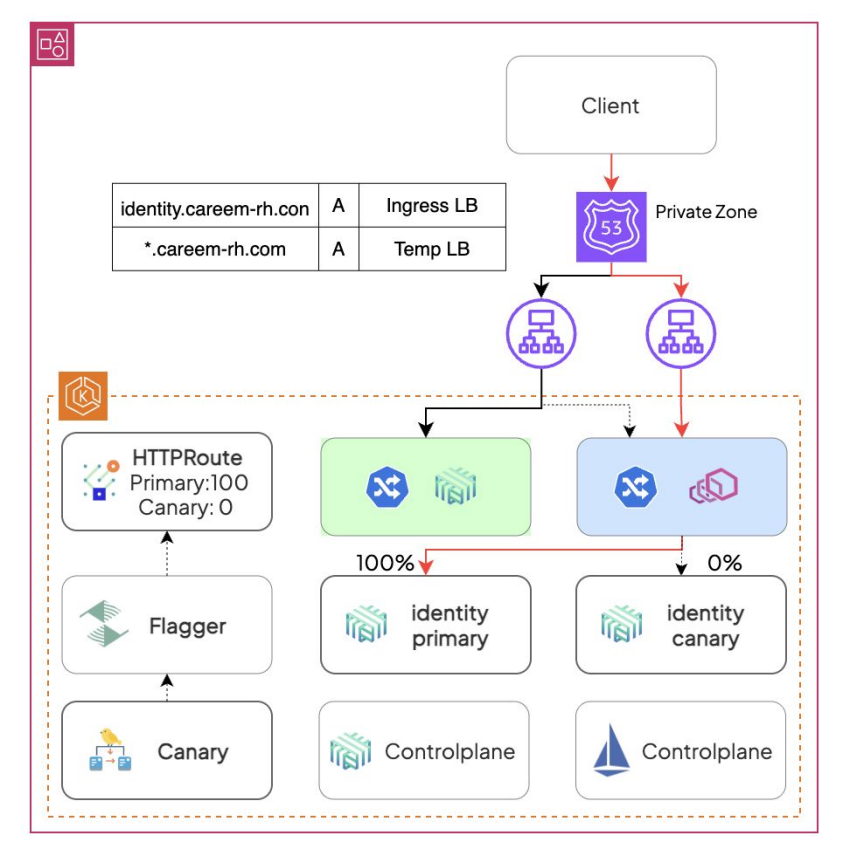
The key thing here is, there is not vendor specific lock-in now. If they ever change meshes again, the HTTPRoute definitions can stay.
If you want to understand this migration in detail, please watch the GAMMA in action video.
Conclusion
The Gateway API is becoming the standard for Kubernetes Ingress and Mesh traffic management.
While Istio’s VirtualService and DestinationRule APIs are still widely used, GAMMA provides a vendor-neutral approach. Meaning, you can use HTTPRoute for internal traffic and decouple the routing logic from the underlying mesh implementation.
It will also make migrations (as seen in the Careem case study) and multi-mesh operations significantly easier.
Over to you.
Have you started experimenting with Gateway API? Or are you planning for a migration?
Either way, lets me know your thoughts in the comments.